Participant
February 10, 2021
Answered

OCR capabilities

  • February 10, 2021
  • 1 reply
  • 1477 views

I have just subscribed to Adobe Acrobat PRO with big expectations on its OCR capabilities, but instead I am getting dissapointed fast. When aplying "enhace" to an existing B&W scanned .pdf  document, Acrobat does recognize the text, but I was expecting that it woud make possible to completely substitute the old text by the new version. However, the old text remains there completely uneditable and unremovable. I have being playing with some of the settings like "background Removal" > high, but no change is noticable.  I would apreciate any small advice in case I am missing something. Thanks!



This topic has been closed for replies.
Correct answer gary_sc

Hi Funn5C09,


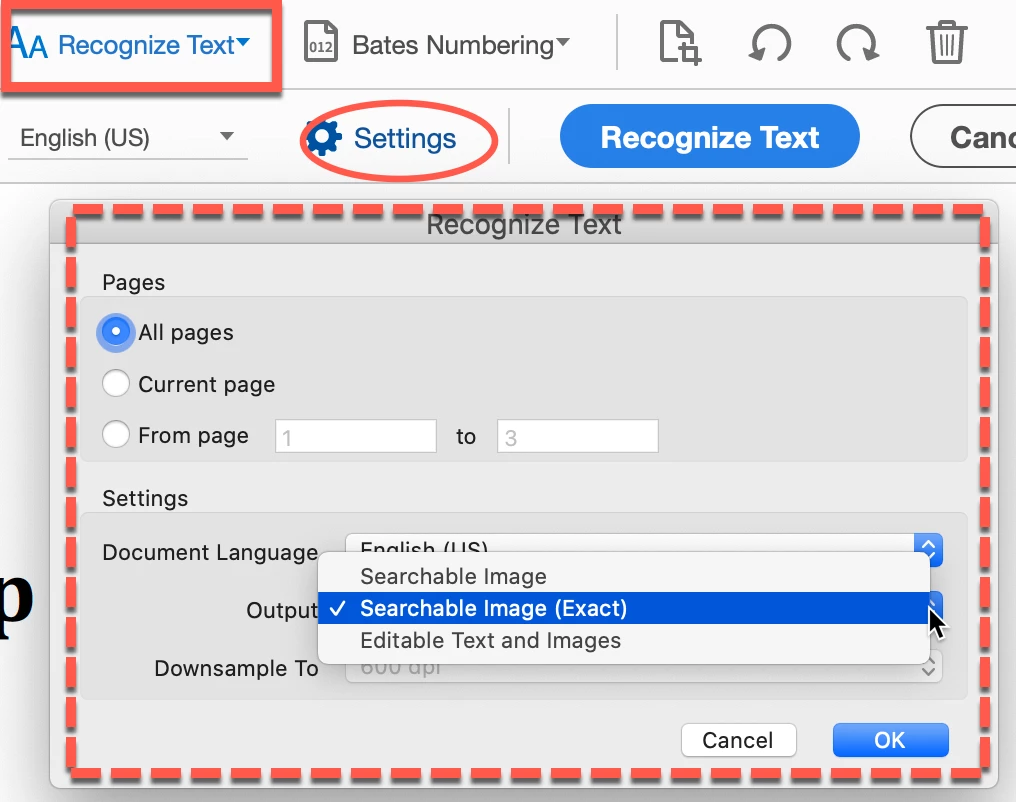
It looks like you have the 3rd selection in the Settings for Recognizing text. One place you can locate this is if you go to the Edit mode and click on the Aa Recognize Text (in the rectangle), then click on Settings (in the oval) which brings you the place to set your options (dashed rectangle).

Specifically, the difference between Searchable and Searchable (exact) is that the latter provides maximum fidelity to the original and may take more time (the plus and minus). My guess is that you have the third option selected which synthesizes a new custom font that closely approimates the original. 


So try the first or selected option and see how that works.


BTW, getting a GREAT scan is part of getting better OCR results. You may want to go through this blog I wrote for Adobe on how to get a good result. You might find something of value.


http://photosbycoyne.com/Gary's_Help/Scanning/clean-scanning.html

1 reply

gary_sc
Community Expert
gary_scCommunity ExpertCorrect answer
Community Expert
February 11, 2021

Hi Funn5C09,


It looks like you have the 3rd selection in the Settings for Recognizing text. One place you can locate this is if you go to the Edit mode and click on the Aa Recognize Text (in the rectangle), then click on Settings (in the oval) which brings you the place to set your options (dashed rectangle).

Specifically, the difference between Searchable and Searchable (exact) is that the latter provides maximum fidelity to the original and may take more time (the plus and minus). My guess is that you have the third option selected which synthesizes a new custom font that closely approimates the original. 


So try the first or selected option and see how that works.


BTW, getting a GREAT scan is part of getting better OCR results. You may want to go through this blog I wrote for Adobe on how to get a good result. You might find something of value.


http://photosbycoyne.com/Gary's_Help/Scanning/clean-scanning.html

Participant
March 2, 2021

Hi Gary,


Do you know if we can do OCR on google drive files using the app add-on?
I have the premium account of adobe and even logged in, it does not appear an option to transforme scanned files in texts.


Best,


Kah.

gary_sc
Community Expert
Community Expert
March 2, 2021

Hi Gary, tks for your quick response.

That is sad... My case is for files that are IN google drive.


I have Adobe Acrobat Pro DC provided by the company I work for; however, it has been of little help since all hundres of files I have to access every day are scanned files Google Drive.

My team and I work with a lot of sensitive documents, so we must always edit them online and also we need to do a lot of research without downloading them. When I use the Adobe add-on I can see some functions to split the file, make commnents and delete pages indeed, but no OCR reading.

Is there any cloud techonolgy available that allow us to use OCR without requing us to download the file?

Thank you!


As far as I know any OCR functionality requires a copy of the document, not a link to a document. 


Acrobat does have a web version where you can send a JPG or such to and have the document OCRed but again, that means that you need to send somthing TO the web version of Acrobat for it to have somehting to work on.


You could take a screenshot of the document BUT that violates your need to now download the document and also will be of such low resolution as to limit the quality of the OCR.


And I gather that the documents you are working on are images of pages, not selectable text?


Since this is your job, have you asked your supervisors and/or boss and asked them how they think it can be done?


Sorry but it's beyond my pay grade (and I do not get paid so that leaves a lot of territory).


Best & good luck!