
Participating Frequently
September 26, 2017
Question

on Blur added to forms.

  • September 26, 2017
  • 3 replies
  • 2130 views

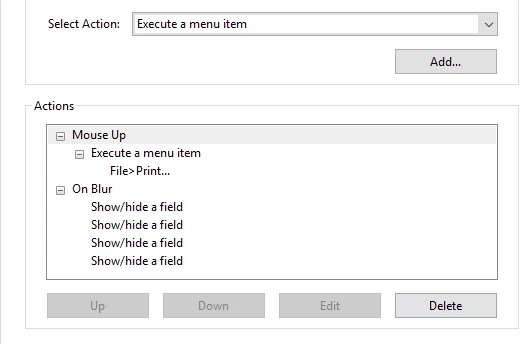
We have posted several forms to our website.   The button action is set to Mouse Up > Execute a menu item > File Print, etc.   It seems an On Blur  > Show/hide a field is automatically being added to buttons and the buttons stop working.   Does anyone know why this is happening?

.  
This topic has been closed for replies.

3 replies

pdfrossAuthor
Participating Frequently
September 28, 2017

I have removed on Blur.  i am concerned that it might reappear.  Any idea what's causing it to appear?  Could it be something in the Action or something the user is doing?

Bernd Alheit
Community Expert
Community Expert
September 29, 2017

Can the user change the form on the website?

pdfrossAuthor
Participating Frequently
October 20, 2017

No.  The user can't change the form.   I'm not sure why OnBlur appears.    I was not there when the form was created and posted.

pdfrossAuthor
Participating Frequently
September 27, 2017

You see the button,

for example the Print button and you see the Action

   = Mouse Up

   = Execute a menu item

   = File>Print . 

I have also set it up Form Field to Visible but doesn't print.

On Blur seems to change Form Field from Visible but doesn't print to Hidden.

I'm not sure where On Blur came from.  It was included in the button when it was posted on our website.

Hope this helps.

Bernd Alheit
Community Expert
Community Expert
September 28, 2017

Try this:

  • remove the On Blur actions
  • upload the form again
Bernd Alheit
Community Expert
Community Expert
September 27, 2017

What can you see when you add a new button?