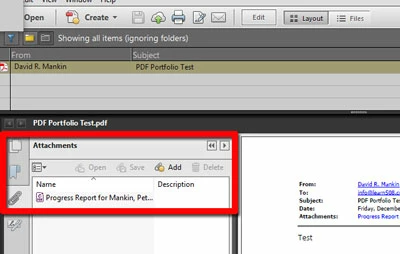
A PDF Portfolio is a virtual container filled with other files. They can be any type of files, not just PDFs. A PDF Portfolio can also be displayed in a few different ways. Regardless, you will have a list of the included files presented to you. If you double click on one of the listed files, it should open up in its own workspace. If one of those files is a PDF, and contains attachments, THAT is where you should see a paper clip icon, and will allow you to open/view the attached file in that PDF. If you do not see any icons on the left at that point, try pressing F4, which will show/hide your panels.
I am not sure that the original emails that contain attachments will retain them in the conversion. There is a setting in the PDF Maker for Outlook that should be enabled to mandate the inclusion of attachments in the portfolio.
I hope this is helpful.
My best,
Dave

 AdChoices