
Participant
April 15, 2019
Answered

Print PDF from Revit 2019 Isuue

  • April 15, 2019
  • 1 reply
  • 8508 views

I am having trouble Plotting the PDF files from REVIT 2019 full version with ADOBE PDF. Using windows 10

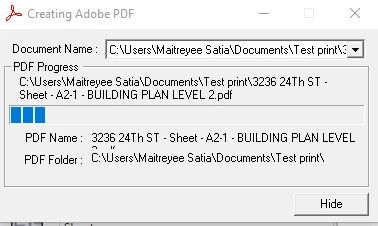
1. I tried plotting multiple sheets together and it does plotted first sheet but after that it freezes unit I end task from Task Manager.

2. I tried plotting one by one sheets but again it is potting first sheet perfect and freezes for the second one.

3. I looked for several solutions online and did purge my file, deleted all of the %temp% files from my computer, had low resolution for plotting but stills it's same issue for me.

It will be really stress relieving if some one can guide me. It is very frustrating when you have to submit the drawing set to client and it takes more than 1.5 hr to just plot 15 sheets.

Please find attached screenshot of freezing tab.
This topic has been closed for replies.
Correct answer Meenakshi Negi

Hi Maitreyees,

As you are experiencing an issue with Adobe PDF printer while creating PDF from Revit, would you please go through once to the conversation on a similar issue in this forum thread Creating a PDF using Adobe PDF Pro with Revit

Try the suggestion mentioned in reply 6.

Check if that helps.

As you have mentioned that it does plot the first sheet, would you mind sharing that sheet with us, so we can check it on our end?

You may share the file in a private message using the steps provided in this help document How to share a file using Adobe Document Cloud

To initiate a private message, use the steps suggested over here How Do I Send Private Message

Let us know if you need any help or have any questions.

Regards,

Meenakshi

1 reply

Meenakshi Negi
Meenakshi NegiCorrect answer
Legend
April 16, 2019

Hi Maitreyees,

As you are experiencing an issue with Adobe PDF printer while creating PDF from Revit, would you please go through once to the conversation on a similar issue in this forum thread Creating a PDF using Adobe PDF Pro with Revit

Try the suggestion mentioned in reply 6.

Check if that helps.

As you have mentioned that it does plot the first sheet, would you mind sharing that sheet with us, so we can check it on our end?

You may share the file in a private message using the steps provided in this help document How to share a file using Adobe Document Cloud

To initiate a private message, use the steps suggested over here How Do I Send Private Message

Let us know if you need any help or have any questions.

Regards,

Meenakshi

Participant
April 16, 2019

Dear Meenakshi,

Thanks for respond. I did refereed that thread and it worked!

Best,

Maitreyee

Meenakshi Negi
Legend
April 17, 2019

Hi Maitreyee,

Glad to know it helped.

Thank you for updating the thread.

Let us know if you need any help.

Regards,

Meenakshi