
Print question - Using pantone colours alongside jpegs
I'm putting together a packaging job for a food production company. A design has been made within Illustrator using only vector shapes and pantone solid coat colours - all good so far.
The client now wants to add real-world imagery of food within the design. My question is about how we would incorporate raster imagery in a way that would print correctly?
I've included an example below. Both the orange and brown elements are pantone/vectors. The chocolate and nuts are jpegs with a multiply effect with a white custom-shape layered below. My understanding is that using any kind of transparency effect (such as multiply) is a no-no. How would these need to be incorporated for them to print correctly? I'm particularly concerned about the shadows underneath each of the ingredients.
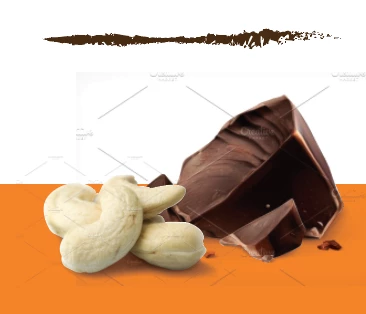
Any help would be appreciated - Thanks
 AdChoices