pumpsk
Participant
June 5, 2017
Answered

print to pdf from word high quality and automate bookmarks

  • June 5, 2017
  • 1 reply
  • 3513 views

Hi there - i always print to pdf and use high quality print.  i need to have the heading levels bookmarked though this time.  when i use the converter to pdf from word the document images/logos are not as sharp but it automates the bookmarks. 

Is there a way to print to pdf but also have the bookmarks autmoated?

Help pls!
This topic has been closed for replies.
Correct answer Dave__M

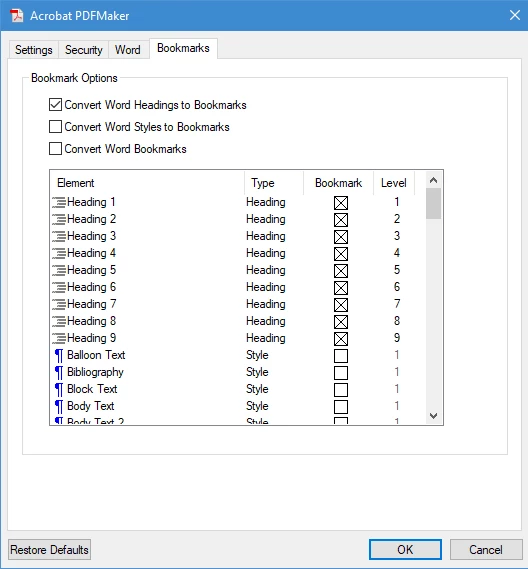
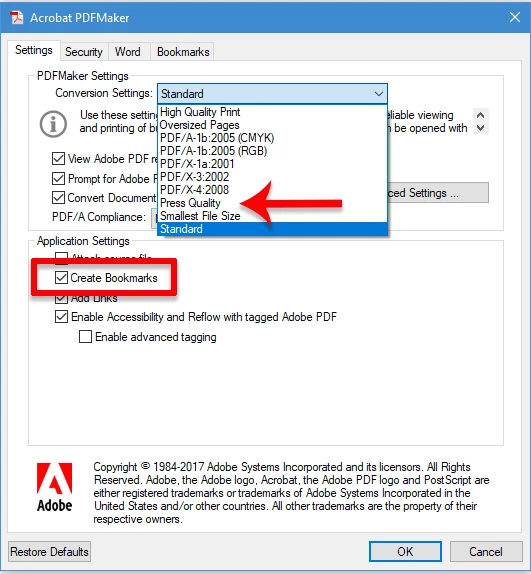
I would very strongly encourage you to use the PDF Maker (the Acrobat ribbon tools) in converting from Word to PDF.  If you click on the Preferences button on the Acrobat ribbon, you can set both the inclusion of PDF bookmarks and the general quality of the images.  I'd use the Press Quality preset for a high-res starting point.  If you click on the Bookmarks tab, you can define what Headings to include (or exclude) from the automatically created bookmarks.

Once you've setup your desired preferences, click OK and use the Create PDF button.  This method should create a better, and customized quality/feature PDF.

I hope this info is useful.

My best,

Dave

1 reply

Dave__M
Community Expert
Dave__MCommunity ExpertCorrect answer
Community Expert
June 5, 2017

I would very strongly encourage you to use the PDF Maker (the Acrobat ribbon tools) in converting from Word to PDF.  If you click on the Preferences button on the Acrobat ribbon, you can set both the inclusion of PDF bookmarks and the general quality of the images.  I'd use the Press Quality preset for a high-res starting point.  If you click on the Bookmarks tab, you can define what Headings to include (or exclude) from the automatically created bookmarks.

Once you've setup your desired preferences, click OK and use the Create PDF button.  This method should create a better, and customized quality/feature PDF.

I hope this info is useful.

My best,

Dave