Participant
July 13, 2018
Answered

Re: Format Text Box Acrobat Pro DC

  • July 13, 2018
  • 1 reply
  • 4266 views

Where has the Text Box tool gone?  I rely heavily on this tool.  I'm stuck in a law firm where we don't have a choice of which version of Acrobat we use.  I need the Text Box tool.  Someone please tell me how to create a Text Box.  Thanks!

This topic has been closed for replies.
Correct answer Meenakshi Negi

Hi Steve,

There is a "Textbox tool"  under the Comment tool on the tool panel at right.

Open a PDF in the application and click on the "Comment" in the tool panel at right.
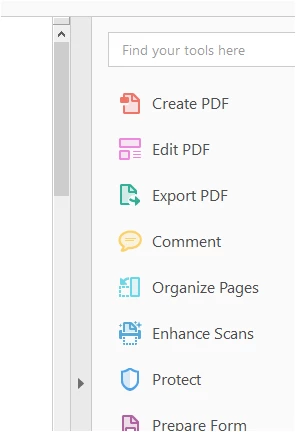
You will find the Text Box tool there. Check the screenshot below:

If this is not what you are referring to, please provide us more information about the tool.

Share the exact steps you used to open that tool.

If possible, it would be helpful if you can share a screenshot of the tool that you are referring to.

Also, please update the application to the latest version available.

Launch the application and go to Help > Check for updates.

You may also refer this help link Release Notes | Adobe Acrobat, Reader to check the latest updates available.

Regards,

Meenakshi

1 reply

Meenakshi Negi
Community Manager
Community Manager
July 13, 2018

Hi Stevesusoyev,

Could you please let us know which text box tool you are referring to?

Please let us know if you are editing a PDF or creating a PDF form?

Are you using Adobe Acrobat Reader or the Adobe Acrobat application? To check that, take help of the steps mentioned here Identify the product and its version for Acrobat and Reader DC.

It would be helpful if you elaborate the issue you are experiencing.

We will be waiting for your response.

Let us know if you need any help.

Regards,

Meenakshi

SteveiBoyAuthor
Participant
July 17, 2018

Thank you for your response, Meenalshi.

As the subject line of my request shows, I’m asking about Acrobat Pro

DC—NOT Reader.

I am using:

Continuous Release

Version 2018.011.20040

Version File Version: 18.011.20040.19174

AGM Version 4.030.00075

CoolType Version: 5.014.00030

Core Version 18.2816

JPO2K Version 1.002.00002.40754

The tool I’m referring to is called the “Text Box Tool.” It is more

versatile than the Typewriter Tool.

The Text Box Tool has been available in every version of Acrobat since

Acrobat 4.

Now, in Acrobat Pro DC, the Text Box Tool seems to have vanished.

Thank you for your follow-through!

Steve

Meenakshi Negi
Community Manager
Meenakshi NegiCommunity ManagerCorrect answer
Community Manager
July 18, 2018

Hi Steve,

There is a "Textbox tool"  under the Comment tool on the tool panel at right.

Open a PDF in the application and click on the "Comment" in the tool panel at right.

You will find the Text Box tool there. Check the screenshot below:

If this is not what you are referring to, please provide us more information about the tool.

Share the exact steps you used to open that tool.

If possible, it would be helpful if you can share a screenshot of the tool that you are referring to.

Also, please update the application to the latest version available.

Launch the application and go to Help > Check for updates.

You may also refer this help link Release Notes | Adobe Acrobat, Reader to check the latest updates available.

Regards,

Meenakshi