
Participant
January 18, 2016
Answered

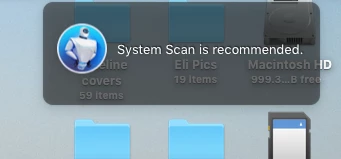
What is System Scan is recommended?

  • January 18, 2016
  • 2 replies
  • 23859 views

On Jan 6th I received an update so did it.  To which part of Adobe I'm not sure.  However, since that time I constantly get a popup with a Blue circle on it and it says "System Scan is recommended".  I am using a Mac and have never had nor do I need a security application if this is what I've accidently installed.  How do I get rid of it and what is it?  Thank you for your assistance! Danamcg
This topic has been closed for replies.
Correct answer Meenakshi_Negi

Hi danamcg,

You may have MacKeeper installed on your system. Refer this link for help How to uninstall MacKeeper from your Mac | Macworld

If this is a browser pop-up, then it's a phishing scam and should be ignored.

Regards,

Meenakshi

2 replies

Legend
January 18, 2016

Discussion here, it's malware  https://discussions.apple.com/thread/6898737?start=0&tstart=0

If this appeared at the same time as Acrobat Reader was installed, you may have been tricked into downloading a fake, infected, Acrobat Reader. Get rid of it and download from http://get.adobe.com/reader . Be sure to look for "offers" of free software and turn them off. If you have malware, a complete wipe of your system and reinstall of everything should be considered.

Meenakshi_Negi
Meenakshi_NegiCorrect answer
Legend
January 18, 2016

Hi danamcg,

You may have MacKeeper installed on your system. Refer this link for help How to uninstall MacKeeper from your Mac | Macworld

If this is a browser pop-up, then it's a phishing scam and should be ignored.

Regards,

Meenakshi

danamcgAuthor
Participant
January 18, 2016

Thank you very much.  Your reply was great and the instructions you gave me the link to were also great and very easy.  All is clean now.  I have never had a problem with anything getting past MAC security so this was really a surprise.  I will be more careful on accepting updates in the future from Adobe or anything else.  Again, thank you.  Dana