
Participant
September 2, 2017
Answered

Windows 10 will not install Acrobat X Standard

  • September 2, 2017
  • 3 replies
  • 3238 views

I ran ADOBE ACROBAT X STANDARD on Windows 7 and when
Microsoft offered and upgrade to Windows 10, I upgraded.

Recently, the Windows 10 became corrupted, and had
to be erased and reinstalled. Following the clean installation of Windows 10, I
have had to reinstall some of my programs, which include Photoshop Elements and
Acrobat X Standard.

Windows 10 will not allow installation disk to
install these Adobe programs. I tried to too download and use my serial numbers
and the registration will not accept them.

Please note my products are registered.

How can I get these programs up and running again?

Do I need new serial numbers?
This topic has been closed for replies.
Correct answer kglad

1. don't display your serial number in public. 

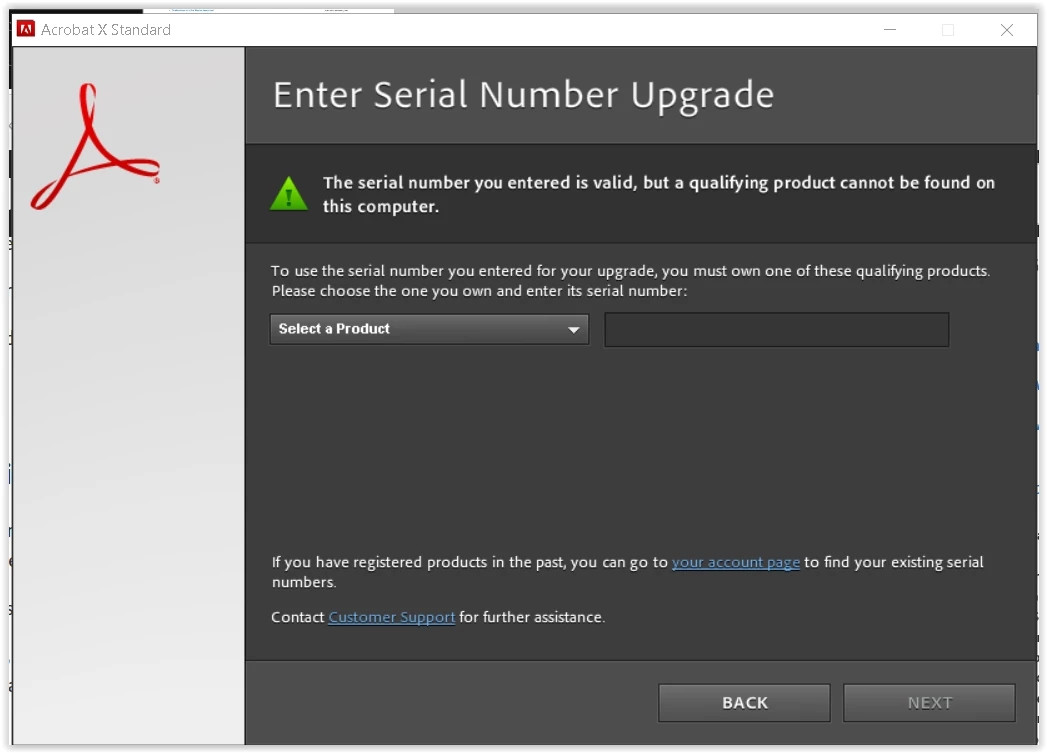
2. you have an upgrade serial number.  select the previous product from that dropdown (that you own) and enter its serial number.  your acrobat x installation will proceed.

3 replies

try67
Community Expert
Community Expert
September 3, 2017

You should also be aware that Acrobat X is not officially compatible with Windows 10.

Dov Isaacs
Legend
September 2, 2017

And if you don't have the old serial numbers and assuming you registered your previous version of Acrobat with Adobe, if you logon to Adobe's website, you can find the older version's serial number under your account information!

          - Dov

- Dov Isaacs, former Adobe Principal Scientist (April 30, 1990 - May 30, 2021)
kglad
Community Expert
kgladCommunity ExpertCorrect answer
Community Expert
September 2, 2017

1. don't display your serial number in public. 

2. you have an upgrade serial number.  select the previous product from that dropdown (that you own) and enter its serial number.  your acrobat x installation will proceed.