


Inspiring
Mar 17, 2024 3:06 PM UTC
Answered

Adobe Document Cloud for Microsoft Outlook - Acrobat

After updating Adobe Reader DC to version 24.001.20604, I became the "happy" owner of an absolutely unnecessary module for me, which is called "Adobe Document Cloud for Microsoft Outlook - Acrobat" in my Outlook 2019:



After reading a lot of information on the Internet, I still haven't found the right solution to disable it. I tried disabling it in the COM settings in Outlook but after the restarting app, this plugin appears again and again and it doesn't help:
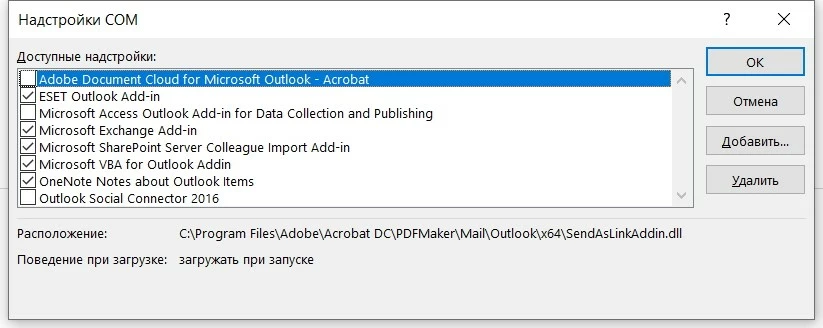


I tried to disable it by adding an option bAdobeSendPluginToggle to the registry according to the Adobe instructions:


[HKEY_LOCAL_MACHINE\SOFTWARE\Wow6432Node\Policies\Adobe\Adobe Acrobat\DC\FeatureLockDown\cCloud]
"bAdobeSendPluginToggle"=dword:00000001


And it doesn't help too. One of the options suggested by one user was renaming the Outlook folder to Outlook_DISABLE at the following address:


C:\Program Files\Adobe\Acrobat DC\PDFMaker\Mail\Outlook


But I think this is not a way out of this situation, because after updating the app, this plugin will reappear in Outlook. I have disabled all Adobe Reader DC Cloud Services in GPO. and I'm not going to use Cloud Services to share my files, because I appreciate privacy.


I would like to receive official support from the employees how can I disable this plugin so that it never appears in my Outlook 2019 again.

This topic is closed to new replies. Start a new post to keep the conversation going.
Dmitry36132388lafhCorrect answer
Inspiring
Apr 14, 2024 1:10 PM UTC

Hi @Tariq Ahmad ,


Thank you for your reply. Are these additional commands suitable for original Adobe Reader DC .exe installer?


"D:\AcroRdrDCx642400120643_ru_RU.exe" /msi "EULA_ACCEPT=YES DISABLE_PDFMAKER_OUTLOOK=YES DISABLEDESKTOPSHORTCUT=1"

Also check the syntax please... I would be grateful to you.


@Tariq Ahmad 


Today, I installed Adobe Reader DC 2024 [24.2.20687.0] on my test machine and can confirm that the option "DISABLE_PDFMAKER_OUTLOOK=YES" worked successfully.


I have performed a clean installation of the program using the following options (without quotes in the name of the parameters):


"D:\AcroRdrDCx642400220687_ru_RU.exe" /msi EULA_ACCEPT=YES ENABLE_OPTIMIZATION=0 DISABLE_PDFMAKER_OUTLOOK=YES ENABLE_CHROMEEXT=0 DISABLE_BROWSER_INTEGRATION=YES DISABLEDESKTOPSHORTCUT=1


Thank you very much.

8 replies

Legend
Mar 18, 2024 4:19 PM UTC

Hello, 


I saw your comment on my other post. 
Are you sure you only have Adobe Reader DC installed, not Adobe Acrobat Acrobat Pro?
Could you try the path from this guide: https://www.adobe.com/devnet-docs/acrobatetk/tools/PrefRef/Windows/FeatureLockDown.html#Services(UnifiedShare) and let me know if that helps?


Regards,
Tariq

Translate
Inspiring
Mar 18, 2024 5:33 PM UTC
Hello Tariq,
 
Thank you for your reply.  The DWORD registry option bToggleSendAndTrack doesn't work too... I have Adobe Reader DC free version installed and I never upgrade it to Pro version...
 
I think that due to some bug, the parameter bAdobeSendPluginToggle just doesn't work. Because it is designed to disable the Adobe Document Cloud plugin for Microsoft Outlook based on the Adobe description... Could you inform the responsible developers about it? Now I have this option in the registry and if it will be fixed in the plugin, it will work successfully:
 

[HKEY_LOCAL_MACHINE\SOFTWARE\Wow6432Node\Policies\Adobe\Adobe Acrobat\DC\FeatureLockDown\cCloud]
"bAdobeSendPluginToggle"=dword:00000001

 
I would be grateful to you.
Translate
Participant
Jul 16, 2024 5:00 PM UTC

I am glad it worked for you. 
Happy to help. Feel free to reach out if you have further questions in the future. 


~Tariq


Will this work for the Adobe Pro version?

Translate