Participant
Mar 9, 2022 10:57 AM UTC
Answered

Disable Document Cloud Outlook Add-in

Hi,

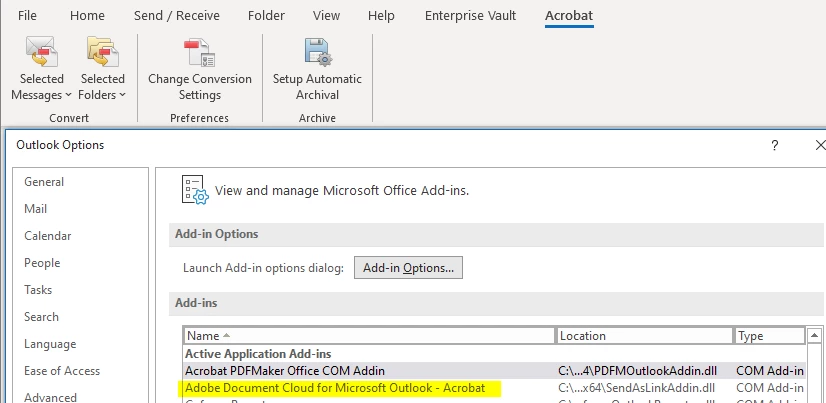
Even after disabling all "Document Cloud" feature for Acrobat Pro DC via Adobe Customization Wizard DC, I'm still able to see this "Adobe Document Cloud For MS Outlook add-in" in Outlook.
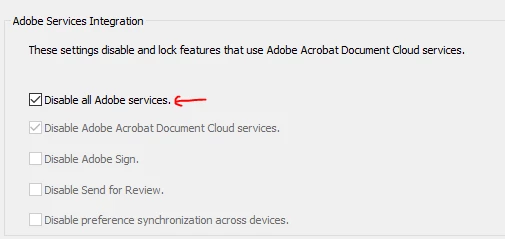
 

Can you please tell is it disabled or not? or Is it expected to be there even after it is disabled?

If not, how can I disable this add-in via Customization Wizard?

Peter25227529uepnCorrect answer
Participating Frequently
Aug 26, 2022 2:45 AM UTC

Click File on the Outlook menu.
Click Options on the File menu.
Click Add-ins.
Select COM Add-ins from the Manage drop-down.
Click Go.
Deselect Adobe Document Cloud for Microsoft Outlook - Acrobat.
Click OK.


Hope This Works,

Peter

66 replies

Participant
Aug 11, 2026 2:59 PM UTC

This is not the correct answer, it keeps reactivating on its own.

Translate
DigitalCoffee101
Inspiring
Aug 11, 2026 5:43 PM UTC

thats exactly what i said…….

Translate
Participant
Nov 25, 2024 3:55 AM UTC

For those still struggling with this, I have created a PowerShell which can be run or pushed out that fixes it permanently (that we can tell):

https://github.com/EpicPilgrim/FixPDFMakerAddin

Translate
Participant
Aug 14, 2024 7:50 PM UTC

I am so tired of having to disable Adobe junk (bloatware) that I DON'T WANT.  Stop adding I don't ask for!!!!!


[Abuse removed by moderator]

Translate
Participant
Jul 2, 2024 12:55 PM UTC

Go to Outlook "File -> options -> Trust Center -> Trust Center settings -> Select "Macro Settings" and uncheck "Apply Macro security settings to installed add-ins" . This will resolve the issue.


Translate
Participant
Apr 17, 2025 2:32 PM UTC

Just an FYI, that method didn't work for my organization.  We still have it showing up after every update.

Translate
Participant
Apr 17, 2025 8:33 PM UTC

The only way you will fix that is using the script i wrote and posted as a comment in this thread.

Translate
Participant
Jun 30, 2024 9:31 PM UTC

Thank you for this! Works perfectly to get rid of all those pesky add-ins

Translate
Participating Frequently
Jun 12, 2024 3:36 PM UTC

What I've done instead is completely uninstall Acrobat Reader.  When I want to view a pdf document I let the PC use Microsoft Edge and it works just fine.  No need to mess with registry entries.  

Bottom line - do a complete uninstall of Acrobat Reader and use another standard app to view pdf documents.  I'm using Microsoft Edge to view PDFs and it works very well.

Translate
Bevi Chagnon - PubCom.com
Legend
Jun 14, 2024 3:50 PM UTC

Many of our browsers are now (June 2024) able to open and read PDF files, like MS Edge, Mozilla's FireFox, and Google's Chrome.


But they haven't yet provided full functionality such as filling in form fields, editing, commenting, and accessibility access. Hopefully those features will eventually be built into our common browsers.


So if all you need to do is read and print and PDF, and your browser can do that, then sure go ahead and use them.


But if you need more functions, keep your installation of Acrobat (Reader, Standard, or Pro) and use the "classic" method of downloading the PDF to your computer and then opening it in Acrobat.


You can control which software app opens a PDF by changing the settings or preferences on your computer (both Mac and Windows do this, but the technique is a bit different for each). In Windows, go to Settings / Apps / Default apps and procede from there. If you want your Edge browser to open all PDFs, the choose Edge for "PDF" files. Don't forget to reboot your computer to make it "set".


Translate
|    Bevi Chagnon   |  Designer, Trainer, & Technologist for Accessible Documents ||    PubCom |    Classes & Books for Accessible InDesign, PDFs & MS Office |
Participating Frequently
Jun 18, 2024 9:39 AM UTC

Hi Bevi, this doesn't address the issue of Adobe installing very persistent and difficult to remove unwanted additions.  My advice to everyone, until Adobe stops this practise, is not to use Adobe software.

Translate
Participant
Feb 19, 2024 6:38 PM UTC

Adobe has some hjow inserted itself into my Firms's Outlook email acocunt.  Every attachment is now a cloud link. If this does not stop we will be canceling adobe immediately and removing it from our system and viewing it as a threat to our business.  Adobe has been given no persmisison to behave this way inside our business operating systems.

Translate
Participating Frequently
Feb 19, 2024 7:23 PM UTC

Try this:

I found a workaround to disable this crap definitely.

  1. Close Outlook

  2. Go to C:\Program Files\Adobe\Acrobat DC\PDFMaker\Mail

  3. Rename the "Outlook" folder, in my case: Outlook_DISABLE (put whatever you want)


When you do this, the add-in can't load on Outlook and it is shown with an error on the Add-ins management screen on Outlook.

Worked for me.

Translate
Participant
Feb 19, 2024 7:37 PM UTC

Thanks.  We have already made teh decison to can Adobe.  In the process of unistalling it now and down loading a competitor product. I get they are feeling squezed out of the market by Microsoft and Google but this crap was unnecessary on their behalf.  Seems like a really stupid business decision. Make all your existing customers mad at you.

Translate
Participating Frequently
Sep 18, 2023 7:24 PM UTC

I found a workaround to disable this crap definitely.

  1. Close Outlook

  2. Go to C:\Program Files\Adobe\Acrobat DC\PDFMaker\Mail

  3. Rename the "Outlook" folder, in my case: Outlook_DISABLE (put whatever you want)

  4. Be happy.

When you do this, the add-in can't load on Outlook and it is shown with an error on the Add-ins management screen on Outlook.

Worked for me.

Translate
Participant
Feb 27, 2024 5:14 PM UTC

You are a hero. I have been trying to disable this stupid *** for months. Thank you! @AnandSri (I'm tagging you because you are an Adobe employee and you can influence this) Adobe fix this, not everyone will find this answer. If the plugin is disabled, it should not re-enable itself a few days later

Translate
Participant
Feb 27, 2024 5:23 PM UTC
Peter25227529uepnCorrect answer
Participating Frequently
Aug 26, 2022 2:45 AM UTC

Click File on the Outlook menu.
Click Options on the File menu.
Click Add-ins.
Select COM Add-ins from the Manage drop-down.
Click Go.
Deselect Adobe Document Cloud for Microsoft Outlook - Acrobat.
Click OK.


Hope This Works,

Peter

Translate
Participant
Jun 26, 2023 3:08 AM UTC

perfect..finally

Translate