
kyoder770
Participant
October 24, 2016
Question

Fill & Sign loading signature

  • October 24, 2016
  • 7 replies
  • 9684 views

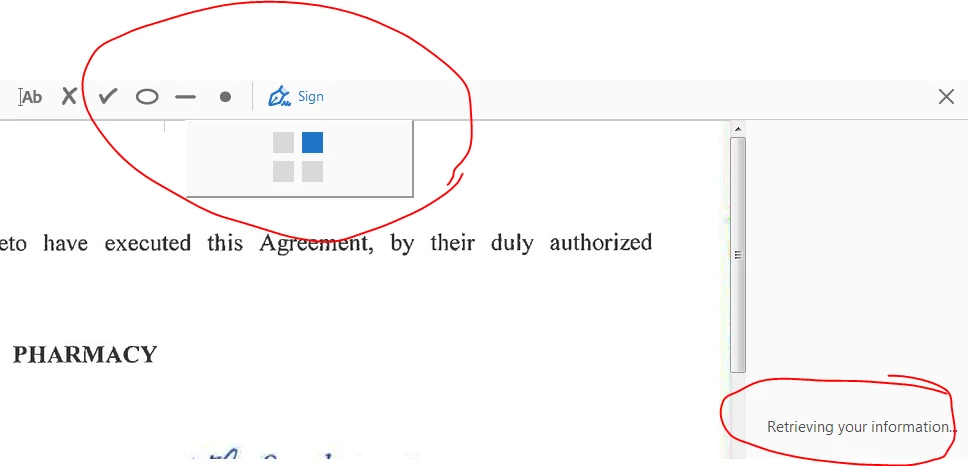
I have continue to encounter this issue even after signing in and signing out, uninstalling and reinstalling, and restarting everything multiple times.  I open a file to edit as I have done many times previously.  When attempting to use the Fill & Sign function in Acrobat Pro DC, the fill text and stamps work fine but he Sign options do not load.  The Adobe 4 squares sit there and spin forever, and the side bar says "retrieving your information."  Tried taking the issue through chat support, which was highly unresponsive and ultimately unsuccessful.  Please advise.
This topic has been closed for replies.

7 replies

Participant
November 17, 2017

Same issue here....

Community Manager
November 17, 2017

There is an outage in the Document Cloud and other Adobe services ongoing today - please try again later or tomorrow.

Thanks,

Josh

Participant
November 17, 2017

It's not a "cloud" if there's a  outage, Josh.  Delaying a signature is not AN OPTION.  Why is it stored in A CLOUD if the alleged "cloud" can be offline, thus DEFEATING THE PURPOSE OF CLOUDS. 

Participant
October 20, 2017

Same issue here....Tried to text support 2x to no avail.

Participant
October 16, 2017

has this been resolved , I had the ability to Sign a PDF , But now i am getting the same error , retrieving your information.

do you think its linked to the cloud ?

Adobe Employee
December 2, 2016

Hi Kyle Yoder,

1. Does this also happen with other applications like Save As Dialog, Send and Track, Send for Signature etc.?

2. When the loading screen appears , go to Task Manager and check whether a process named "AcroCEF" is running or not? Is it in a hanged state? If yes right  click on the process and create the dump file.

3. Kindly share the contents of these two locations :

      For 64 bit machine go to :

    • C:\ProgramFiles(x86)\<Reader/Acrobat installation>/WebResources/Resource0
    • C:\ProgramFiles(x86)\<Reader/Acrobat installation>/AcroCEF

      For 32 bit machine go to:

    • C:\ProgramFiles\<Reader/Acrobat installation>/WebResources/Resource0
    • C:\ProgramFiles\<Reader/Acrobat installation>/AcroCEF

Regards,

Sandeep

Adobe Employee
October 26, 2016

Hi kyoder770,

Sorry for the inconvenience caused to you. Can you please provide the following details :

1. Version of your Acrobat/Reader. Go to Help > About Acrobat/Reader.

2. What is the OS version you are using ?

3. Does a similar thing happens if you try to access Fill and sign app form cloud.acrobat.com ?

4. Have you tried the same workflow with some other PDF file or does it happen with every PDF file ?

Thanks and Regards,

Sandeep Grover

qeq73654646
Participant
October 26, 2016

Hi kyoder770,

Sorry fro the inconvenience caused to you. Can you please provide the following details :

1. Version of your Acrobat/Reader. Go to Help > About Acrobat/Reader.

2. What is the OS version you are using ?

3. Does a similar thing happens if you try to access Fill and sign app form cloud.acrobat.com ?

4. Have you tried the same workflow with some other PDF file or does it happen with every PDF file ?

Thanks and Regards,

Sandeep Grover

kyoder770
kyoder770Author
Participant
October 27, 2016

1.

2. Windows

3. No.  The cloud app works

4. Occurs on any and all PDFs.

Community Manager
December 7, 2016

I have the exact same problem, and unfortunately is is not resolved with the latest version for me.

...


Hi Fuji-san,

What steps you already have take to troubleshoot this issue?

Would you let us know the below details:

1. Name and version of the operating system?

2. Is it your personal machine or Work machine connected to domain?

3. Current version of Reader installed?

Let us know and will try to suggest the remaining troubleshooting steps, if any pending.

-Tariq Dar

Community Manager
October 24, 2016

How long has this been going on?  Can you try again now?  There were some issues with the Document Cloud that could have affected this today. 

Thanks,

Josh

kyoder770
kyoder770Author
Participant
October 25, 2016

Josh,

First noticed this happening last week.  I uninstalled and reinstalled the program which seemed to help for about a day.  However, the issue has persisted for about 5 days.  Continues this morning.

Thanks