Participant
May 22, 2017
Answered

how can I save documents to document cloud, then delete them later?

  • May 22, 2017
  • 1 reply
  • 553 views

I wish to save documents and data files (worksheets) on a temporary basis with the option to modify or delete them later.  like I can create and save documents on microsoft Word and Excel.  Can that be done on document cloud? 

    This topic has been closed for replies.
    Correct answer Meenakshi Negi

    Hi Ohana_5849.,

    Yes, you can save documents and data files to Document Cloud.

    Open this link https://cloud.acrobat.com/  and go to Files > Document Cloud.

    Then click on upload icon as shown in the screenshot below:

    Browse the location where the file is saved and select the file to upload.

    It will be saved in the Document Cloud.

    When you need to make changes to the file, you need to open the same link and select the file in Document Cloud.

    At right you will get an option to download the file. Click on that and save it to make the changes on that file.

    Check the screenshot below:
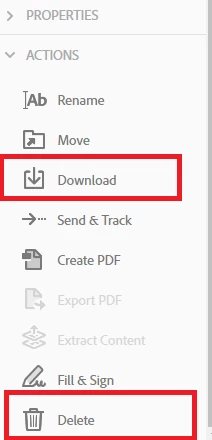
    To delete the file, select that file and click on delete option at bottom right as shown in the screenshot above.

    Let us know if you have any questions or need any help.

    Regards,

    Meenakshi

    1 reply

    Meenakshi Negi
    Adobe Employee
    Meenakshi NegiCorrect answer
    Adobe Employee
    May 23, 2017

    Hi Ohana_5849.,

    Yes, you can save documents and data files to Document Cloud.

    Open this link https://cloud.acrobat.com/  and go to Files > Document Cloud.

    Then click on upload icon as shown in the screenshot below:

    Browse the location where the file is saved and select the file to upload.

    It will be saved in the Document Cloud.

    When you need to make changes to the file, you need to open the same link and select the file in Document Cloud.

    At right you will get an option to download the file. Click on that and save it to make the changes on that file.

    Check the screenshot below:

    To delete the file, select that file and click on delete option at bottom right as shown in the screenshot above.

    Let us know if you have any questions or need any help.

    Regards,

    Meenakshi