Participant
January 9, 2020
Answered

How do I turn off cloud link question when attaching pdf in outlook?

  • January 9, 2020
  • 12 replies
  • 157110 views

I have to send several hundred individual emails, and cannot use mail merge feature (don't ask).  I don't want to have to answer do you want to send a cloud link  every time?  Can I reset that so it defaults to no?  OR turn it off?


Thanks.
Correct answer Code24601236aonr

I dont have a MY ACCOUNT button on my home tab!!!


Please explain further - this is the MOST annoying feature ever!


The answer in ths post regarding Add-ins lead me to the full answer.  Here are the steps:

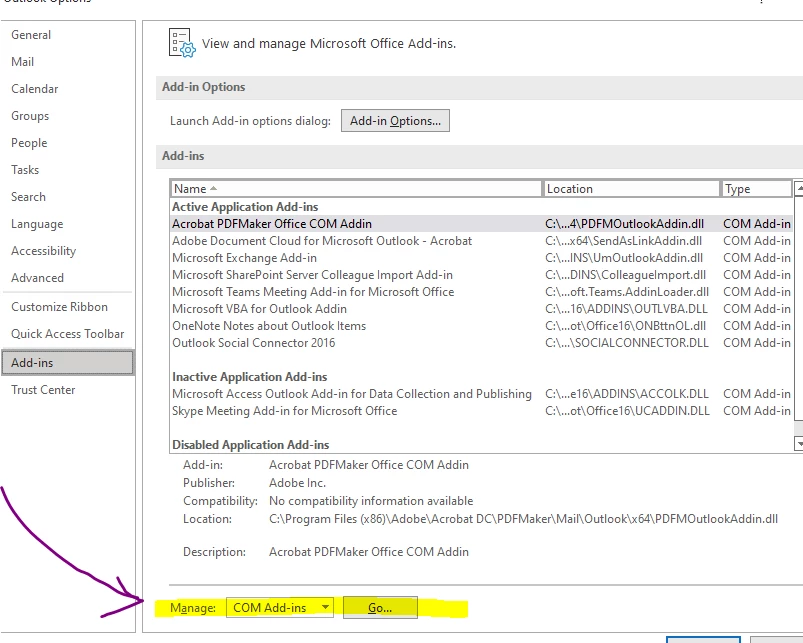
1.  In Outlook, go to File -> Options -> Add-ins - > Manage COM-Add-ins, Go:

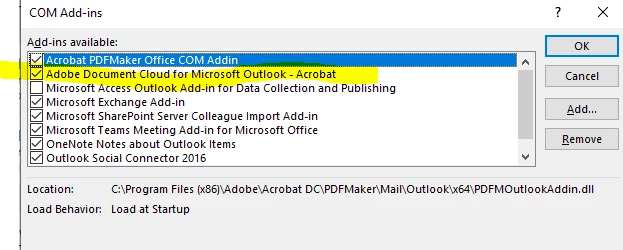
2.  After you Click "Go" you'll get a pop-up dialog box:


3.  Uncheck Adobe Document Cloud for Microsoft - Outlook

I just tested it in Outlook Office 16 and it removed that Adobe Cloud pop-up.

Good luck!

12 replies

AkanchhaS8194121
Legend
January 10, 2020

Hey Carol,

Sorry for the delay. Great to hear that you figured it out and we also appreciate for taking out time to share your findings.


Let us know if there's any further assistance is required. 


Thanks,

Akanchha 

Participant
September 22, 2021

Can you please give more thorough instructions I can't find the option. Is the ribbon in Pro DC or in the Creative Cloud Desktop? Screen shots would be helpful, thank you.

Participant
February 7, 2022

Hello,


Thank you for reaching out and sorry for the trouble.


Could you please provide more details about the issue you are experiencing?

Would you mind sharing the screenshot of the pop-up message that appears? 

Share the application and OS version.


Let us know if you need any help.


Thanks,

Meenakshi


Hi,

 I just figured this out. It's on the Home Tab Ribbon in Outlook (Full Client) under the My Account option. Click on that icon and go to settings. In there you can turn off the setting to Never Prompt. 

Participant
January 9, 2020

I found it...thank you.  It's in the Adobe "My Account" icon in the ribbon under settings.

Participant
August 3, 2023

Many thanks . This has helped me to disable  auto attachement of documents . Many thanks for your support