Participant
October 20, 2017
Answered

How do I upload a multi-page pdf file into Adobe PDF pack?

  • October 20, 2017
  • 1 reply
  • 827 views

How do I upload a multi-page pdf file into Adobe PDF pack?  I need to sign one page (not the first page) of the multi-page file, and everytime I upload it, it only imports the first page.

This topic has been closed for replies.
Correct answer Adorobat

Hi Irenea,

Sorry for the delay in response.

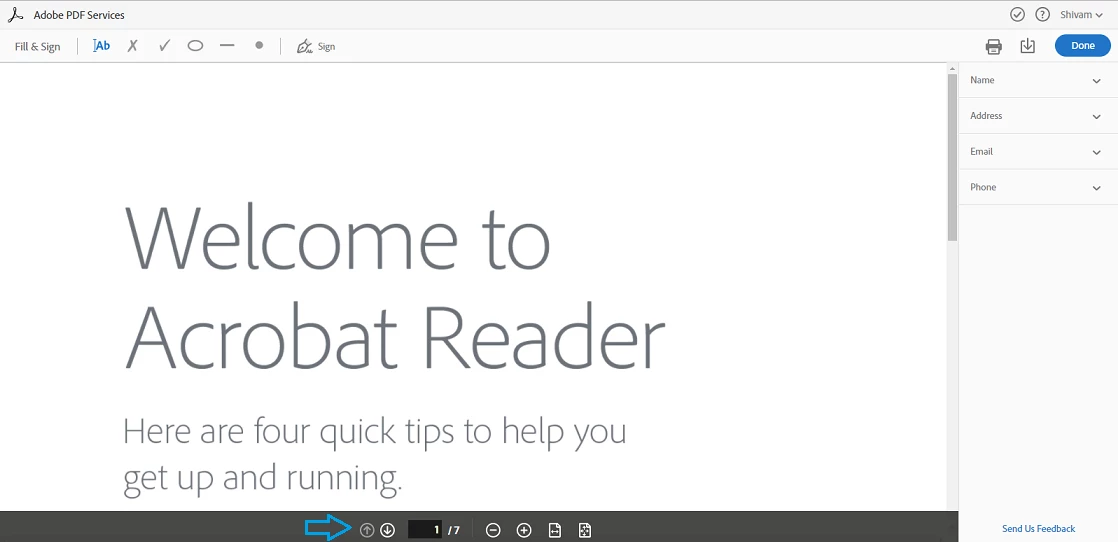
Adobe PDF Pack is an online service (more info here: FAQ | Adobe PDF Pack ) which allows you to create/ export pdf in Adobe Reader application or online in a web browser. Assuming you are referring to signing pdf online, using 'Fill & Sign' option in web browser at this link: https://cloud.acrobat.com/fillsign , try moving mouse to the bottom of the page which brings up page control toolbar using which you can navigate multi-page document clicking down-up arrow on the toolbar. Below is the screenshot:
Let us know if you have a different query.

Shivam

1 reply

Adorobat
Community Manager
AdorobatCommunity ManagerCorrect answer
Community Manager
December 22, 2017

Hi Irenea,

Sorry for the delay in response.

Adobe PDF Pack is an online service (more info here: FAQ | Adobe PDF Pack ) which allows you to create/ export pdf in Adobe Reader application or online in a web browser. Assuming you are referring to signing pdf online, using 'Fill & Sign' option in web browser at this link: https://cloud.acrobat.com/fillsign , try moving mouse to the bottom of the page which brings up page control toolbar using which you can navigate multi-page document clicking down-up arrow on the toolbar. Below is the screenshot:

Let us know if you have a different query.

Shivam