Participant
June 29, 2017
Answered

How to cancel the subscription?

  • June 29, 2017
  • 3 replies
  • 3270 views

I want to cancel my bargain. Is that possible? How can I do  that? Please send me to the  right person/place to advice me and help me  to cancel.Regards Anna Sigridsdatter Heen, Oslo, Norway.

    This topic has been closed for replies.
    Correct answer Adorobat

    Hi Anna,

    Follow below mention steps to cancel your subscription:

    1- Sign in into your Adobe account using this link: Adobe ID

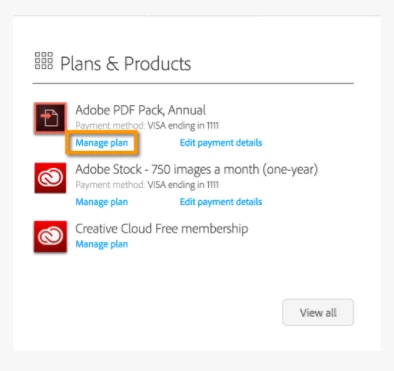
    2- Under Plans & Products>click Manage Plan.

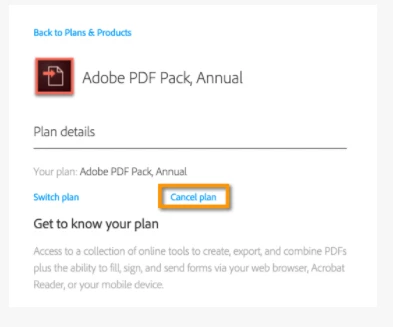
    3- Under Plan details>click Cancel plan.

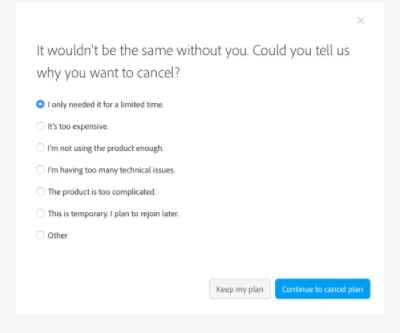
    4- Select the reason and click Continue to cancel plan.

    Let us know if you face issue while performing the steps.

    Shivam

    3 replies

    Participant
    November 18, 2022

    Hi,


    I want to cancel my subscription but my manage account page gives me no option to. Can you please advise what I need to do as it is very frustrating not being able to do this. It is also frustrating I cannot talk to anyone about this, and has made the whole experience distasteful to be honest.

    Meenakshi_Negi
    Legend
    November 21, 2022

    Hi Maher Mikhael271130183xye,


    Thank you for reaching out.


    We have checked your account and see the service is in canceling mode.

    That seems to be the reason you do not see the option on the Manage account page.

    Hope the information helps.


    Let us know if we can be of any further help.


    Thanks,

    Meenakshi

    Adorobat
    AdorobatCorrect answer
    Participating Frequently
    July 3, 2017

    Hi Anna,

    Follow below mention steps to cancel your subscription:

    1- Sign in into your Adobe account using this link: Adobe ID

    2- Under Plans & Products>click Manage Plan.

    3- Under Plan details>click Cancel plan.

    4- Select the reason and click Continue to cancel plan.

    Let us know if you face issue while performing the steps.

    Shivam

    Adorobat
    Participating Frequently
    June 30, 2017

    Hi,

    As i was able to understand the issue, you want to cancel your subscription, is that correct?

    On checking the details for your account, you have subscribed to Adobe Export PDF.

    Follow the steps given in the link below to cancel the subscription:

    Cancel your membership or subscription | Adobe Acrobat, Document Cloud PDF services

    Let us know if you have any question.

    Shivam

    Participant
    July 1, 2017

    Hello Shivam;

    I Have followed the link you sent, but need your hel/more instruction t cancel my bargain. This Comes UP: What can I do to continue the prosess so the canceling will be done. I am lost….

    Best regards Anna S. Heen

    Adobe Export PDF, Årsbasert‎

    Betalingsmåte: Visa slutter på 2866

    Administrer plan <https://accounts.adobe.com/plans/7B24B189971C81C61AAA>

    Rediger betalingsinformasjon <https://accounts.adobe.com/plans/7B24B189971C81C61AAA/edit-payment>

    30. jun. 2017 kl. 15.12 skrev Adorobat <forums_noreply@adobe.com>:

    I want to cancel my bargain. Is that possible? How can I do that? Please send me to the right person/place to advice me and help me to cancel.Regards Anna Sigridsdatter Heen, Oslo, Norway.

    created by Adorobat <https://forums.adobe.com/people/Adorobat> in Document Cloud PDF services - View the full discussion <https://forums.adobe.com/message/9679248#9679248>

    Hi,

    As i was able to understand the issue, you want to cancel your subscription, is that correct?

    On checking the details for your account, you have subscribed to Adobe Export PDF.

    Follow the steps given in the link below to cancel the subscription:

    Cancel your membership or subscription | Adobe Acrobat, Document Cloud PDF services <https://forums.adobe.com/external-link.jspa?url=https%3A%2F%2Fhelpx.adobe.com%2Fdocument-cloud%2Fkb%2Fcancel-subscription-acrobat-online-services.html>

    Let us know if you have any question.

    Shivam

    If the reply above answers your question, please take a moment to mark this answer as correct by visiting: https://forums.adobe.com/message/9679248#9679248 and clicking ‘Correct’ below the answer

    Replies to this message go to everyone subscribed to this thread, not directly to the person who posted the message. To post a reply, either reply to this email or visit the message page:

    Please note that the Adobe Forums do not accept email attachments. If you want to embed an image in your message please visit the thread in the forum and click the camera icon: https://forums.adobe.com/message/9679248#9679248

    To unsubscribe from this thread, please visit the message page at , click "Following" at the top right, & "Stop Following"

    Start a new discussion in Document Cloud PDF services by email <mailto:discussions-community-documentcloudPDF--services@adobe-v8.hosted.jivesoftware.com> or at Adobe Community <https://forums.adobe.com/choose-container.jspa?contentType=1&containerType=14&container=4870>

    For more information about maintaining your forum email notifications please go to https://forums.adobe.com/thread/1516624 <https://forums.adobe.com/thread/1516624>.

    This email was sent by Adobe Community because you are a registered user.

    You may unsubscribe <https://forums.adobe.com/unsubscribe.jspa?email=sigridsdatter%40icloud.com&token=5217c338f674acf73360402ba59f3e8d3e11bd74d430d6742e652bd73bef800e> instantly from Adobe Community, or adjust email frequency in your email preferences <https://forums.adobe.com/user-preferences!input.jspa>