
Participant
January 2, 2018
Answered

How to change or unlock document properties?

  • January 2, 2018
  • 4 replies
  • 21371 views

How to change or unlock document properties? When I save to PDF the document saves to another person, not me

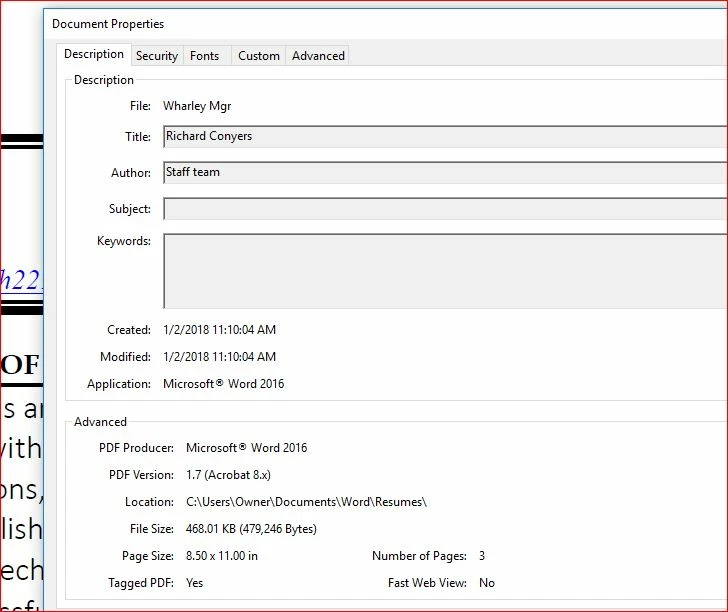
See attached. I saved a Word doc to a PDF. The tag name is Richard Conyers, a name of someone other than me.

How do I unlock or change the document properties and save to my name?
    This topic has been closed for replies.
    Correct answer ~graffiti

    Can we assume you only have the free Adobe Acrobat Reader? If so, you cannot change that on the pdf itself. Word is adding that meta-data so you need to find out how to change it before it is pdf'd or use the full version of Adobe Acrobat (assuming there are no edit restrictions on the document).

    4 replies

    Participant
    September 10, 2022

    This file is protected password for forgot didn't open the file. So unlock file please help me with Adobe.

    Legend
    September 11, 2022

    No, remember the password or give up.

    Participant
    January 11, 2018

    just in case make copy of PDF, open PDF file with let's say Notepad++, search for Title, change value inside (), and that's it.

    July 16, 2020

    After an hour search, this is the only answer that actually works if you don't have access to the original Word or PDF file.

    try67
    Community Expert
    Community Expert
    July 19, 2020

    This is not a good workaround. The metadata information can be saved in multiple locations in a PDF and editing it directly is not going to take care of all of it, and it can corrupt the file beyond repair if you make a mistake. If you need to edit files in this manner then get Acrobat.

    Participant
    January 2, 2018

    Thanks so much. The name was embedded in Word.

    I can only image how many years people that I had some strange alias. All the best, W

    ~graffiti
    ~graffitiCorrect answer
    Legend
    January 2, 2018

    Can we assume you only have the free Adobe Acrobat Reader? If so, you cannot change that on the pdf itself. Word is adding that meta-data so you need to find out how to change it before it is pdf'd or use the full version of Adobe Acrobat (assuming there are no edit restrictions on the document).