
Participating Frequently
March 21, 2018
Answered

operation in progress

  • March 21, 2018
  • 13 replies
  • 4186 views

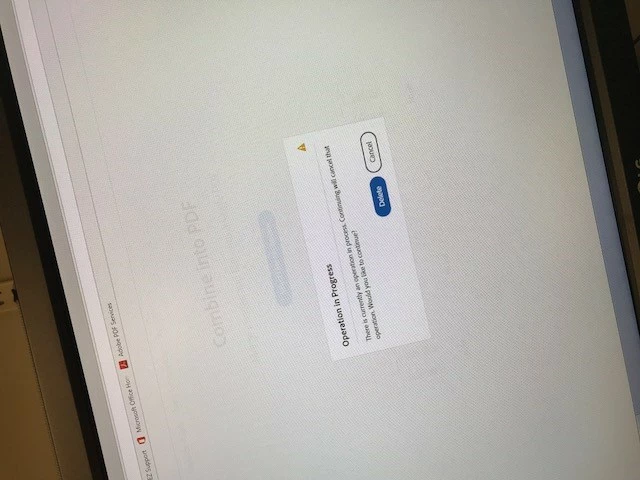
We have the Adobe PDF pack to be able to combine files at work. I've been using it for a couple months now and have had no issues. This past week or so, when I choose my files and click combine it goes through the whole process of uploading, but then when I try to combine it tells me there is already an operation in progress (there isn't) and I can either delete or cancel. If I hit delete it all goes away so that i can start over, but then tells me that my uploads have failed. If I hit cancel, it looks like it might still be trying to combine the files, but it just spins forever and doesn't actually do anything. Does anyone know how to fix this? I've tried erasing my browser history in case it's still trying to work on something that I'm not aware of. I'm not really sure where to go from here. I was hoping the issue would have resolved itself by now.
This topic has been closed for replies.
Correct answer joshuap95258662

For us, it looks like this has been finally fixed.  It's been working fine for the last couple of days <knock on wood> 

13 replies

AnandSri
Community Manager
Community Manager
April 13, 2018

Hi All,

We are not able to reproduce the issue at our end. We will highly appreciate if you help us with the following pieces of information so that we can try to reproduce this issue:

  • Which browser are you using while getting the error message? And, what is the version of the browser?
  • If freeware Adobe Reader is installed, what is the dot version of Reader installed? To identify, refer to https://helpx.adobe.com/acrobat/kb/identify-product-version.html
  • Which security software is installed?
  • Is it a Mac or Windows machine and what is the version of operating system installed?

Will wait for your response.

Regards,

Anand Sri.

joshuap95258662
joshuap95258662Correct answer
Participant
April 25, 2018

For us, it looks like this has been finally fixed.  It's been working fine for the last couple of days <knock on wood> 

AnandSri
Community Manager
Community Manager
April 25, 2018

Hi Joshuap,

Great! Good to hear that the issue got fixed and you are back on track. Feel free to update this discussion for any further assistance or you face any issue.

Regards,

Anand Sri.

sams36173668
Participant
April 11, 2018

I have also looked into multiple different services. I found Nuance to be helpful software but I decided on a great program called "Nitro" website is gonitro.com. I found this program to the easiest application to work with, user friendly and has a very updated look and design to it. I love it 10X better than ADOBE already!

Participant
April 11, 2018

If it is of any help to ANYONE, we gave up waiting on Adobe and of course wouldn't send files as they are proprietary.  I looked around and our company finally decided upon Nuance.  It's a desktop program and WELL WORTH THE MONEY.  To be honest, I've found it's much easier to use and combines unlimited (as far as I can tell) files into one PDF.  Might be something to look into for your company since there seems to be zero resolution to the issue via Adobe.

Hope it helps some!

ACACIA_WILDWOOD
Participating Frequently
April 11, 2018

THANK YOU, DEBRA!!!! I am looking into this as we speak and will be selecting a version that best fits my business needs. You've been far more helpful than any of the Adobe communications to date, I appreciate you sharing this alternative solution. Enjoy the rest of your day.

Participant
April 11, 2018

Same issue here and it's affecting my job.

AnandSri
Community Manager
Community Manager
April 11, 2018

Hello Megmo,

We apologize for the inconvenience caused. The issue is not reproducible at our end on both the platforms Mac and Windows.

Is it possible to share sample files or the files causing the issue with us so that we can try it at our end? To share the file, please use Adobe Send feature, upload the file, share the link to files via private message only, How Do I Send Private Message

For testing purpose, please connect the computer to a different network environment like a guest wired/wireless network or a mobile hotspot.

Note: Please share the file via private message only, and if possible, please share a callback number, the best time for a callback and the timezone via private message only.

Please mention the forum thread in the subject line of the  private message.

Regards,

Anand Sri.

kathm66688621
Participant
April 11, 2018

This CONTINUES to be an issue for me. Occasionally, I cam merge up to 4 PDF's but most often I get the same message and have to abandon the entire thing.  It is extremely frustrating and I have lost hours of time. I will NOT be sending files (this is a privacy issue) and it is not the files themselves that are the issue. There is obviously some problem with the program itself given the number of complaints about the same thing. The files I am attempting to merge have not been a problem in the past. Nothing has changed at my end. I am currently investigating alternative providers and am extremely disappointed with Adobe's response and service.

AnandSri
Community Manager
Community Manager
April 10, 2018

Hi All,

Sorry for the delayed response and inconvenience caused. The issue is not reproducible at our end on both the platforms Mac and Windows.

Is it possible to share sample files or the files causing the issue with us so that we can try it at our end? To share the file, please use Adobe Send feature, upload the file, share the link to files via private message only, How Do I Send Private Message

For testing purpose, please connect the computer to a different network environment like a guest wired/wireless network or a mobile hotspot.

Note: Please share the file via private message only, and if possible, please share a callback number, the best time for a callback and the timezone via private message only.

Please mention the forum thread in the subject line of the  private message.

Regards,

Anand Sri.

Participant
April 11, 2018

I am having the same issue,  files wont convert.  Please fix as your solutions do not work.

Please contact me urgently on [Personal info removed by Mod: Email] Note: Please do not share the email address, phone number or any personal details on the forum. as I am paying for a service that I cannot use and I cannot fix. 

AnandSri
Community Manager
Community Manager
April 11, 2018

Hi Sachai,

We apologize for the inconvenience caused. The issue is not reproducible at our end on both the platforms Mac and Windows.

Is it possible to share sample files or the files causing the issue with us so that we can try it at our end? To share the file, please use Adobe Send feature, upload the file, share the link to files via private message only, How Do I Send Private Message

For testing purpose, please connect the computer to a different network environment like a guest wired/wireless network or a mobile hotspot.

Note: Please share the file via private message only, and if possible, please share a callback number, the best time for a callback and the timezone via private message only.

Please mention the forum thread in the subject line of the private message.

Regards,

Anand Sri.

Participant
April 4, 2018

Same issue here.  Have been using the service for a year now and is a fairly integral part of my position.  Has made this part of my job very counterproductive.  Will follow and hope for an answer soon.  Very frustrating. 

kathm66688621
Participant
April 1, 2018

I am having the same issue and it is incredibly frustrating. It has been happening on and off for 2 weeks. I have had the occasional success but have just tried merging the same docs about 6 times in a row and the same thing happens. Does anyone know how to fix this??

phillipc69316430
Participant
March 31, 2018

Any update? I am also having this issue and, it is becoming very annoying - the service being paid for is not being delivered - it is not fit for purpose. 

Noting the above mentioned issues raised, if there is no resolution provided in the next 14 days, I shall be seeking a refund.

sams36173668
Participant
March 30, 2018

I too have had this problem the last 2 weeks and it has become very frustrating. I combine multiple PDF files daily and this has become a counter productive tool for work. I will be canceling my membership and moving towards a different service.

Participant
March 28, 2018

Same here, getting the same exact message and it is completely stopping me when I try to combine files. I knew I should have gone with Nuance. Do we have any resolution yet?

Participating Frequently
March 30, 2018

No, I am still having the same issue. We may need to look into changing programs as well. This is getting ridiculous.