
Participant
March 26, 2024

Adobe Express - 'save to pdf' doesn't support Hindi perfectly

  • March 26, 2024
  • 4 replies
  • 427 views

Hi Team Adobe,


I am using Adobe Express, and I have typed Hindi (devnagiri) text which perfectly saves in jpg, png formats, however, when I 'save as pdf' (for printing purpose), it's not ideally what should be as in the text is not perfect. To better explain this, I have shared sceenshots.

Please figure a solution to this, I have searched around everywhere but cannot find a fix.

this is what it should not be (pdf file)
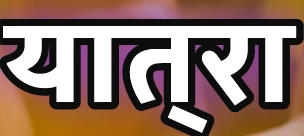

This is what it should be (jpg file)


Thank you,

Van

4 replies

Adobe Employee
November 27, 2024

Hi @vandana.n (cc: @Tarun Saini)

This is a known limitation, as noted on https://helpx.adobe.com/express/troubleshoot/known-and-fixed-issues/known-issues.html


Until we address that, downloading as png/jpeg may be your only option. Sorry for the inconvenience.


Thanks,
Abhi G

vandana.nAuthor
Participant
November 27, 2024

Hi,


Thank you for the tips, however, I used both Safari and Chrome, but the problem is still there. 


I also cleared cache, problem still persists.

Tarun Saini
Community Manager
Community Manager
November 27, 2024

Thanks for your response.


Could you please share the screen recording of the issue? Also, share your project URL with me via private message giving the edit access. You can create a duplicate file of the project and share that.


Regards,

Tarun

Tarun Saini
Community Manager
Community Manager
November 25, 2024

Hi 

@vandana.n

,


Welcome to the community! We're sorry to hear about this. Did you try using the other suggested browsers (Safari, Microsoft Edge, and Google Chrome) or incognito mode to see if it makes a difference?


Also, try clearing the browser's cache and cookies of the browser and restart it and try again. For more info on how to clear cache and cookies check this link- https://adobe.ly/3VvCOMT


Regards,

Tarun

Participant
March 26, 2024
Hindi words are changed when downloading Hindi Text in PDF format
Winnie_M
Inspiring
April 2, 2024

Hi @default36323832r1bo2g,


Sorry to hear about the issue. 


Can you share the font you used and a screenshot of the PDF before and after the download? Is it a font from Adobe or from somewhere else? Did you use the font in a video or image template? Did you try to download the project with a different browser?


Can you confirm the browser and the OS version on your device?


We need some details to help you.


Thanks,

^Winnie