

Jennifer33605755onq5
Participant
November 2, 2024

Consistent Issues for Past 2 Days With Uploading Media to Posts

  • November 2, 2024
  • 38 replies
  • 6171 views

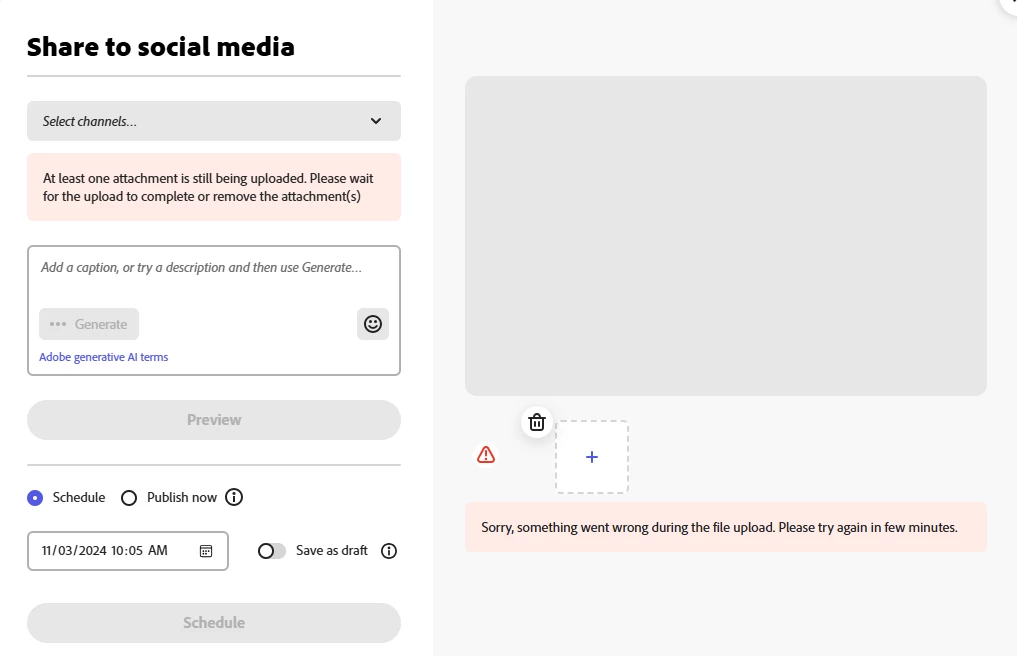
I have been receiving the error shown in the screen shot below for the last two days every time I attempt to upload media to a post in the Adobe Express Scheduler.


It is taking 7-10 attempts before the media will upload successfully. I have closed/reopened the website, cleared cookies, rebooted - none of these steps has any effect on the issue.


The issue is also occuring on my iPhone Adobe Express app.


I have never encountered this issue before. This is having a negative impact on my posting schedule and becoming very time consuming. 


Is something broken? Please advise and resolve. 
38 replies

SC-Agency
Inspiring
December 20, 2024

It is not fixed. Happening for me and my associate. Help agent yesterday said developers are aware. Scheduler you can't upload creations from Express is useless.

Tarun Saini
Community Manager
Community Manager
December 23, 2024

Hi 

@SC-Agency

,

We're sorry to hear about this. Did you try using the other suggested browsers (Safari, Microsoft Edge, and Google Chrome) or incognito mode to see if it makes a difference? If possible, can you share the screen recording of the issue?  Also, can you share your Adobe ID with us?


Regards,

Tarun

Tarun Saini
Community Manager
Community Manager
December 2, 2024

Hi all,


Can you please confirm if anyone from you still experiencing this issue? 


Regards,

Tarun

Participating Frequently
December 2, 2024

This was fixed after about 2 days after I posted this. Thanks! Enjoying
the software!!! 🙂


*Peggy Glassman*
{Mod Note- Personal information has been removed by the Moderator}
*Click: Portfolio <>*

Tarun Saini
Community Manager
Community Manager
November 18, 2024

Hi @rb54839397,


Could you please also, confirm if you're getting any error 413 while using the Adobe Content Scheduler?


Regards,

Tarun

Andy Lambert
Community Manager
Community Manager
November 18, 2024

I'm so sorry about this - I'm not able to replicate this issue. Are you seeing them when creating from the calendar or from the editor and is it all types of posts (video/image) that are failing? 

Also as a fail-safe, are you able to clear your browser cache and see if this resolves the issue? 

Thanks!Andy
Participant
November 14, 2024

Same here, and I thought it was my computer that is causing this. My problem only started three days ago as far as I can tell but it is really affecting me now. No need to post yet another screenshot as it is literally the same as everybody else's. But on a side note - I tried posting the same video directly onto Fb and there it only loads as a black screen - sound works fine but no video... funny as this happened at the same time... so right now it seems I can't post any videos... 

Tarun Saini
Community Manager
Community Manager
November 14, 2024

Hi 

@rb54839397


We're sorry to hear about this. I'd like to inform you that we've shared this information with our product team. Once we have an update we will let you know.


Regards,

Tarun

Participant
November 12, 2024

I'm having the same problem. This is terrible. Will this be fixed soon?

Participant
November 9, 2024

David__B
Adobe Employee
Adobe Employee
November 7, 2024

Hi @Celestial_Eagle5E46 


Would it be possible to share some screenshots of the issue for reference?


Thanks,
Dave

Participant
November 7, 2024

I'm having this exact same problem. Every time I try to upload this message comes. Very frusterating since this software is usually so fast.

Participant
November 6, 2024

My issue is the scheduler isn't saving the link after I add it to my pin. It shows it saved but once I exit and return, the link is gone. I've done rinse and repeat several times and the link is always gone but the image is there. I've tried Chrome, Firefox, and iphone app and the result is the same.