Participant
April 7, 2025

Design Elements Flipping Horizontally Upon PDF Generation

  • April 7, 2025
  • 2 replies
  • 193 views

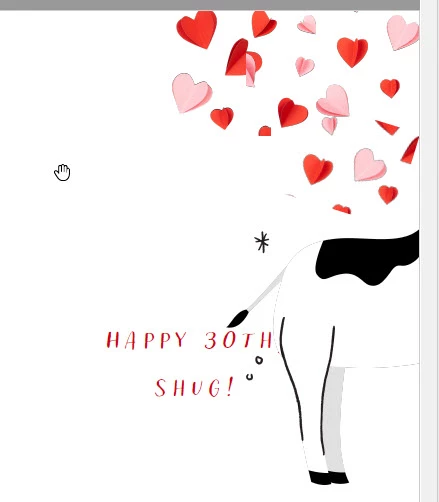
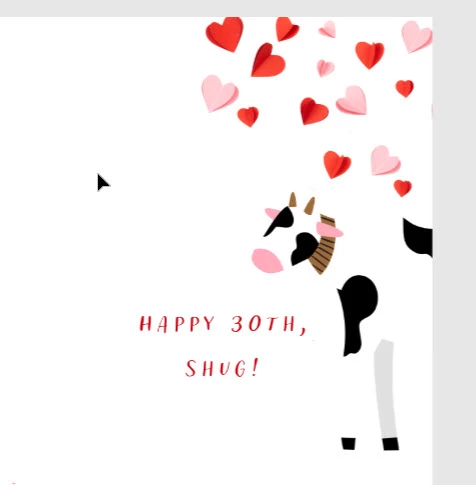
I'm creating a greeting card (8.5 x 11 - Letter size) landscape.  Using premium design element "Cow", I've placed in the image, then erased some glintzes.  I dragged the COW to the far right so the only half or the front end was showing in the print aread and then after saving exported as a PDF.  The element is flipped horizontal showing the back end of the cow instead of the front of the cow.

I'm using online Adobe Express with a premium account.
 

2 replies

Adobe Employee
April 7, 2025

Hi @scarng 


We are aware of an issue with Erase (https://community.adobe.com/t5/adobe-express-bugs/export-pdf-diff%C3%A9rent-du-projet/idc-p/15255506#M25946) but I haven't been able to replicate the flpping issue.


If you continue to run into it, please send me a direct message so we can set up file sharing for investigation.


Thanks

Abhi G

Amitej S
Community Manager
Community Manager
April 7, 2025

Hi @scarng, Welcome to our Adobe Express community! 


I tried reproducing the issue you mentioned, but it worked fine for me. Can you share a screen recording of the workflow with the faulty outcome so we can better understand the process and investigate it? Is it happening with just this project? Can you also test the same on some other projects to see if they follow a similar pattern? 


Would it be fine for you to share the project URL with us for testing? Also, have you tried clearing the browser's cache and cookies or working in incognito/private browsing mode to see if that makes any difference? 


Please let us know about your observations and details, for us to assist you better.


Thanks!

Amitej