
Exit
  • Global community
    • Language:
      • Deutsch
      • English
      • Español
      • Français
      • Português
  • 日本語コミュニティ
  • 한국 커뮤니티
8

Asset marked with the failed icon ! But There is NO marked asset !

New Here ,
Jun 09, 2024 Jun 09, 2024

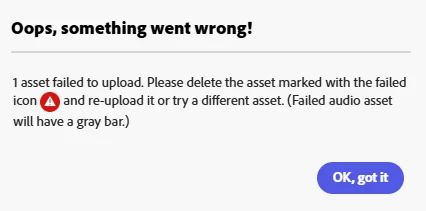
I can't download my PDF, it gives the error; "1 asset failed to upload. Please delete the asset marked with the failed icon".  But there is NO ASSET marked with FAILED ICON ! I've checked every page & asset but no marked one. Also I've used my own assets 90%... How can I solve this ?  
 

Ender307244853kd2_0-1717967695794.png


TOPICS
Desktop Web , Exporting and Sharing , PDF
2.7K
Translate
Report
Community guidelines
Be kind and respectful, give credit to the original source of content, and search for duplicates before posting. Learn more
community guidelines
New Here ,
Jun 24, 2024 Jun 24, 2024

Me too.


Translate
Report
Community guidelines
Be kind and respectful, give credit to the original source of content, and search for duplicates before posting. Learn more
community guidelines
New Here ,
Jul 05, 2024 Jul 05, 2024

I just had this issue 7/5 using my own assets too, and I could not find which asset had the red marker. 
Upon logging out, logging back in & the refreshing the page it worked!

Can you try that and let us know?

Translate
Report
Community guidelines
Be kind and respectful, give credit to the original source of content, and search for duplicates before posting. Learn more
community guidelines
Adobe Employee ,
Jul 10, 2024 Jul 10, 2024

Dear all, I'm sorry to hear you're having trouble. To investigate this issue better, please share the project and a walk-through video with us.
Please head to this thread here. @joanw81871970 has mentioned a workaround for this.
I'm looking forward to hearing from you.

^Lyn

Translate
Report
Community guidelines
Be kind and respectful, give credit to the original source of content, and search for duplicates before posting. Learn more
community guidelines
New Here ,
Jun 19, 2024 Jun 19, 2024
A IMAGEM FICA MOSTRANDO UM PEQUENHO TRIANGULO NA PARTE SUPERIOR ESQUERDA, PRECISO SABER O MOTIVO DISSO E COMO POSSO ESTAR AJUSTANDO
Translate
Report
Community guidelines
Be kind and respectful, give credit to the original source of content, and search for duplicates before posting. Learn more
community guidelines
Adobe Employee ,
Jul 10, 2024 Jul 10, 2024

@default38144554kycq4i, I have merged your post to this relevant thread.

Translate
Report
Community guidelines
Be kind and respectful, give credit to the original source of content, and search for duplicates before posting. Learn more
community guidelines
New Here ,
Aug 20, 2024 Aug 20, 2024

STILL AN ISSUE! KIND OF A MAJOR ONE! 

Translate
Report
Community guidelines
Be kind and respectful, give credit to the original source of content, and search for duplicates before posting. Learn more
community guidelines
New Here ,
Aug 20, 2024 Aug 20, 2024

I spent weeks creating 4 Ebooks and I CANNOT download them because of this moronic glitch. 

Translate
Report
Community guidelines
Be kind and respectful, give credit to the original source of content, and search for duplicates before posting. Learn more
community guidelines
Explorer ,
Oct 06, 2024 Oct 06, 2024

Currently getting this on a file that was working 2 weeks ago. No failed icons, can't download, logging out does nothing, turning off adblockers does nothing. Fully paid Creative Suite account, can't download a flipping PNG . . . 

Translate
Report
Community guidelines
Be kind and respectful, give credit to the original source of content, and search for duplicates before posting. Learn more
community guidelines
New Here ,
Nov 06, 2024 Nov 06, 2024

This has happened to me as well. I hope there's a work around for this issue...

erica_9713_0-1730949484559.png


Translate
Report
Community guidelines
Be kind and respectful, give credit to the original source of content, and search for duplicates before posting. Learn more
community guidelines
New Here ,
Nov 15, 2024 Nov 15, 2024

Having the same issue. Nothing is marked with a failed icon. Can't download assets.  What is the work around, please. Thanks.

Translate
Report
Community guidelines
Be kind and respectful, give credit to the original source of content, and search for duplicates before posting. Learn more
community guidelines
New Here ,
Nov 22, 2024 Nov 22, 2024

Same issue here.

My project is a template based poster, and i animated most off the assets to create a short 15s reel.
Before animating i had no issue downloading the still poster as PNG, now i cant even do that

Translate
Report
Community guidelines
Be kind and respectful, give credit to the original source of content, and search for duplicates before posting. Learn more
community guidelines
New Here ,
Nov 22, 2024 Nov 22, 2024

Ok, so removing all the animations of the photo assets helped. I was able to DL the still png, and after adding the animations again, i could dl the video too.

Translate
Report
Community guidelines
Be kind and respectful, give credit to the original source of content, and search for duplicates before posting. Learn more
community guidelines
Community Beginner ,
Nov 23, 2024 Nov 23, 2024

Having this same issue, no indicator on which asset is wrong. I am creating a still png image.


Translate
Report
Community guidelines
Be kind and respectful, give credit to the original source of content, and search for duplicates before posting. Learn more
community guidelines
Community Beginner ,
Nov 23, 2024 Nov 23, 2024

Also seeing no response since July makes me wonder if they care about this issue.


Translate
Report
Community guidelines
Be kind and respectful, give credit to the original source of content, and search for duplicates before posting. Learn more
community guidelines
Community Beginner ,
Nov 23, 2024 Nov 23, 2024

Fixed my issue. The symbol doesn't show up for which photo it is. That is a site problem.

I had to go through one by one, deleting and undoing each asset until I found the right one.


Translate
Report
Community guidelines
Be kind and respectful, give credit to the original source of content, and search for duplicates before posting. Learn more
community guidelines
New Here ,
Nov 23, 2024 Nov 23, 2024
You can also share it to your Google Drive or Dropbox account and access it
that way. Upper left hand corner "SHARE" button. Hope this helps.


--
*Oliver Holt*

*Holt Management Systems would never solicit money through email. Block
and report anyone who does. Thank you for assisting us in maintaining the
exceptional reputation of our organization. And thank you for helping us
protect you and others from fraud.*

FLUTTER APP SOFTWARE ENGINEER | INVENTOR | INVESTOR


holtsystems/ <>
/Holt-Management-Systems-
<>
HMS <>
Translate
Report
Community guidelines
Be kind and respectful, give credit to the original source of content, and search for duplicates before posting. Learn more
community guidelines
New Here ,
Dec 10, 2024 Dec 10, 2024

I also found a workaround by creating a new project in Express and copying and pasting everything into the new one. It downloaded for me without issue.

Translate
Report
Community guidelines
Be kind and respectful, give credit to the original source of content, and search for duplicates before posting. Learn more
community guidelines
New Here ,
Feb 25, 2025 Feb 25, 2025
LATEST

This was the only method that worked for me as well.

Translate
Report
Community guidelines
Be kind and respectful, give credit to the original source of content, and search for duplicates before posting. Learn more
community guidelines
Community Beginner ,
Feb 22, 2025 Feb 22, 2025

Review all your pages with the layers visible on the right side. You might find a hidden element on one of your pages from the template you selected. It will look like the attachment here. Delete it and you should be okay. examples.png

Translate
Report
Community guidelines
Be kind and respectful, give credit to the original source of content, and search for duplicates before posting. Learn more
community guidelines