Copy link to clipboard
Copied
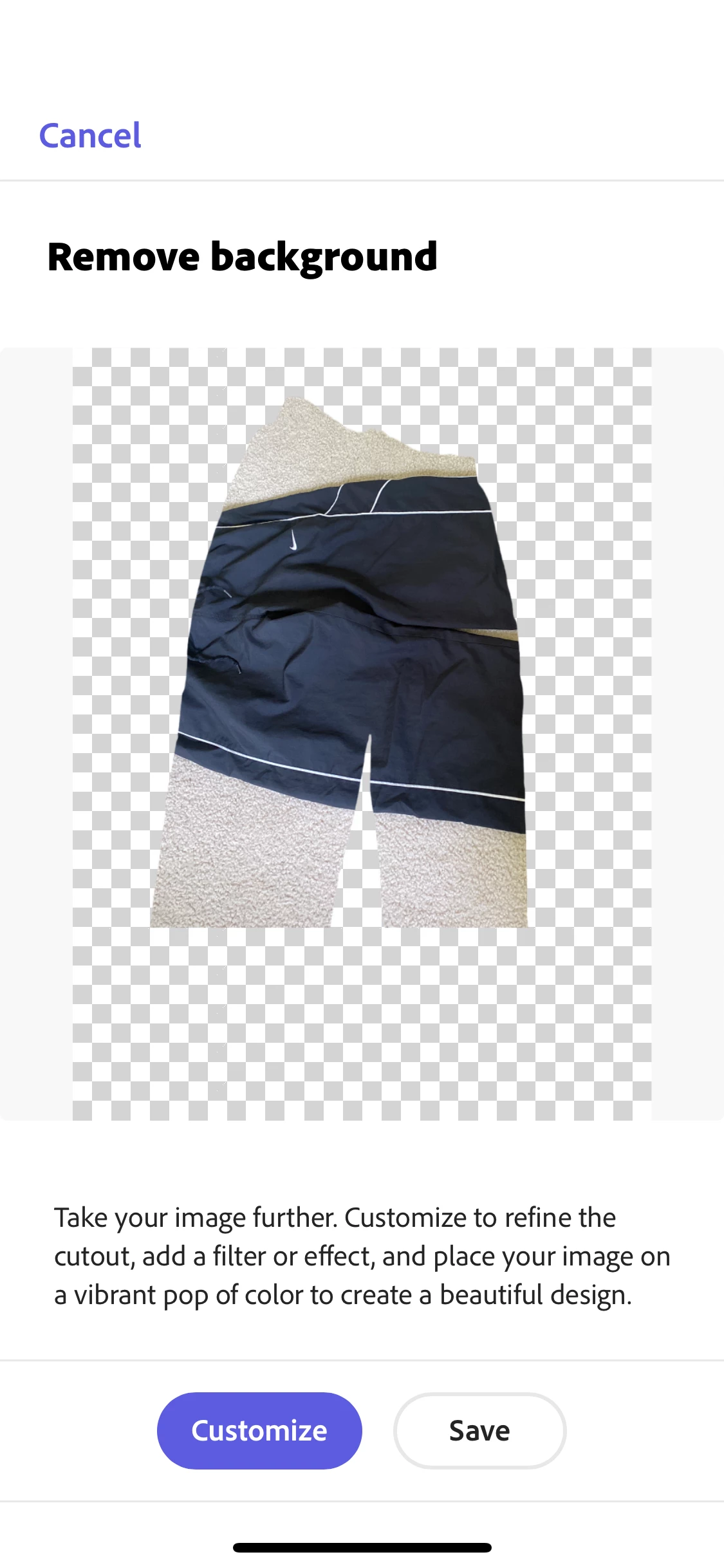
For some reason, and I've never had trouble with this before, when I remove the background on an item that I took a picture of, the image basically inverts. I attached a picture of an example.

Hey @reid,
We've shared the details with the team and will let you know once this gets resolved. Until then, you can use Remove Background Quick Action on a browser from a desktop device to complete your task.
Let us know if it helps.
Thanks,
Amitej
Hey @reid, We know it might be frustrating, but please try this feature from a desktop device and not from mobile devices until it gets fixed.
@reid30043172ma0k, Thank you for confirming this has worked for you.
Our engineering team has also confirmed that the fix was deployed on June 14, 2023, and should not cause any more issues.
Thank you for your patience and support ❤️ , and please feel free to reach out anytime again should you encounter further issues or have questions, as we're here to help.
Lyn 🙂
Copy link to clipboard
Copied
Hey @reid,
I tried to replicate this with a similar image, and it worked fine for me on Android and iOS devices. You can try restarting the device once to check if that makes any difference. Also, ensure the device OS and the Adobe Express application are updated to their latest version.
Let us know how it goes.
Thanks,
Amitej
Copy link to clipboard
Copied
I restarted and it didn't work. It's also not an update issue. My Adobe Express is on 11.16.1
Copy link to clipboard
Copied
If you have any more suggestions, I'd really appreciate it.
Copy link to clipboard
Copied
@reid30043172ma0k a new update is live. Please update your Adobe Express App to iOS 11.17.0 and retest.
We're looking forward to hearing from you.
Lyn 🙂
Copy link to clipboard
Copied
Copy link to clipboard
Copied
I've deleted and redownloaded the app, updated the version, and changed my phones camera setting but nothing will work. It has to be a bug with the remove background feature.
Copy link to clipboard
Copied
How do I get actual help for this because I've gotten no solutions that work and I need this issue to be fixed quickly, I'm on a time crunch.
Copy link to clipboard
Copied
Hey @reid, You can try performing this quick action via the webapp so your work doesn't get hampered.
Let us know if it works.
Copy link to clipboard
Copied
Hi @reid,
Can you share a screen recording of the workflow that results in this output? Also, please share with us the make/model of the device and the app version installed. We'd require this info to investigate the issue further.
Copy link to clipboard
Copied
Copy link to clipboard
Copied
Got anything? Also what was that quick action u guys talked about in an earlier post, nothing showed up for me.
Copy link to clipboard
Copied
Hey @reid,
We've shared the details with the team and will let you know once this gets resolved. Until then, you can use Remove Background Quick Action on a browser from a desktop device to complete your task.
Let us know if it helps.
Thanks,
Amitej
Copy link to clipboard
Copied
That feature does the same thing for me. It just inverts the image.
Copy link to clipboard
Copied
Hey @reid, We know it might be frustrating, but please try this feature from a desktop device and not from mobile devices until it gets fixed.
Copy link to clipboard
Copied
Could you kindly update the App to v11.17.1 and retest?
If you still experience the issue after the update, kindly send me one of the images you are trying to remove the background that resulted in an error.
I'm looking forward to hearing from you,
Lyn
Copy link to clipboard
Copied
Copy link to clipboard
Copied
Thank you for sharing, and thank you for reporting the bug.
I understand your frustration.
I have been able to replicate the bug, and it seems that the issue lies with the "Take Photo" option.
For now, a workaround would be to pre-take all your images with your iPhone camera and save them in your camera roll. Then, when you go into Adobe Express Remove Background, choose "Photo Library" instead of "Take Photo". This should work as a temporary solution.
Rest assured, it has been raised to our engineering team, and they are actively working on finding a permanent solution.
I will follow this up and let you know as soon as there is an update, but please feel free to reach out at any time should you have any other questions or issues.
Thank you for your patience and support,
Lyn
Copy link to clipboard
Copied
Copy link to clipboard
Copied
Thank you for sharing.
Please use the workaround for now by pre-taking all your images with your iPhone camera and saving them in your camera roll. Then, when you go into Adobe Express-> Under "Quick Actions", "Remove Background", choose "Photo Library" instead of "Take Photo". This should work as a temporary solution.
We will keep you updated.
Lyn
Copy link to clipboard
Copied
Thank you
Copy link to clipboard
Copied
Copy link to clipboard
Copied
Any new developments?
Copy link to clipboard
Copied
Our engineering team is still working on this, but I'm sure this will be resolved soon.
I will let you know as soon as this is resolved.
Thank you for your support ❤️ and your patients,
Lyn 🙂
Copy link to clipboard
Copied
Hey I fixed it, thanks for the help.
Get ready! An upgraded Adobe Community experience is coming in January.
Learn more