Exit
  • Global community
    • Language:
      • Deutsch
      • English
      • Español
      • Français
      • Português
  • 日本語コミュニティ
  • 한국 커뮤니티
0

Exporting Creative Cloud Express files

New Here ,
Dec 16, 2021 Dec 16, 2021

Is it possible to export CC Express files and open them in another program? Maybe open them in inDesign for example? 

3.5K
Translate
Report
Community guidelines
Be kind and respectful, give credit to the original source of content, and search for duplicates before posting. Learn more
community guidelines

correct answers 1 Correct answer

Community Expert , Dec 17, 2021 Dec 17, 2021

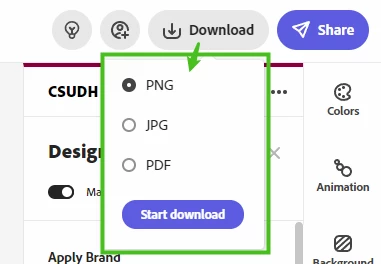
You can export to .PNG, .JPG, and .PDF:
anissa_thompson_0-1639734519466.png

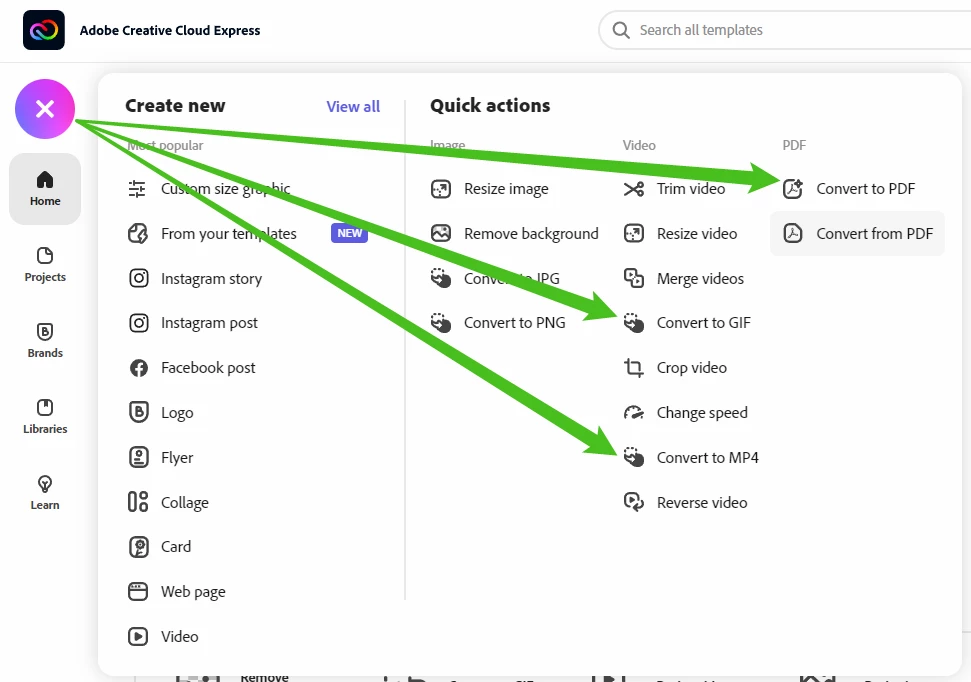
You can use your exported files in other applications. In addition, you can do some pretty quick and easy edits and conversions too:
anissa_thompson_1-1639734568959.png


Hope this helps!

Translate
Community Expert ,
Dec 17, 2021 Dec 17, 2021

You can export to .PNG, .JPG, and .PDF:

anissa_thompson_0-1639734519466.png

You can use your exported files in other applications. In addition, you can do some pretty quick and easy edits and conversions too:

anissa_thompson_1-1639734568959.png


Hope this helps!

Hope this helps!
Make sure to press "✔ Correct Answer" on this post if this answers your question. Happy Creating!
Anissa • @anissat
Translate
Report
Community guidelines
Be kind and respectful, give credit to the original source of content, and search for duplicates before posting. Learn more
community guidelines
New Here ,
Dec 23, 2021 Dec 23, 2021

Hi there,


I wanted to add to this question because I am having issues exporting to GIF for one of my files. When I hit the "download" button in the top right, the file formats don't display for me for some reason.


I have created what I see in the attached file. It's like the drop down menu to choose the file format is not displaying correctly. Do we have the option to export to .gif or .mp4 file formats from the web application? The menu won't even show me .jpg .png or even .pdf file formats.


Any help would be greatly appreciated.


Thank you!


Translate
Report
Community guidelines
Be kind and respectful, give credit to the original source of content, and search for duplicates before posting. Learn more
community guidelines
New Here ,
Apr 22, 2023 Apr 22, 2023
LATEST

This is incorrect. No one needs to meerly insert a large "photo" of their PDF. We want WORKABLE files. Something created in Express that can be taken further with InDesign.

Please post an appropriate correct response

Translate
Report
Community guidelines
Be kind and respectful, give credit to the original source of content, and search for duplicates before posting. Learn more
community guidelines