


Amitej S
Community Manager
Community Manager
April 8, 2025
Answered

FIXED -❗Adobe Express outage - 'You're offline' error ❗April 8th, 2025

  • April 8, 2025
  • 43 replies
  • 3577 views

Hi Everyone!!

Adobe Express experienced an outage, and the app stuck on "Getting everything ready for you," with a message displaying "You're offline."
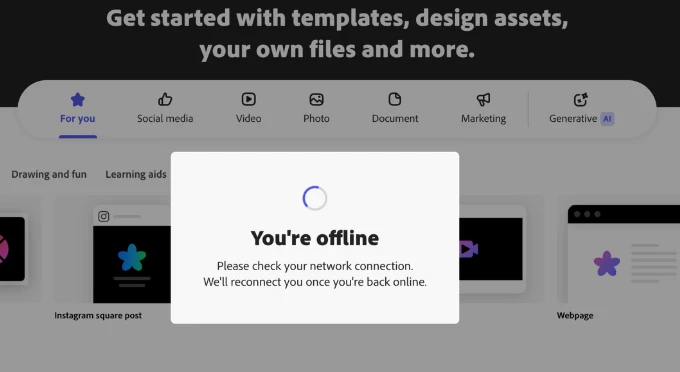


Our team worked on fixing the issue. If you're still experiencing it, let us know.


We apologize for the frustration and thank you for your patience.

Correct answer Abhi.G @ ADBE

@rachael_3007 @Grace Presbyt36105630rs4j 


We are actively investigating this issue. Thanks for your patience.


Abhi G

43 replies

Participant
April 8, 2025

Same issue.

Participant
April 8, 2025

Hi 


Randomly Adobe Express started telling me I am offline when I am not. All other websites work. I did not change anything and normally use it with no issue. Any thoughts? I have a big deadline and need to access my presentation to complete it.


Thank you

Participant
April 8, 2025

Same here. I have been trying to troubleshoot and nothing is working. I wonder if its down?

Amitej S
Community Manager
Amitej SCommunity ManagerAuthor
Community Manager
April 8, 2025

Hey @zachary_5406, Welcome to our Adobe Express Community! 


Our teams are aware of the issue and have worked to fix it. Please try again and let us know if it works for you now.


Best!

Amitej

Participant
April 8, 2025

I am having the same issue. I have attached the screen shot with the Blocked Code Notice from Chrome.

Participant
April 8, 2025

I truly cannot comprehend how a company worth almost $150 billion cannot make a web app that works reliably. I love the Adobe apps....when they work, but this is starting to get absurd. You guys have known about this problem since at least 2023. It's time to either deal with the problem or accept all of your users switching to something else. I do not know if Express is simply not a priority for you guys, but at this point it's becoming laughable. You can't even seem to incorperate something as simple as spell check. I'm not trying to be rude and I understand that it's not the fault of whatever Adobe employee reads this, but come on guys. 

Participant
April 8, 2025

I have tried on multiple laptops and I still get the same message. Garbage

Participant
April 8, 2025

Fix this issue! This is why "always online" are a problem. Bring back offline modes!

Participant
April 8, 2025

Please for the love of all that is Holy get this fixed asap. If I lose a client because I am not able to do the presentation that I have in 30 mins I will be telling my ogranization to undownload everything to do with adobe and switching to something else. I understand technical difficulties, but when countless people rely on on your software to run their business, more diligence is needed.

Participating Frequently
April 8, 2025

Happening to me in Chrome. Please fix asap.

Participant
April 8, 2025

This problem has happened to me before, but it has stopped. Today it is impossible to work and from previous messages, this is a known problem and you have not given it due attention. Please resolve this as soon as possible.

Abhi.G @ ADBECorrect answer
Adobe Employee
April 8, 2025

@rachael_3007 @Grace Presbyt36105630rs4j 


We are actively investigating this issue. Thanks for your patience.


Abhi G