New Participant
October 10, 2024
Answered

Generative Ai in Resizing: How to turn it off

  • October 10, 2024
  • 2 replies
  • 624 views

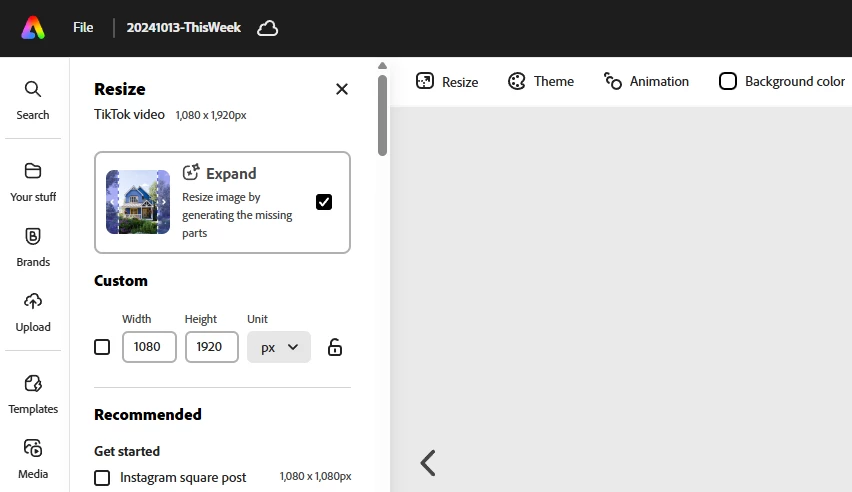
Generative Ai has taking over the duplicate and resize feature in Express. How do I disable it? We are creating technical work that must be accurate and not an AI fantasy.

This topic has been closed for replies.
Correct answer thejanebradbury

@Cheri25494497tc5x @Lynne297472837hrg When you select the Resize option uncheck the Expand option in the box at the top. Resize then simply resizes the page. 
 

2 replies

thejanebradbury
thejanebradburyCorrect answer
Community Expert
October 18, 2024

@Cheri25494497tc5x @Lynne297472837hrg When you select the Resize option uncheck the Expand option in the box at the top. Resize then simply resizes the page. 


New Participant
October 22, 2024

Thanks! I figured it was hiding in plain sight! It's like trying to find the ketchup in the fridge.

thejanebradbury
Community Expert
October 23, 2024
quote

Thanks! I figured it was hiding in plain sight! It's like trying to find the ketchup in the fridge.


By @Cheri25494497tc5x

Esepcially  for a man! (Did I really just say that? 🫢) I swear my husband can't see what's in front of his nose sometimes! Anyway, glad I helped. I got caught out by it myself because it was a new feature that slipped by me unnoticed. 

Tarun Saini
Community Manager
Community Manager
October 14, 2024

Hi 

@Cheri25494497tc5x

,


Thanks for reaching out. Can you please elaborate more on the issue you're seeing? If possible, can you share the screen recording of the issue to assist you better?


We're here to help, just need some info.


Regards,

Tarun

New Participant
October 17, 2024

I had the same experience. I wanted to resize my page in Expess and insead of resizing my artboard there was a "generating" load screen and then it presented options to "accept"


All I wanted to do was change my artboard from 11X8.5 to 15X10.