Participant
March 25, 2023
Answered

HOW TO STRECH TEXT IN ADOBE EXPRESS

  • March 25, 2023
  • 3 replies
  • 3656 views

I AM TRYING TO STRECH BUT NO SOLUTION FOUND

PLEASE HELP!

Correct answer Henrik Heigl

Hi,


First of please try not to write in all-capital letters. Thats would be this is considered rude and I'm sure you do not mean it that way.

About your question if you are editing the Text in your Project you have the "SpacinG" Option on the right side.
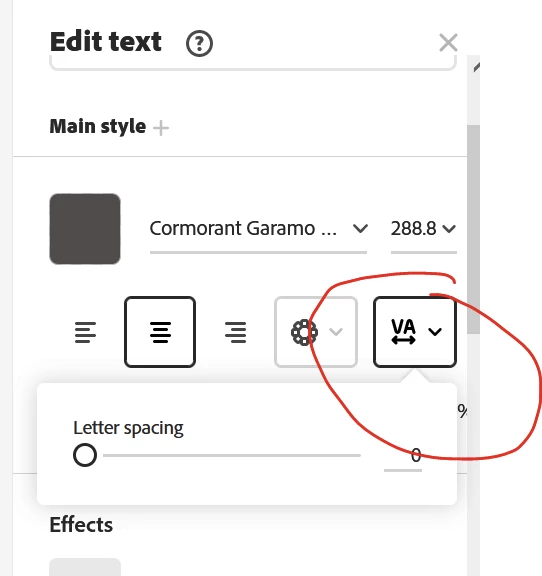
 

With that the Spaces between the Characters will get wider. Hope that helps.


3 replies

themewesetech
Inspiring
June 29, 2025

You can't. You can't stretch or skew. Your best best is to save the text on a blank page, download as a .png and upload to your project. But it won't change the shape of the characters. There is no basic "word art" feature.

Participant
April 2, 2025

I will bet you need to use photoshop, illustrator or InDesign.
Then edit your text in one of those other products to add stretch effect.

Save it to your files.

Open your project and click the plus then click "Your Stuff" and add it as an image.

Henrik Heigl
Community Expert
Henrik HeiglCommunity ExpertCorrect answer
Community Expert
March 25, 2023

Hi,


First of please try not to write in all-capital letters. Thats would be this is considered rude and I'm sure you do not mean it that way.

About your question if you are editing the Text in your Project you have the "SpacinG" Option on the right side.


With that the Spaces between the Characters will get wider. Hope that helps.


regards,Henrik
Corey37314319vvgr
Participant
May 10, 2024

THIS IS DEFINITELY NOT WHAT WAS ASKED, TRY AGAIN.