
Participating Frequently
December 14, 2021
Question

Low quality pictures

  • December 14, 2021
  • 1 reply
  • 4637 views

Hi. I really love the new Creative Cloud Express, but i have a problem with the quality of the exported files.
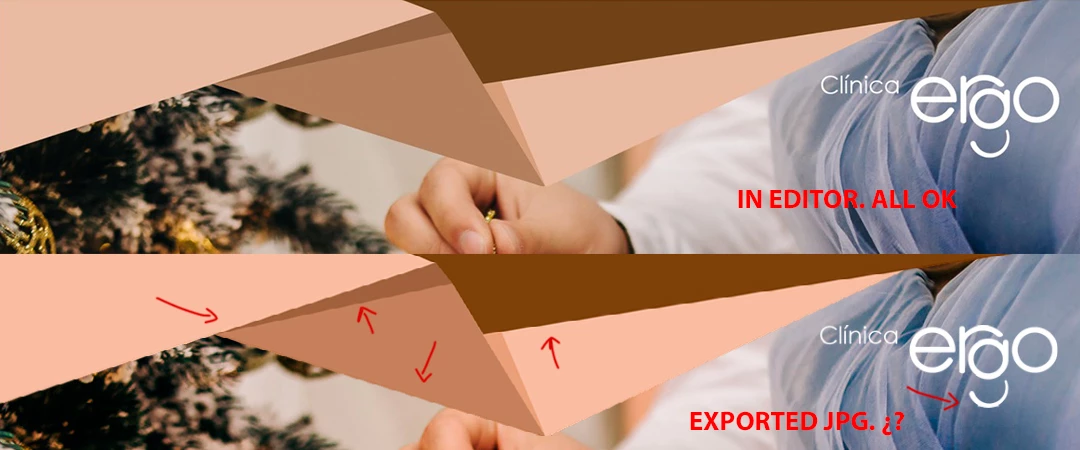


I have a layer with a PNG in high quality. And a logo also in PNG. In the editor everything looks perfect but when I export to JPG or PNG, it looks terrible. Saw teeth and low quality. In CANVA I use the same assets and it looks sharp. What is the problem?


This is the document.


This topic has been closed for replies.

1 reply

Community Manager
December 15, 2021

Hi Eusebio,


Glad you are loving Adobe Creative Cloud Express and sorry for the trouble. We can get this checked.


Would you be able to clear cache and try again with the incognito/private mode on the browser you are using? Let us know if this works, if not, we will dive deeper.


Thanks,

Saquib


Participating Frequently
December 15, 2021

Hi Saquib. I just try with Firefox and Chrome... same result. Low quality export. Thanks for your help. Try the link to the document and see yourself.

Participating Frequently
December 15, 2021

I use this file, but when i export to JPG or PNG the system generate a compressed version that looks very bad. If i export to PDF... looks great !!!


Here you have the original asset in PNG and SVG.