Participant
August 17, 2023
Answered

new express is not able to download transparent background PNG

  • August 17, 2023
  • 3 replies
  • 4710 views
new express is not able to download transparent background PNG. It is downloading the white backdrop.

Correct answer thejanebradbury

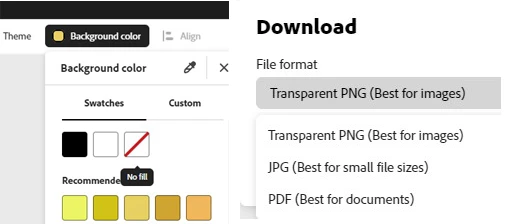
To download as a transparent PNG:

  1. Set your background to No Fill:
  2. Now when you go to Download, you will be able to choose Transparent PNG:

3 replies

Participant
March 13, 2024

I'm having this same issue... created the file fine in the web version of Adobe Express, erased the background and have transparent background selected. But no matter what, when I download the png file - it still has a white background?... it just looks like i'm downloading the image I uploaded?

Adobe Employee
March 13, 2024

Hi @Kiki36055632lb0a 


Which browser are you using? And could you post the downloaded png here (or send me a direct message?)


Thanks

Abhi G

Participant
September 1, 2023

this just happened to me this morning and I was downloading transparent files last week! 

thejanebradbury
Community Expert
Community Expert
September 1, 2023

Have you tried the method above? Here's a video too, if that helps. 


Participant
November 16, 2023

Still does not work, gives me a black background

thejanebradbury
Community Expert
thejanebradburyCommunity ExpertCorrect answer
Community Expert
August 17, 2023

To download as a transparent PNG:

  1. Set your background to No Fill:
  2. Now when you go to Download, you will be able to choose Transparent PNG:

Participant
October 2, 2023

When I do what is described above, it gives me a gray background.