
Participating Frequently
January 20, 2025
Question

New "Group" Feature is a Huge Hinderance

  • January 20, 2025
  • 4 replies
  • 627 views

Grouping items was a simple way to move several components around simultaneously, making it easy to align, move, etc. 
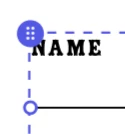
This strange new grouping function has removed that convenience entirely. Now when you click on something that is grouped, it assumes that you're trying to click on a single component, and then you have to click a new icon that indicates you're selecting the entire "group".


Genuine question, what is this purpose? Why would you need a grouped object to act as a bunch of single objects, if that's how they act by default *before* you group them? 
Maybe I just group too many things and find use in the feature more than most - but this has made the program incredibly difficult to use for me as now simply moving a grouped object is 3 clicks instead of one like it used to be. 


The image below shows the new icon in question that appears when you click on something that is a part of a group.
 

4 replies

Participating Frequently
May 26, 2025

YES to all of this! Please, Adobe, make selecting a group intuitive again! This is an unrelenting source of frustration. It leads to errors as I'm unsure what's been selected. There are way too many menu options popping up when I need to SEE MY OWN WORK. I hate this so much. Glad I'm not alone, and it's validating to see that this issue has been open for months. What a frustrating app. i wish a competitor dealt with type as well as Adobe. My company will be gone in a second.

sharont67402169
Participant
August 15, 2025

I thought I was doing something wrong.. This new update for grouping is so difficult to work with I just want to move the whole group and resize in one go,  not have to do it in several moves.. Please change it back

Community Manager
August 15, 2025

Hi @sharont67402169,


Thank you for sharing your feedback on the new Group feature. We understand that the current workflow for moving and resizing grouped items may impact efficiency. Your input has been forwarded to our product team for consideration as they evaluate potential improvements in future updates.


^MM

chromax
Known Participant
February 7, 2025

It should behave like known tools like PowerPoint or Figma. It resembles Photoshop, that also has this ancient behaviour, where you have to manually set to move a group.


The click on the dotted line is a good hint, but not very intuitive.

Participant
February 2, 2025

Just noticed this today, and I thought "Surely this is some glitch, because how could anyone in their right mind think that this is in any way an improvement?" Yet here we are.
This "upgrade" is a complete downgrade. So much less intuitive. This goes beyond "if it ain't broke don't don't fix it" and straight into "It works great, let's break it"

Truly idiotic.

Community Manager
January 21, 2025

Hello @MH GBP ,

Thanks a lot for your feedback!

This is indeed a recent change we have made to the groups functionality, with the main purpose to simplify selection and editability of objects that are nested within groups. We are doing this change because many of our users complained that selecting, editing, or moving assets within groups was difficult, especially when a group had multiple nesting levels. This was also especially visible on mobile and tablet devices. 

Now, please note that we have added a few new ways so that you can still interact with the main group easily:

  1. clicking on the icon that you have mentioned above would select the main group; click & dragging the icon will not only select the main group, but also move it as you drag.
  2. clicking on the dotted line (the decoration around the group) would select the main group; click & dragging also can move the main group. (available only on desktop devices)
  3. the right-click menu of each inner group element and/or the three dots (...) in the contextual menu now also contains a new "select group" action which helps select the main group. (on mobile and tablets, this action is also available in the panel).

    Wondering if you have tried any of these interactions, or if you feel these would improve your experience.

    Thanks a lot!
Participant
January 28, 2025

Serious question: why would I want a group to act as individual pieces by default? That was the point of grouping them! 😭


It slows down the process so much and I wish there was a way to turn off this feature. Like, if I group something, I don't mind double-clicking to get into the group or just ungrouping them to do what I need to do. But now, I end up trying to move a group, moving an individual piece instead, getting irritated that this glitch-feature was introduced, having to undo it, and then find that tiny little handle to move it. Something that was once intuitive is now frustrating. Having to think about how to click on a group to move it is not how I want to spend my time designing things 🥲


I reiterate: can we at least get a button to select / deselect to turn this "groups act as individual pieces" feature off?