
FSchleyhahn
Inspiring
April 18, 2022
Question

No Thumbnail When Sharing Creative Cloud Express Project

  • April 18, 2022
  • 1 reply
  • 2391 views

In reference to the attached image, I am trying to post an Adobe Creative Cloud Express online book that I created on Facebook, but instead of getting a "picture" of my title page of the project, all I get is a link with a light gray background that says "express.adobe.com".  With Adobe Spark, the title page thumbnail would get displayed as a background image to the link, thereby drawing attention.  Is it possible for Adobe Creative Cloud Express to generate a thumbnail like Adobe Spark did instead of just a boring gray background?  I tried using the text within the "Embed" option, but it just displays a JPG of the title page and doesn't open the actual online book.  Any assistance will be appreciated.  Thank you
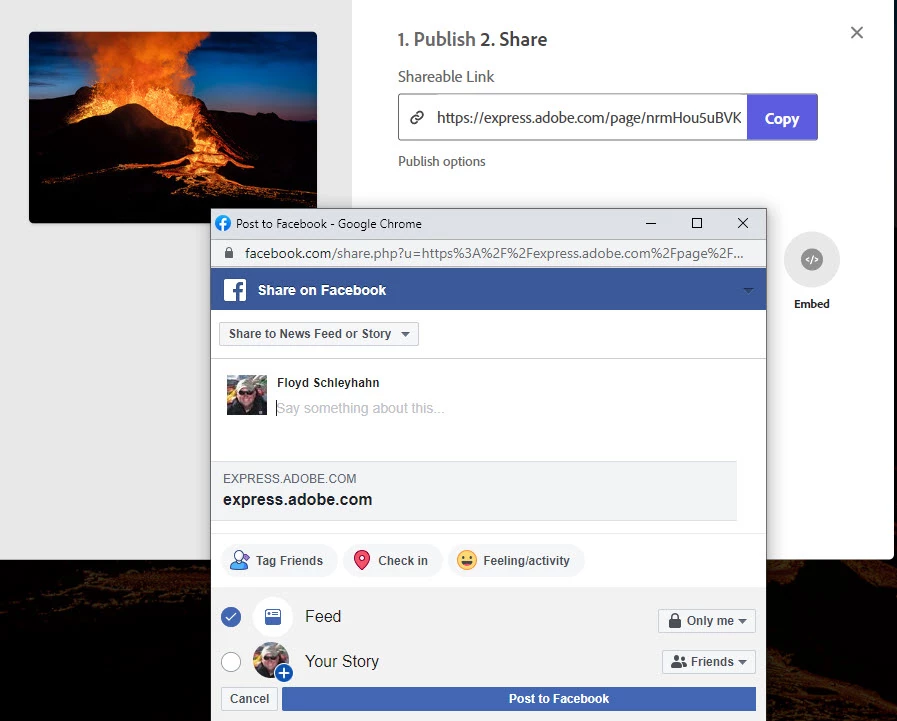
1 reply

Amitej S
Community Manager
Community Manager
April 21, 2022

Hi there,


Thanks for reaching out; this shouldn't be happening. I want to inform you that we were able to replicate this on our end, and it is shared for further investigation. Once we have any info regarding this, you'll be updated.


Meanwhile, could you try posting a web page that is shared with you, and see if that also displays a light grey background saying "express.adobe.com".


Regards,

Amitej

Participant
May 2, 2022

I also have the same problem. I wanted to share my project in a private group on Facebook, but your "Share on FB feature" only gives me a possibility to share in a story or my feed. And when using this feature it seems that the preview will show.  


But/ Since this is not where I wanted to share it, I tried to copy only the link of the project and then post it in my preferred private group, and also on Messenger, but then only the text "Express.adobe.com" showed up. No preview or project title.😢 So there seems to be limitations on how to share. 


Can you please give us back the possibility to share in group and also on Messenger using a link with a preview?


FSchleyhahn
Inspiring
May 2, 2022

Try using this:  https://anyimage.io/#

Just take a screenshot of your opening/cover slide and use it for the background.  Then, upload it to that link I just provided and then you will have a "clickable" image for your audience to click on.  With just the boring gray express.adobe.com default that you get, I had one like (it was from my wife), but when I used the screenshot of my cover/title page, I had over 100 likes.