


Participant
October 30, 2021
Answered

Adobe Fonts are showing as icon in Apple apps

  • October 30, 2021
  • 12 replies
  • 16282 views

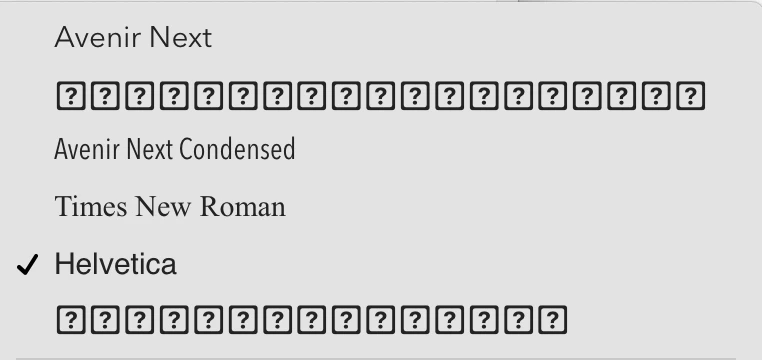
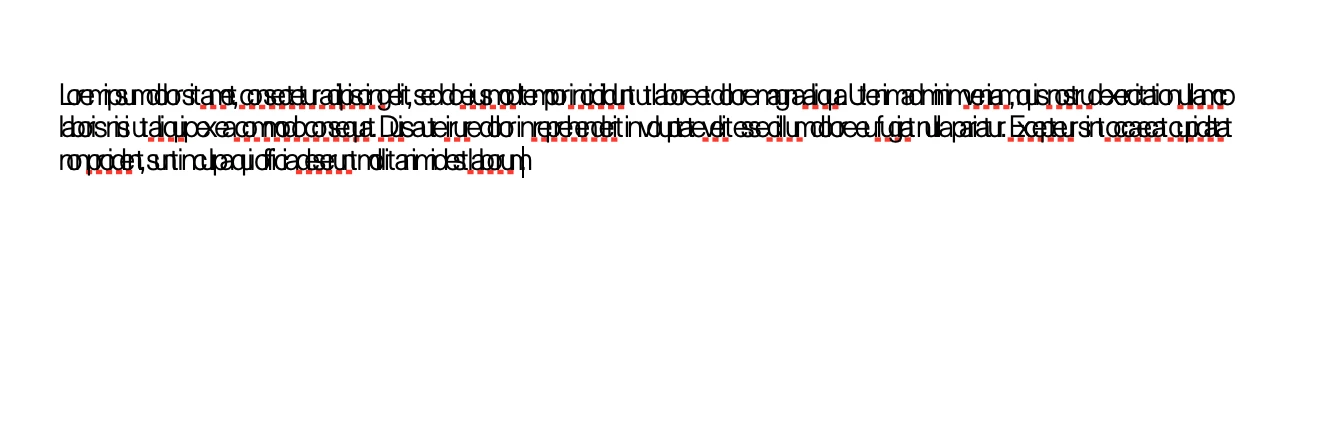
I am using Monterey 12.0.1 on apple silicon. Fonts downloaded from Adobe fonts work well in Adobe apps, however they are not working in Pages. The font list displays adobe fonts as boxes with question marks. When an Adobe font is selected the font displays with characters overlapping. I've attached photos to illustrate the issue. Any help on this problem would be much appreciated! (I've also reached out to Apple.)
 

<Title renamed by moderator>

 

This topic has been closed for replies.
Correct answer Molly Doane

An update for MacOS Monterey 12.1 has been released and appears to fix the problem. If you are experiencing the issue described in this thread, please try updating your operating system and let us know if the problem persists.


Thanks,

Molly

12 replies

Molly Doane
Molly DoaneCorrect answer
Participating Frequently
December 16, 2021

An update for MacOS Monterey 12.1 has been released and appears to fix the problem. If you are experiencing the issue described in this thread, please try updating your operating system and let us know if the problem persists.


Thanks,

Molly

Participant
December 17, 2021

Happy to confirm that the update has corrected my previously reported issue of Adobe Garamond rendering onscreen in Pages, but dropping out when printing or when exporting to PDF. Thank you!

Participant
December 6, 2021

I am using Monterey 12.0.1 on apple silicon. Fonts downloaded from Adobe and Google work well in Adobe apps and also Apple Text Edit app, however they are not displaying correctly in Pages, Numbers or Keynote. Not sure why it's working with Text Edit but not the others as they are Apple approved applications. The font list appears as boxes with question marks and when an Adobe font is selected the font displays with characters overlapping. I have also been in contact with Apple. Spent 3 hours on phone trying to resolve issue. Tried clearing cache, restoring standard fonts, deactivating fonts, rebooting in safe mode, creating new account user, uninstalling Number, Pages, Keynote, even Adobe with no success. I should also note, I am also using a font manager, Typeface. All fonts appear correctly in here. 

Josh Hadley
Adobe Employee
Adobe Employee
December 6, 2021

Please report this to Apple using https://feedbackassistant.apple.com/ (see details in my answer above).

Apple is aware of the problem and has confirmed it is a problem with macOS/Apple iWork apps. They have a "potential fix identified - for a possible future macOS release" but no details on when that might be published.


Participant
December 12, 2021

Can Adobe not do more to fix this problem? Telling users to report this to Apple, when the problem is already known, isn't really helpful. It is happening only with Adobe Fonts and it means I'm unable to read or edit any of the documents that I've created in Pages. It's a really big deal. I can't access any of my work.


Running latest version of everything - MacBook Pro 16" (16-inch, 2021) with macOS Monterey Version 12.0.1.

Participant
November 22, 2021

Adobe fonts are also not working properly (Monterrey 12.0.1 Macbook Air M1)


Font panel not working


While this font family is activated via web…


Indesign can't find neither Semibold, nor Medium.


I'm a bit desperate bescause I'm having lots of issues with different fonts. I've already tried to desconnect and reconnet my acount with Adobe. No changes. It looks it's a problem with the OS

Molly Doane
Participating Frequently
November 22, 2021

Apologies - this issue looks different than that being discussed on this thread. Does the spinning circle ever resolve?

We will need your Adobe ID email address and the output of our log collector in order to investigate: https://helpx.adobe.com/creative-cloud/kb/cc-log-collector.html

Please feel free to message me directly with this information if you prefer.

Participating Frequently
November 23, 2021

Hi Molly,
I just wanted to note that I also have both the Manage Fonts panel and the Monterey overlap problem. I am in a real pickle with this, as all of my documents require Adobe typefaces. Before I buy a ticket back to the office over a holiday, or sub everything for Helvetica and TNR, can I please confirm that buying Font Folio and installing fonts directly will allow them to be installed in Font Book and thus likely fix this? I'm looking for an emergency brute-force solution without downgrading from Monterey. Thanks!

careofandrea
Participant
November 20, 2021

Same here.  MBP 16, Monterey 12.0.

Is there an Apple forum support page where I can post this too? All my pre-monterey documents can't be displayed correctly and this is really frustrating.

Thank you

gerdk50640021
Participant
November 21, 2021

Same Problem on imac 12.0.1 with Minion Pro in pages 


HELP

Participant
November 11, 2021

Recently updated to MacOS Monterey 12.0.1 on my MacBook Air (M1, 2020). Now, in Pages, my beloved default Adobe Garamond typeface appears in my font list and renders onscreen but drops out when I export to PDF or print. I have never had this problem before through multiple software and hardware upgrades over many years. This past week, I've spent hours on the phone with Apple and Adobe trying to resolve, reinstalled Pages, reinstalled the fonts (despite showing 6 errors), etc., to no avail. There's a bug somewhere. Please help! This affects hundreds of my Pages documents.

HARSHIKA_VERMA
Community Manager
Community Manager
November 11, 2021

Hi katecooperuk,


We apologize for the frustration and sorry for the inconvenience. Our team is investigating this issue and they would like to know which font you were using?


We awill try our best to help.


Thanks,

Harshika

Participant
November 11, 2021

Hi Harshika,


It is happening with all the Adobe Fonts I had activated.  I deactivated them all and reactivated them several times hoping that might help but it didn't change.  I now only have a few activated:


Calluna, Mr Eaves Modern, Adobe Caslon, Interstate and Interstate Condensed – all showing as boxed/bordered question marks in the font select dropdown, and when you use the font in a document (usually Regular) the letters are all squashed together.


Screen recording attached using Mac OS Numbers – in this example, using Adobe Caslon font, the letters of the word become 'D' s when using the Regular style.


I hope this helps, thank you for taking a look at this.

Josh Hadley
Adobe Employee
Adobe Employee
November 5, 2021

If you're experiencing this problem and can spare some time: I recommend opening a feedback report through Apple's Feedback Assistant: https://feedbackassistant.apple.com/ (you will be asked to sign in with an AppleID). When creating a report, start with "macOS", select problem area "iWork apps" (you can then select either Pages or Keynote). Please generate and attach the macOS System Information Report and macOS Sysdiagnose reports (there are instructions how to generate those in the Feedback Assistant app) as these will really help in getting to the root of the problem. You can also include any screen captures that demonstrate the symptoms of this problem.


Participant
November 5, 2021

I did this early this week before I discovered the topic here. They responded with a list of questions to answer, which I completed and emailed back, along with screen caps and a Pages file sample.

Participant
November 4, 2021

I have the same problem. I have also reported it to Apple and the iWork team is following up. 


The fonts do display correctly in the Notes app.

Molly Doane
Participating Frequently
November 4, 2021

Can you please confirm you're on Monterey 12.0.1 and tell me what type of machine you're using?

Participant
November 4, 2021

I'm on a 14 inch MacBook Pro M1 and the Mac OS is Monterey 12.0.1.

Participant
November 3, 2021

Same here as well, I was wondering if I was the only one

Molly Doane
Participating Frequently
November 3, 2021

The fonts team has been working with Apple to resolve this issue. Apple has identified a problem that will likely be resolved by an OS patch. We will update here as information becomes available.


–Molly, Adobe Fonts team


<Marked as correct only to highlight>

Participant
November 2, 2021

Same issue here as well!