

Ann Bens
Community Expert
Community Expert
Apr 21, 2023 10:57 AM UTC
Open for Voting

Offset image in AME export settings
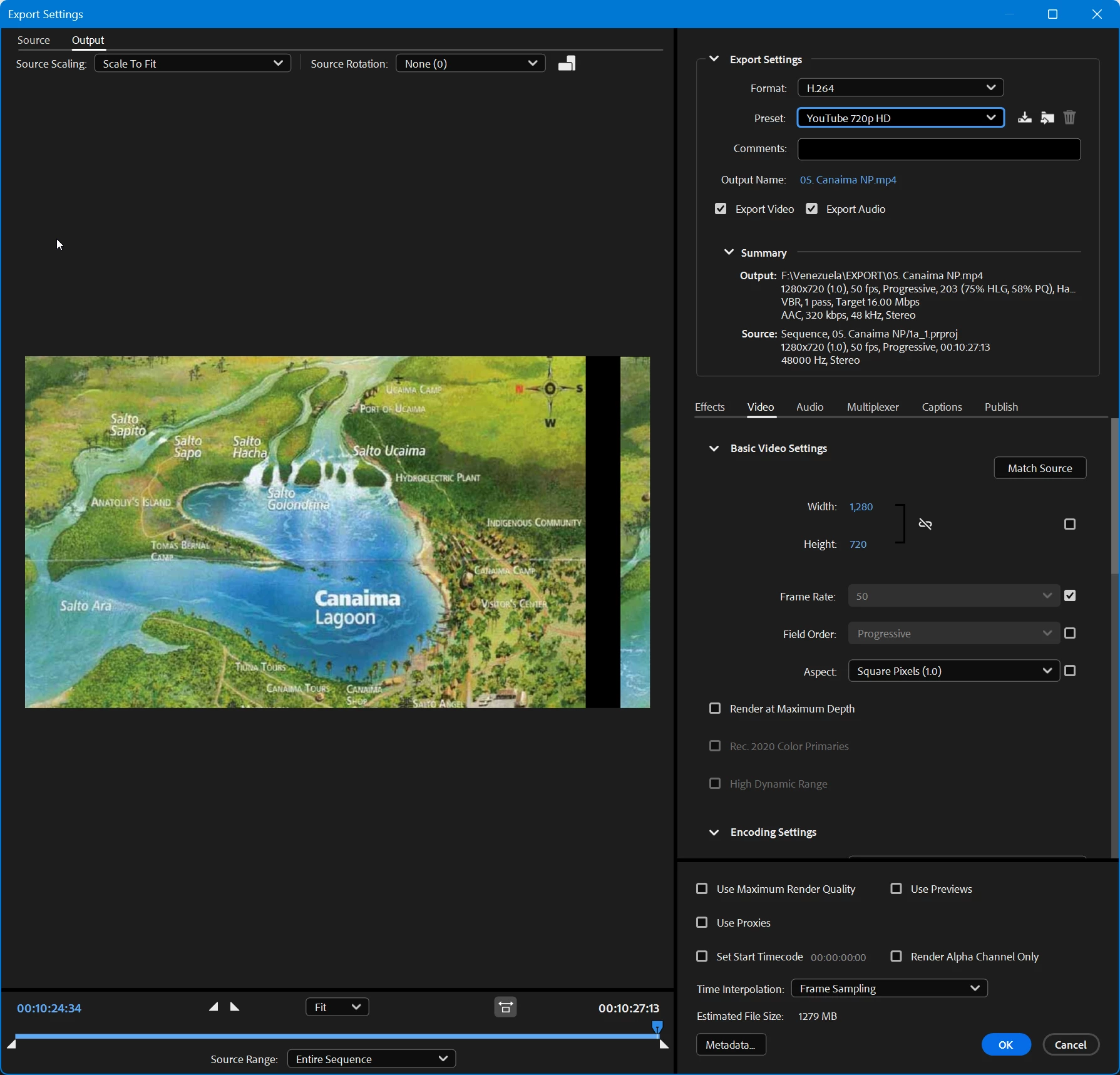
Image is pushed to the left of the frame.

In Premiere, it's in the center.

23.5.9

 

8 replies

Adobe Employee
Jul 20, 2023 5:07 PM UTC

Sorry for my latin here. I meant Adobe Digital Video and Audio products (Premiere Pro, After effects, Mediea Encoder, Caracter Animator, Audition, …).

Translate
Participant
Jul 20, 2023 5:01 PM UTC

I'm having this problems - what are DVA apps?

Translate
Adobe Employee
Jul 20, 2023 11:13 AM UTC

Please make sre that your DVA apps are all up-to-date. This is a known issue when DynamicLink versions do not match.

Translate
Participant
Jul 20, 2023 1:09 AM UTC

Has your problem been resolved? I faced the same

Translate
Ann Bens
Community Expert
Ann BensCommunity ExpertAuthor
Community Expert
Apr 21, 2023 7:27 PM UTC

Moved post to the AME beta -bugs forum.

Translate
Adobe Employee
Apr 21, 2023 3:03 PM UTC

Sorry to hear that. I'll send you a private message with instructions on how to provide the files.

Translate
Ann Bens
Community Expert
Ann BensCommunity ExpertAuthor
Community Expert
Apr 21, 2023 2:48 PM UTC

Export is also broken.

Tried different projects and formats, same result.

It also shows in Encoding preview.

23.4 was fine.

I can send you the project file.


Translate
Adobe Employee
Apr 21, 2023 2:26 PM UTC

Interesting. Ist the export okay or also broken? Would you be able to share the project/media? I can send yoou a private message in this forum.

Translate