 Adobe Community

- Home
- Adobe Media Encoder
- Discussions
- Media Encoder giving me half resolutions
- Media Encoder giving me half resolutions

Copy link to clipboard
Copied
Hi guys,
Got a question about the After Effects - Media Encoder workflow. Whenever I send a comp from After Effects to Media Encoder I always have to double check the downsample setting. Is there a way to get Media Encoder to render comps on full resolution by default?
Thanks for any help.
Cheers,
Marten


 1 Correct answer

there is a bug in the current version. information about it here: Known issues in After Effects CC 2017
Yes, that is exactly what I doing. I send my composition from AE to AME with Ctrl+Alt+M shortcut.
it's not Exactly what I suggested. which is this:
you can use the handy "Queue in AME" and avoid this problem:
After Effects CC 2015.3 In-Depth: Queue in Adobe Media Encoder | Creative Cloud blog by Adobe
to use Queue in AME send your composition to the render queue and use the glorious button called
...
 11
Replies
11
11
Replies
11


Copy link to clipboard
Copied
Hi MartenK112,
Change the AfterEffects composition panel resolution to full & then export to Media Encoder.

Please let us know the status.
Thanks,
Vidya Sagar.

Copy link to clipboard
Copied
I have the same problem along with presets from previous versions that crash AME, and just random crashes all over the place. AME 2017 is one big mess and almost unworkable in a professional environment. I'm back to rendering in AE, wish is just ridiculous. AME needs an update fast!
Cheers,
Auke
Copy link to clipboard
Copied
Hi Vidya,
Thats what bothers me. If I render a comp in After Effects it doenst matter what downsampling is used, it always gets the full resolution for rendering (because of the templates). But it doenst use these templates in Media encoder.
So I often end up with half res renders because I forgot to turn downsampling to full.
I think the templates should also be used when sending comps to media encoder.
Regards,
Marten

Copy link to clipboard
Copied
I have the same problem. It was everything OK in previous version, but now I must to remeber to turn "Full resolution" in composition panel, it is very annoying. 😞 I want to render my composition in full resolution by default! Please.
Copy link to clipboard
Copied
you can use the handy "Queue in AME" and avoid this problem:
After Effects CC 2015.3 In-Depth: Queue in Adobe Media Encoder | Creative Cloud blog by Adobe
Copy link to clipboard
Copied
Yes, that is exactly what I doing. I send my composition from AE to AME with Ctrl+Alt+M shortcut. And AE sends to AME information about preview render settings:
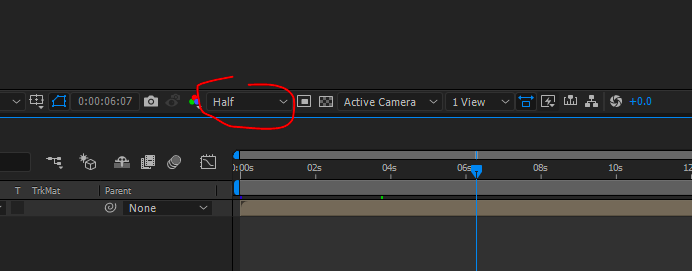
I don't want it. In previous versions of AE composition was sent in full resolution by default. How I can bring it back? Thanks!
Copy link to clipboard
Copied
there is a bug in the current version. information about it here: Known issues in After Effects CC 2017
Yes, that is exactly what I doing. I send my composition from AE to AME with Ctrl+Alt+M shortcut.
it's not Exactly what I suggested. which is this:
you can use the handy "Queue in AME" and avoid this problem:
After Effects CC 2015.3 In-Depth: Queue in Adobe Media Encoder | Creative Cloud blog by Adobe
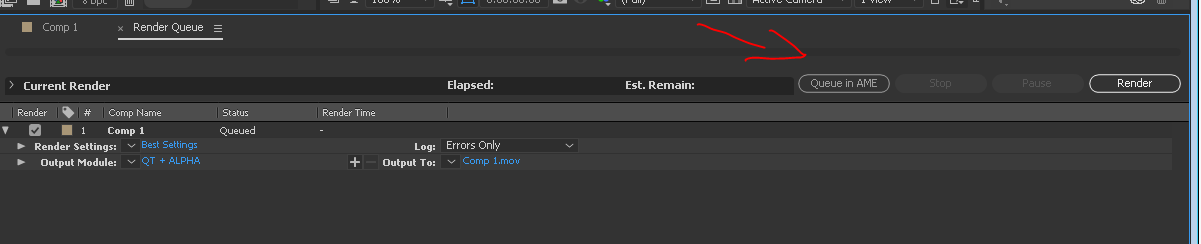
to use Queue in AME send your composition to the render queue and use the glorious button called "Queue in AME"
Copy link to clipboard
Copied
Oh, sorry. I can see now.  But, anyway, this solution require more actions from me to render compositions than usual. Hope Adobe will fix it. Thank you!
Copy link to clipboard
Copied
I agree this should be fixes ASAP. but know that there are advantages to using Queue in AME that are well worth an extra step that takes a second. a shortcut for Queue in AME is definitely in order.

Copy link to clipboard
Copied
There should be an option in Media encoder that forces it to render it in full resolution, I have had instances where I noticed this too late and the animation was already running on digital signage screen in low resolution...

Copy link to clipboard
Copied
Can someone please make an update that fixes this.... So many of my renders have come out half rez or quarter rez and it's really annoying

 AdChoices