

Participant
January 27, 2021
해결됨

어도비XD 재플린 내보내기 오류

  • January 27, 2021
  • 2 답변들
  • 8095 조회

어도비 XD 버전 정보

36.1.3.25


제플린 버전 정보

Version 3.14 (1104)


아트보드 내보내기 누르면 제플린이 아무반응 없고, 내보내기가 안됩니다.

 

    이 주제는 답변이 닫혔습니다.
    최고의 답변: ahdan0D45

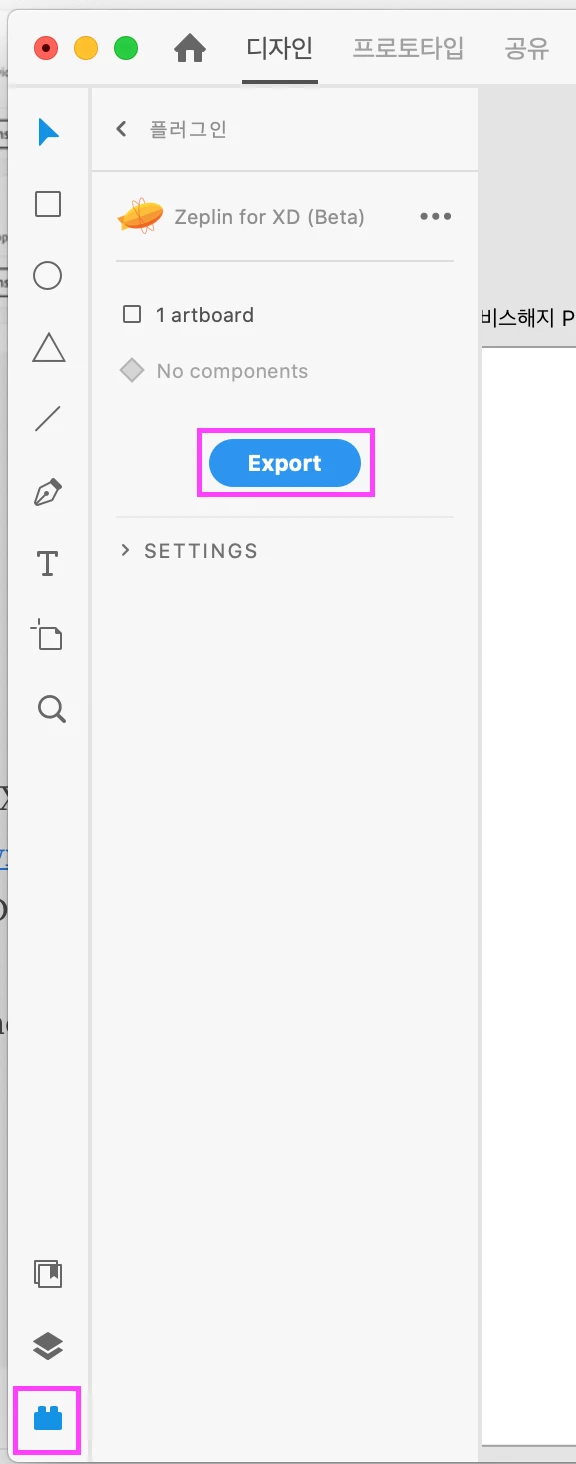
    같은 증상으로 재부팅, 재설치를 하다가 우연히 알게된 방법 공유드립니다.


    1.상단메뉴 plugin에서 zeplin을 검색해서 설치

    2,좌측 하단 블럭버튼 > zeplin > Export
     

    2 답변

    Participant
    April 12, 2021

    저도 같은 증상인데 제플린 내보내기가 안됩니다.

    이전 버전에 35버전이 나타나질 않아서 버전을 다운시키는것도 안되는데

    어떻게 해결해야 할지 모르겠네요

    Rishabh_Tiwari
    Legend
    January 27, 2021

    Hi there,


    Sorry to hear about the trouble. Please try the steps shared below:


    1. Uninstall Zeplin and remove it from the trash as well.
    2. Downgrade Adobe XD to version 35 from the Creative Cloud Desktop app.
    3. Restart Machine.
    4. Download Zeplin and re-install.
    5. Open Adobe XD.
    6. Create a new file and export it to Zeplin.
    7. XD will ask for permissions to open Zeplin(Click on Allow/Okay)
    8. You can now upgrade Adobe XD again to version 36 and the export process should work.


    Let us know if this helps or if you need any further assistance.


    Regards

    Rishabh

    Participating Frequently
    January 28, 2021

    Im having a same problem.


    I can't find downgrade XD option on creative cloud. Under 3 dots icon, there is no option for Other versions.


    please help.


    Participant
    September 30, 2022

    같은 증상으로 재부팅, 재설치를 하다가 우연히 알게된 방법 공유드립니다.


    1.상단메뉴 plugin에서 zeplin을 검색해서 설치

    2,좌측 하단 블럭버튼 > zeplin > Export


    이것때문에 매번 내보내기할때마다 윈도우 컴퓨터 켜서 적용했는데.. 은인이십니다.. 감사합니다~~