
Participant
May 30, 2021
해결됨

Adobe XD is using more than 100GB of my local computer storage

  • May 30, 2021
  • 1 답변
  • 1349 조회

Hello all,

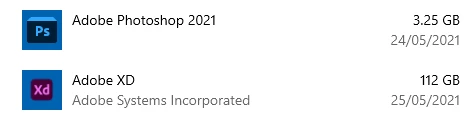
I am facing a problem with my hard drive storage. Short investigation shows that Adobe XD program is using more than 100GB locally. I can not find the stored files on my computer.
All of my working files are store on Adobe cloud. As far as I can see the stored files looks a bit low than expected only 3.9 GB.
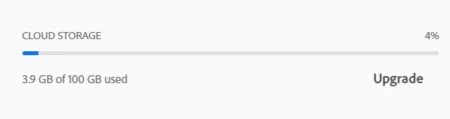
Windows says that Adobe XD is using: 

But when I look in the adobe cloud folder - no files are found:


The questions are:
1. Why is happening?
2. How to free up my local computer store and to force Adobe XD to store everything in the cloud

Thank you in advance

이 주제는 답변이 닫혔습니다.
최고의 답변: Ares Hovhannesyan

Use the Creative Cloud Cleaner Tool to solve installation issues and remove adobe xd files from your system. Reinstall and install again xd

https://helpx.adobe.com/creative-cloud/kb/cc-cleaner-tool-installation-problems.html

1 답변

Ares Hovhannesyan
Community Expert
Community Expert
May 30, 2021

Use the Creative Cloud Cleaner Tool to solve installation issues and remove adobe xd files from your system. Reinstall and install again xd

https://helpx.adobe.com/creative-cloud/kb/cc-cleaner-tool-installation-problems.html

Participant
May 30, 2021

Thank you Ares.
I have tried with cc cleaner tool by deleting the adobe creative cloud app and all related apps. But this reduced to only 20GB. So I installed everything again. And uninstall only Adobe XD from the adobe creative cloud app. So basically I did 2 times uninstall on adobe XD. And finally, I managed to free up my space with 120GB.
The last step was to install again Adobe XD from the cc app.  

Ares Hovhannesyan
Community Expert
Community Expert
May 31, 2021

That is good result. Also you can use Windows Disk Clean Up and Defragmenatation  for deleting temp files and optimizing from your system.