


- Home
- Adobe XD
- Discussions
- Re: Adobe XD - Unable to create new project
- Re: Adobe XD - Unable to create new project

Copy link to clipboard
Copied
Hi! I just downloaded the latest adobe XD 10.0.42.14. Seems to work great until I want to create a new project.
Nothing happens when I click on the 4 presets (iPhone/iPad/Web/Custom Size). The "Begin Tutorial" button is the only thing that works.
I'm using macOS version 10.14 with a Adobe for Enterprise license.


 1 Correct answer


Hi, everyone-
Can you please also share your version of Creative Cloud Sync? You can find this information:
- Launch the Creative Cloud desktop application
- Click the ... button in the upper right hand corner
- Select "Preferences"
- Navigate to the "Creative Cloud" tab
- Select the "Files" tab
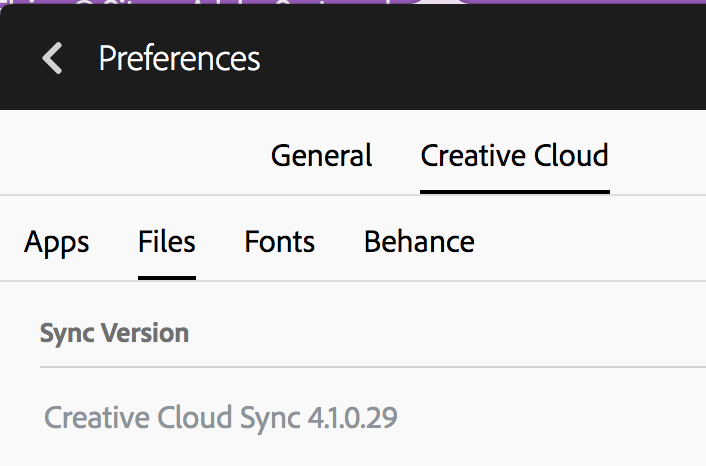
Thanks,
-Elaine

 53
Replies
53
53
Replies
53

Copy link to clipboard
Copied
Yeah, actually I do. 

Is there some way to force an update? Other than reinstalling creative cloud?
Copy link to clipboard
Copied
Let me take this to personal message with you - I'm going to want to grab some additional logs to file that issue, as it should have updated.
Copy link to clipboard
Copied
Hey guys, after alot of trial and error Elainecc found a solution that worked for me.
Depending on your OS this path may differ but you essentially wanna try this to force an update.
1. Rename /Applications/Utilities/Adobe Sync to a different name
2. Then reboot.
3. Once Creative Cloud desktop relaunches, it should reinstall Creative Cloud Sync
This worked with me and I'm very happy to start working with the latest Adobe XD. 

Copy link to clipboard
Copied


Copy link to clipboard
Copied
Renaming the folder didn't work for me I had to delete that folder and then run the CC App installer. This fixed it for me.
Regards, Geoff
To solve this bug I had to take the following steps
- Delete this folder: /Applications/Utilities/Adobe Sync
- Download and install Adobe CC App
- It recreates the Sync folder and forces the CC App to update the Sync Version
Copy link to clipboard
Copied
Hey geoffdm-sim and eranshefi, can you please send me logs from the Log Collector tool? I'm trying to track down the source of why your system didn't update so that you (and others) won't get caught up again in something like this.
How to use the Creative Cloud Log Collector tool
I'd love it if you could get these logs, upload it to a file share like Dropbox or Google Drive, and shoot the link to me via private message - you can do that by hovering over my name in this post and clicking "message."
Thanks,
-Elaine

Copy link to clipboard
Copied
This WORKED FOR ME!!!! Thank you!

Copy link to clipboard
Copied
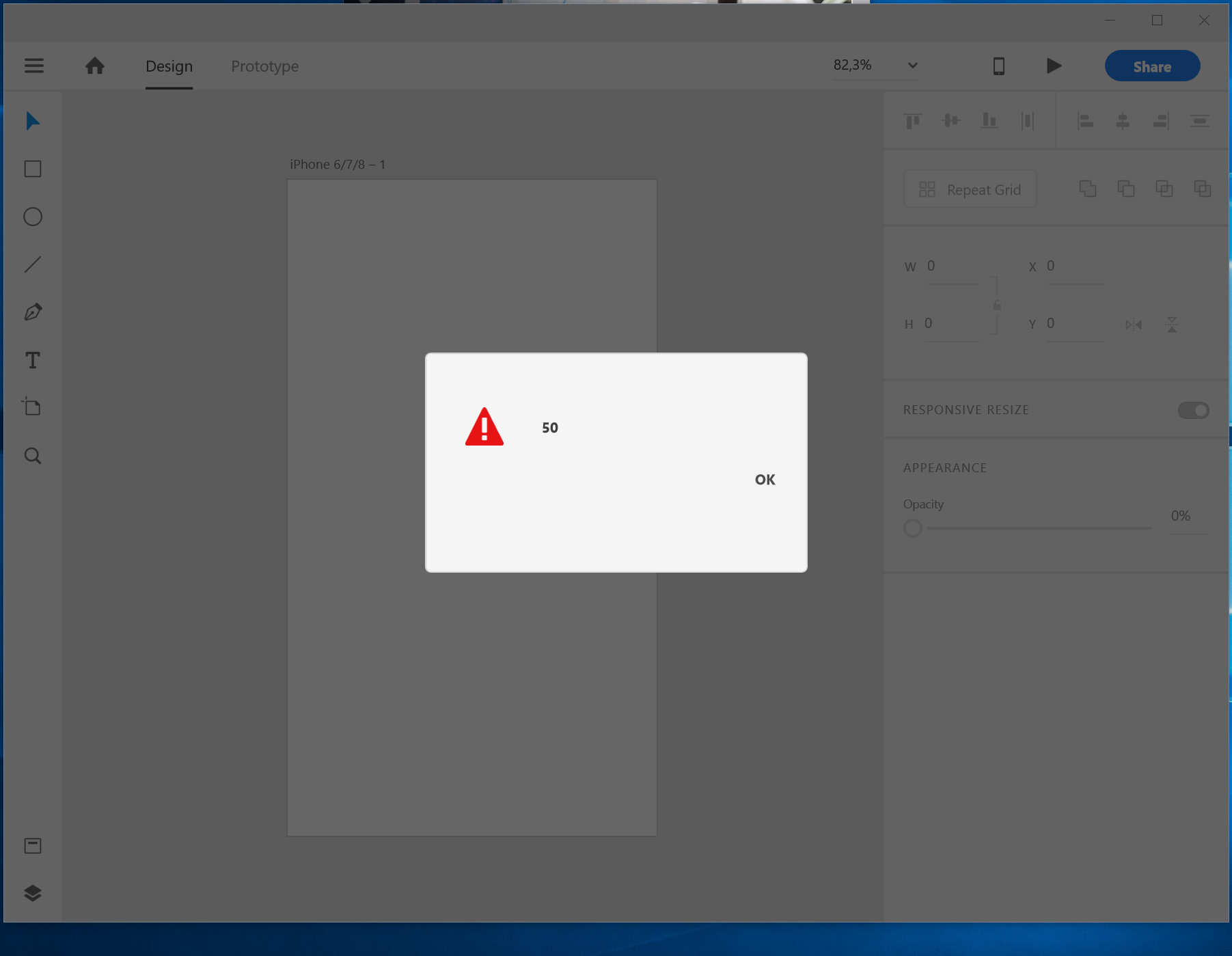
nothing is working for me with this new update. I'm on windows and get this error every time I try to create a new document.

Copy link to clipboard
Copied
I'm having the exact same issue

Copy link to clipboard
Copied
I'm just having the same trouble. I tried everything you mentioned and it still not working.

Copy link to clipboard
Copied
Faced the same issue. I uninstall & re-install creative cloud. Now everything's work normally for me

Copy link to clipboard
Copied
What about this?

Copy link to clipboard
Copied
No! I don’t get an error messag (error:50) I’m just unable to open any of the templates. I can only view the tutorial but I’m unable to start a new template.
Copy link to clipboard
Copied
Hi, folks-
To all of you who have responded, thank you SO MUCH for sending me logs! For anyone else who is experiencing this problem, it would be really helpful if you could send me your logs before attempting the workaround of deleting the sync folder. Getting logs is incredibly important for us to identify the root cause of the issue.
Thanks,
-Elaine

Copy link to clipboard
Copied
Same issue with XD (along with other non-responsive behaviour in other apps which may or may not be related)
CC 4.7.0.400
XD 14.0.42.14
Sync 3.0.3.6
No error message.
Copy link to clipboard
Copied
I received your logs - thanks for sending it! I also private messaged you for a couple more details.

Copy link to clipboard
Copied
As Elaine noted above, it is incredibly important for us to identify the root cause of the issue and for that, I need to request your system log files.
Can you please send me logs from the Log Collector tool? We are working to track down the source of why your system didn't auto-update CoreSync to 4.1.0.29 (it appears that you are currently on a much older version: 3.0.36). It would be helpful if you could gather and share your logs.
How to use the Creative Cloud Log Collector tool
If you could upload the resulting zip file to a share site (ie Dropbox or Google Drive) and send me a link via private message - you can do that by hovering over my name in this post and clicking "message." - then we can investigate further.
Thanks,
- Kim
Copy link to clipboard
Copied
I am on a corporate network and don’t have permission to install anything — other than approved software.
Can I recommend that in a future upgrade you include the ability to generate log files from within the software, or as part of Creative Cloud. I would then be more than willing/ keen to help.
Regards, Geoff
Copy link to clipboard
Copied
Thanks for your feedback, and great suggestion!

Copy link to clipboard
Copied
Hello, i have this problem too (error 50 appears in white window). My CC version is 4.7.0.400 and CC Sync is 4.1.1.32
Copy link to clipboard
Copied
Thanks for the information! Can you check to see if a process called "Core Sync" is running? And does a reboot fix the issue?
Copy link to clipboard
Copied
I even have installed your LogCollector, but i dont know how i can send you this file

Copy link to clipboard
Copied
I am having the same problems.
I've returned to Axure RP.
Adobe's Elephant in the room is "TESTING".
A testing lab with many types of Operating Systems and hardware could have prevented this.
Copy link to clipboard
Copied
Ran out of patience – solved by removing all CC apps and starting from scratch. Took a bit of time and I'll have to do some re-instating but it was causing too many headaches.
Copy link to clipboard
Copied
Same issue. Do we actually pay subscription fees to be used as QA? Pitiful.


Get ready! An upgraded Adobe Community experience is coming in January.
Learn more
 AdChoices