
Inspiring
January 3, 2017
Answered

Color picker picks up the light color in Adobe XD.

  • January 3, 2017
  • 23 replies
  • 49197 views

iOS:バージョン10.15.1

AdobeXD:バージョン 24.1.22


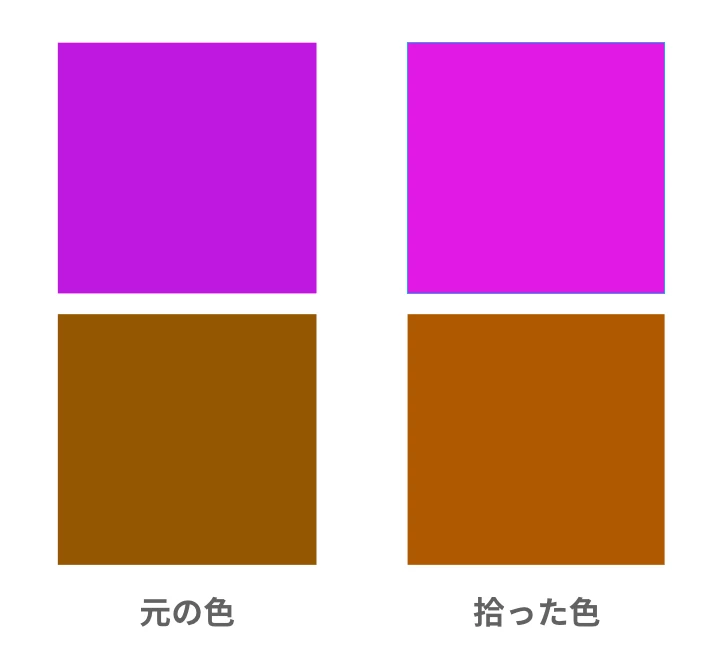
スポイトで色を拾うと少し薄い色を拾っています。

Photoshopのように細かい設定がないので、この場合はどうすればよいのでしょうか。

これから、アンインストールしてからインストールを試してみます。


Translate by mod.
When I pick up the color with a dropper, I pick up a little lighter color. Since there is no detailed setting like Photoshop, what should I do in this case?
Now try uninstalling and then installing XD app.


<The title was renamed by moderator>


Moderator notes
This post was written in Japanese. However, although many answers are received, there are no answers in Japanese.
This thread may be more useful globally than Japanese. and moved it from the Japanese community to the global community.
 

This topic has been closed for replies.
Correct answer yzrh_mine

【解決済み】


返事が早くてとても助かります。


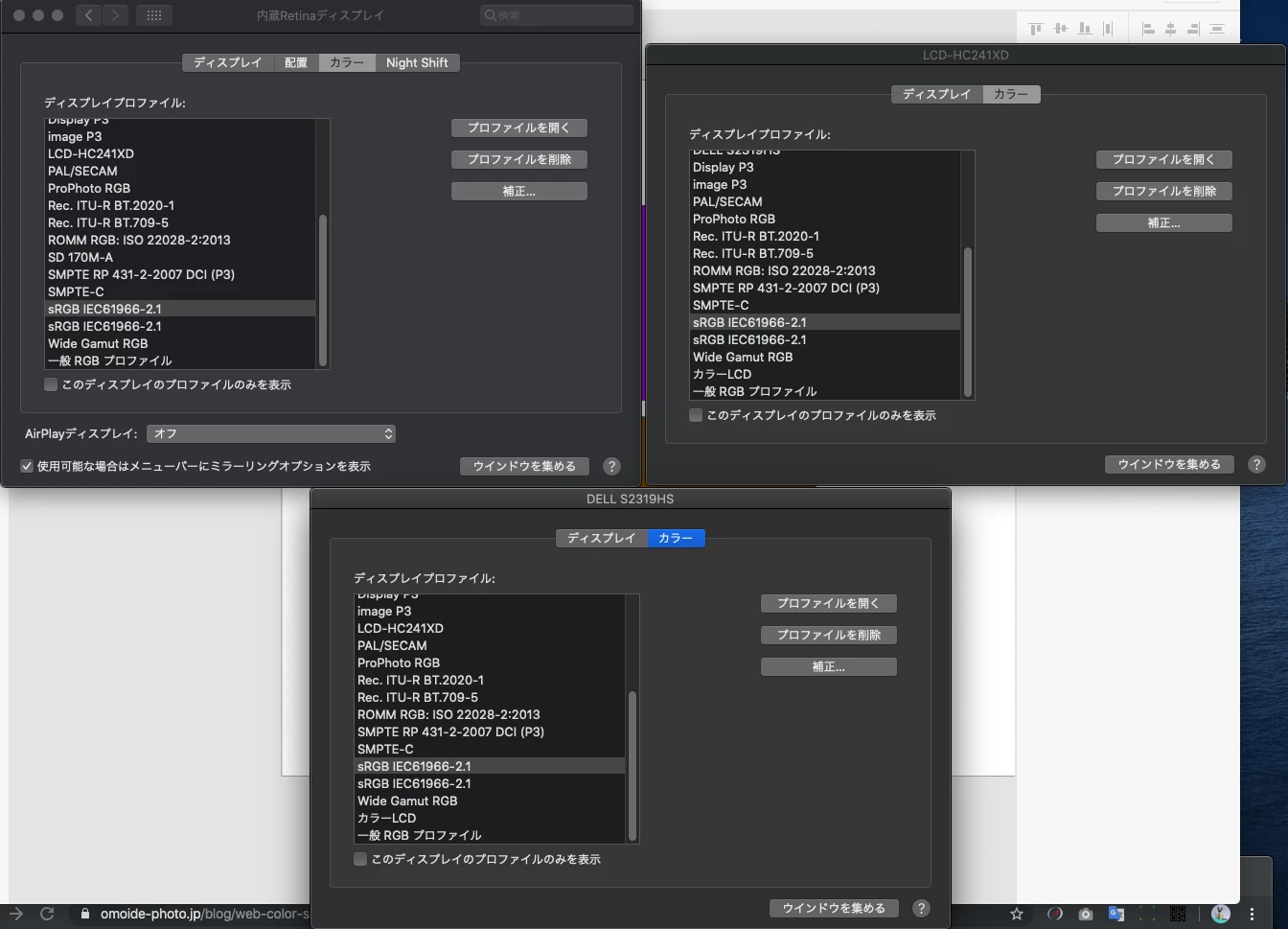
アップルの「設定」→「ディスプレイ設定」→「各モニターのカラーをsRGB」

に変更することで解決しました。

スポイトの色がモニターに起因することを初めて知りました。


ただ、今までこのバグが起きていなかったので、

アップデートで改善されることを待っています。

ありがとう。


ありがとうございました。

23 replies

Participant
May 20, 2020

At last, it works!!!
Thanks a lot, @Harshika Verma for solving this problem
I talked to 2 of your agents on phone and also on chat but they were unable to find out the solution
Thanks again for solving this issue.

Participant
April 10, 2020

Has there been any fix for this yet that isn't changing your display settings? Shouldn't the program just work by default, like other Adobe programs?


This thread is marked solved, but doesn't seem to actually be solved. 

Participant
January 21, 2020

(First, it's really difficult to notify XD of a bug.)

The bug: When using the eye dropper to sample a color, it picks a color that is close but not exact. Not sure under what circumstances this happens, as it happens often but not all the time.


Steps to reproduce:

  1. Create a background layer with fill color #EAEAEA.
  2. Create a shape
  3. Give the shape fill color #ffffff.
  4. Use the eyedropper to sample the fill color from the background layer.
  5. Check the hex codes for the fills on both layers. They do not match.


I would have uploaded a video of this, but I can't do so without uploading it somewhere and sharing a link, which I don't have time to do right now.

HARSHIKA_VERMA
Community Manager
Community Manager
January 21, 2020

Hi Amy,


Sorry for the trounle using color picker in XD. It looks like you're experiencing the similar problem mentioned here:https://community.adobe.com/t5/adobe-xd/panel-color-picker-picks-up-the-light-color-in-adobe-xd/td-p/10729788 If so, please try the workaround solution mentioned in the post.


Let us know if that helps.


Thanks,

Harshika

Participant
January 9, 2020

I've recently noticed that when using the eyedropper tool to copy the color from another element, that the hex value it's returning is slightly off. While it appears the same on the screen, the details of the number itself are different. I don't remember it functioning like this in the past and its become very disruptive by causing inconsistencies. Obviously there are workarounds to this, but what is the issue here?


I've attached a screen recording for reference. 

Ares Hovhannesyan
Community Expert
Community Expert
January 9, 2020

In this converstion https://community.adobe.com/t5/illustrator/eyedropper-picking-wrong-color/td-p/9035291 you can find information anout that issue. Thx

Participant
January 9, 2020

I can't find a color settings menu option in XD. And even when my display color settings are matched to that same RGB profile from Illustrator (as shown in the link) the color matching is still not working. It works fine whilst using Illustrator, but it's off in XD.

Participant
January 8, 2020

I recently started working with XD on a new iMac Retina (2019), previously on an iMac (end of 2012). With the new computer, however, the color rendering is extremely shifted - red tones in particular are displayed far too saturated. If I open the layout in browser preview, the colors are correct. 


How can I fix the problem?

It bothers me enormously because I can no longer create with reliable colors in Xd.

Ares Hovhannesyan
Community Expert
Community Expert
January 8, 2020
Participant
January 8, 2020

Thank You.

But that's not the Problem. The Color-Picker-Problem is just the result of the wrong colors (or color-profile?!) in XD. While working in XD on my secendary screen (Iiyama Full HD) there are no problems with that, at all.


I also know the following feature-request: https://adobexd.uservoice.com/forums/353007-adobe-xd-feature-requests/suggestions/17480899-color-management-set-color-profiles

But with only about 620 upvotes it probably will long years until we get the feature... Why does it not effect more designers?! Probably more than 50% of UI/UX-designers work with Retina-Displays, aren't they!?

Participant
December 22, 2019

Hi, 


I've been having the same issue and it's a nightmare for my coloring job. I want to note that Im not working on an Apple device but with an HP laptop and a PC. I can't change the monitor display as well as I need it custom calibrated. It happens on both the Animate 2019 and 2020 versions. 

Any news on the fix for this major issue?

Participant
December 17, 2019

カラーピッカーで色を抽出すると、正確なカラーコードではない色が出力されます。

この問題の解決方法はありますか?


Extracting colors with the color picker will output colors that are not accurate color codes.

Is there a solution to this problem?

HARSHIKA_VERMA
Community Manager
Community Manager
December 17, 2019

Hi Erik,


We understand it could be annoying for you. We have a similar discussion going on here: https://community.adobe.com/t5/adobe-xd/color-picker-picks-up-the-light-color-in-adobe-xd-in-macos-10-15/td-p/10729788 we would request you to please join the discussion and try the suggestion mentioned in the post.


Let us know if that helps. 


I am also merging this post with the same post.


Thanks.

Harshika

Kalitsl
Participating Frequently
December 16, 2019

Hello,


I've something to explain about the eyedropper color bug.

This message is very important because I think the dev team can isolate the problem easier.

In adobe Xd on Mac, yes the eyedropper works wrong with lighter colors.

BUT, in illustrator, when you pick a color of on object wich is in a symbol, the color will be wrong, way lighter. If it's an object that is not linked to a symbol, the color is perfect. 

When you pick a color with RGB = 0 0 255, 255 0 0, 0 255 0, 255 255 0, 255 0 255, 0 255 255, the eyedropper is correct. 

Another point : in illustrator, if you pick the background color, it is lighter.

And with Photoshop ? The eyedropper is correct except for the background color outside the artwork. In this case, it is darker when picked.


I have also made some tests on adobe XD. 

Start color : RGB = 100 255 255, first eyedroppper : RGB = 111 255 255, second eyedropper : RGB = 122 255 255. It seems to be linear. No matter if R or G or B starts with a 100, every eyedropper adds 11 to his value.


So when a value is at 255, it cannot be lighter. But, when a value is at 0, it is not affected by the problem.


This exposed me something. If 0 does not go up, it could try to go down. So i tryed this :

Start color : RGB = 10 255 255, first eyedropper : RGB 7 255 255, second eyedropper : RGB = 4 255 255.

Start color : RGB = 50 255 255, first eyedropper : RGB 57 255 255, second eyedropper : RGB = 65 255 255.

Start color : RGB = 40 255 255, first eyedropper : RGB 45 255 255, second eyedropper : RGB = 51 255 255.

Start color : RGB = 30 255 255, first eyedropper : RGB 32 255 255, second eyedropper : RGB = 35 255 255.

Start color : RGB = 20 255 255, first eyedropper : RGB 19 255 255, second eyedropper : RGB = 17 255 255.

Start color : RGB = 25 255 255, first eyedropper : RGB 25 255 255, second eyedropper : RGB = 25 255 255.

It means that when a value is higher than 25, it goes up, when it is lower than 25, it goes down. and the more you are far of 25, the fastest you jump to another value.


Let's focus on Red value of RGB :

start = 26

first eyedropper = 27

= 28

= 29

= 31

= 33

= 36

= 40

= 45

= 51

= 58

= 66

= 75

= 85

= 95

= 106

= 117

= 128

= 139

= 150

= 160

= 170

= 179

= 188

= 196

= 203

= 210

= 216

= 221

= 226

= 230

= 234

= 237

= 240

= 242

= 244

= 246

= 248

= 249

= 250

= 251

= 252

= 253

= 254

= 255.


second text from 24 :

24 seems to be stable as 25. 23 too.


Third test from 22 :

start = 22

first = 21

= 20

= 19

= 17

= 14

= 10

= 7

= 4

= 2

= 0


So this is no longer a linear transformation. In fact the changing value is accelerating then decelerating. no matter if it is going lower or upper. (See the linked file).


So, on adobe XD, near 24, 0 et 255 it is stable. but in the middle of these, the value is changing a lot faster.


As a conclusion, I've tried it on illustrator when I pick a color in a symbol. And it is not the same at all. No mathematical function can be linked to the values. It is not random but poorly comprehensible. I have to conclude that on adobe XD on a mac, there is a real developping problem. But for illustrator, it might be display color configuration.

Sjaani
Community Expert
Community Expert
December 16, 2019

Wow great description, thanks for putting in so much detail.

Have you by any chance seen the other thread on this topic?
Does the solution used there help with your colour picker issues at all?

Kalitsl
Participating Frequently
December 17, 2019

Yes i have also posted this on the post you linked. And... No it doesn't work for me. The fact is adobe XD does not have preferences and I do not think it is due to display colors.

I havve forgotten to tell something... Even if I download an older version, the eyedropper is not working. I think Addobe XD might use some native eyedropper fonctions and Apple might changed it in the last versions. But Adobe XD does not only use the native functions. Because when I use the native color tool of Mac OS, it works fine. Maybe it is the way it is implemented.

briton b90162280
Participant
December 3, 2019

The eyedropper tool in xd is picking the wrong color. In the attached gif, I show that it's not functioning correctly. This is kinda a nightmare and even though I just updated to version 24.4.22.1 after I noticed the but and it still isn't working correctly.

Shwetha Diwanji
Community Manager
Community Manager
December 4, 2019

Hi Briton,


Thank you for reaching out and sharing your feedback. The team is aware of the issue and is working on it to fix it. You may see the improvements in the future releases of  XD.


Sorry for the inconvenience.

Kalitsl
Participating Frequently
December 16, 2019

Hello,


I've something more to bring for the help.

This message is very important because I think the dev team can isolate the problem easier.

In adobe Xd on Mac, yes the eyedropper works wrong with lighter colors.

BUT, in illustrator, when you pick a color of on object wich is in a symbol, the color will be wrong, way lighter. If it's an object that is not linked to a symbol, the color is perfect. 

When you pick a color with RGB = 0 0 255, 255 0 0, 0 255 0, 255 255 0, 255 0 255, 0 255 255, the eyedropper is correct. 

Another point : in illustrator, if you pick the background color, it is lighter.

And with Photoshop ? The eyedropper is correct except for the background color outside the artwork. In this case, it is darker when picked.


I have also made some tests on adobe XD. 

Start color : RGB = 100 255 255, first eyedroppper : RGB = 111 255 255, second eyedropper : RGB = 122 255 255. It seems to be linear. No matter if R or G or B starts with a 100, every eyedropper adds 11 to his value.


So when a value is at 255, it cannot be lighter. But, when a value is at 0, it is not affected by the problem.


This exposed me something. If 0 does not go up, it could try to go down. So i tryed this :

Start color : RGB = 10 255 255, first eyedropper : RGB 7 255 255, second eyedropper : RGB = 4 255 255.

Start color : RGB = 50 255 255, first eyedropper : RGB 57 255 255, second eyedropper : RGB = 65 255 255.

Start color : RGB = 40 255 255, first eyedropper : RGB 45 255 255, second eyedropper : RGB = 51 255 255.

Start color : RGB = 30 255 255, first eyedropper : RGB 32 255 255, second eyedropper : RGB = 35 255 255.

Start color : RGB = 20 255 255, first eyedropper : RGB 19 255 255, second eyedropper : RGB = 17 255 255.

Start color : RGB = 25 255 255, first eyedropper : RGB 25 255 255, second eyedropper : RGB = 25 255 255.

It means that when a value is higher than 25, it goes up, when it is lower than 25, it goes down. and the more you are far of 25, the fastest you jump to another value.


Let's focus on Red value of RGB :

start = 26

first eyedropper = 27

= 28

= 29

= 31

= 33

= 36

= 40

= 45

= 51

= 58

= 66

= 75

= 85

= 95

= 106

= 117

= 128

= 139

= 150

= 160

= 170

= 179

= 188

= 196

= 203

= 210

= 216

= 221

= 226

= 230

= 234

= 237

= 240

= 242

= 244

= 246

= 248

= 249

= 250

= 251

= 252

= 253

= 254

= 255.


second text from 24 :

24 seems to be stable as 25. 23 too.


Third test from 22 :

start = 22

first = 21

= 20

= 19

= 17

= 14

= 10

= 7

= 4

= 2

= 0


So this is no longer a linear transformation. In fact the changing value is accelerating then decelerating. no matter if it is going lower or upper. (See the linked file).


So, on adobe XD, near 24, 0 et 255 it is stable. but in the middle of these, the value is changing a lot faster.


As a conclusion, I've tried it on illustrator when I pick a color in a symbol. And it is not the same at all. No mathematical function can be linked to the values. It is not random but poorly comprehensible. I have to conclude that on adobe XD on a mac, there is a real developping problem. But for illustrator, it might be display color configuration.

HARSHIKA_VERMA
Community Manager
Community Manager
November 11, 2019

Hi there,


We are sorry to hear you are facing trouble picking up color with the color picker which in turns picks up the light color. We would request you to please try launching your window from your native display. If that doesn’t work, you may try switching your monitor in your Display settings to sRGB.


Let us know if that helps.


Thanks,

Harshika

yzrh_mineAuthorCorrect answer
Inspiring
November 12, 2019

【解決済み】


返事が早くてとても助かります。


アップルの「設定」→「ディスプレイ設定」→「各モニターのカラーをsRGB」

に変更することで解決しました。

スポイトの色がモニターに起因することを初めて知りました。


ただ、今までこのバグが起きていなかったので、

アップデートで改善されることを待っています。

ありがとう。


ありがとうございました。

HARSHIKA_VERMA
Community Manager
Community Manager
November 13, 2019

We are glad to hear you're able to fix the problem with the workaround solution and thank you for sharing the screenshots. We will update you as soon as we hear from the team about the update on the issue.


Please feel free to reach out to us in the future for any query related to Adobe XD. We would be happy to help.


Thanks,

Harshika