


- Home
- Adobe XD
- Discussions
- Re: Exception "50" when creating a new document
- Re: Exception "50" when creating a new document
Exception "50" when creating a new document

Copy link to clipboard
Copied
Clean install on Mac, no cloud docs, new CC customer. Cannot create new Xd directly doc due to this bug.
What I tried:
Uninstall & reinstall using Creative Cloud App
Symptom:
50 error stacks new document creation
Work around:
Create new document on Windows using XD, save locally, and open on Mac.


 5
Replies
5
5
Replies
5


Copy link to clipboard
Copied
Hi Rickl,
Thanks for sharing the details and workaround, I would request you to try the steps mentioned here: - Adobe XD - Unable to create new project and update this discussion with results.
Thanks,
Atul_Saini
Copy link to clipboard
Copied
Hi Atul,
Thank you for the reference. I tried those actions without success before opening a new thread. (I thought since there were several others at the end of that thread that were still seeking a resolution, it may be best to provide concise knowledge about the error code.).
Does anyone know how to access the XD logs or run in debug? What does exception code 50 mean?
Hopeful with these facts we can provide a thoughtful path forward for others who may also face this exception.

Copy link to clipboard
Copied
Code 50 generally means that something went wrong. However, in this case, it's generally due to the fact that CC Sync is out of date. Can you check your user's CC Sync version? If it's not 4.1.0.29, it's the wrong version. Note that this is under Preferences > Creative Cloud > Files, not the version of the Creative Cloud desktop app.

Copy link to clipboard
Copied
I am having the same issue. I just recently wiped my entire iMac and had a fresh install of all my software. I have the latest Creative Cloud Desktop app version as well.
I gave it a try on my new Macbook Pro as well. Same "50" error.
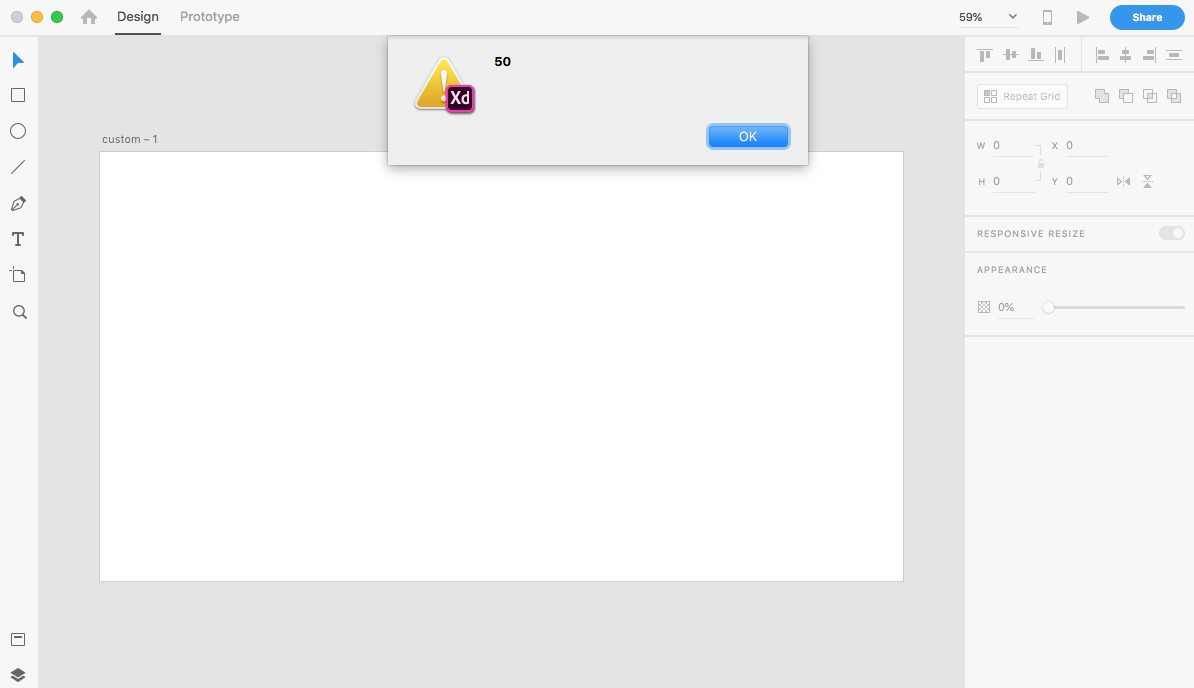

Copy link to clipboard
Copied
Thank you for the info. Can you provide the Creative Cloud Sync info that Elaine has requested for?
Open Creative Cloud Desktop app > ... > Preferences > Creative Cloud > Files. Also, can you let us know if the checkbox under Sync on/off has been enabled?


Get ready! An upgraded Adobe Community experience is coming in January.
Learn more
 AdChoices