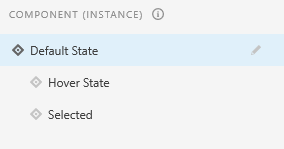
How to delete hover state?

Copy link to clipboard
Copied


 6
Replies
6
6
Replies
6


Copy link to clipboard
Copied
Hello,
You can't delete the state from instances. You can do that only from main component.
To inactive the component instances , you can do "Ungroup Component" but all the states will get delete ,only the choosen one will remain. Like if selected one is Hover state instance and you di "Ungroup component", then only Hover state instance will appear on canvas as object.
I hope it would be helful.
Regards,
Anita Subedi
Copy link to clipboard
Copied
I tried to ungroup - but all the instances are still showing.
The picture I uploaded above is after I ungrouped
Copy link to clipboard
Copied
Hello,
The picture you shared shows overrided instances with states, it is not Ungrouped.
If you want all the instances used in file to be inactive/non-component , then select the main component in Assets panel and delete it.
Regards,
Anita Subedi

Copy link to clipboard
Copied
hi
sorry for late answer
1-right click on item you want remove hover state from it
2- edit main componant
it will change hover states icon and will allaw you to remove it easy .

Copy link to clipboard
Copied
I don't want all my instances to have states removed though.


Copy link to clipboard
Copied
@Laura37191504gq47 Unfortunately, you cannot directly hide a state within a component in Adobe XD. But, you can either hide the hover action in the layers or change the opacity.


Get ready! An upgraded Adobe Community experience is coming in January.
Learn more
 AdChoices