


Copy link to clipboard
Copied
Hi,
I apologize if this has been covered, I haven't found an answer.
When I link one artboard to another in prototype mode, the second linked artboard opens at the top of the page. Alternatively, if I link an object (not the page) from the first artboard to a second artboard (the page), the second linked artboard opens up in the middle of the page. Is there currently a way to make an object link to a new page and open at the top? Maintain scroll position doesn't work because the object is lower on a long page in the first artboard.
Anchor links would solve this but I'm confused as to why artboard to artboard opens at top of page but object to artboard opens in the middle of a page. a
Thanks.
XD 5.0.12.8
MacBook Pro
High Sierra 10.13.3


 1 Correct answer


When I link an object to another artboard (with Preserve Scroll Position unchecked), it goes to the top of that artboard. You're saying that for you it goes to the middle? I have not seen that behavior before.

 6
Replies
6
6
Replies
6



Copy link to clipboard
Copied
Did not quite get what you are trying to do. Can you provide screenshots that can help me get an idea about what you are trying to do, and what happens as a result?
Thanks,
Preran
Copy link to clipboard
Copied
When I link an object to another artboard (with Preserve Scroll Position unchecked), it goes to the top of that artboard. You're saying that for you it goes to the middle? I have not seen that behavior before.
— Adobe Certified Expert & Instructor at Noble Desktop | Web Developer, Designer, InDesign Scriptor

Copy link to clipboard
Copied
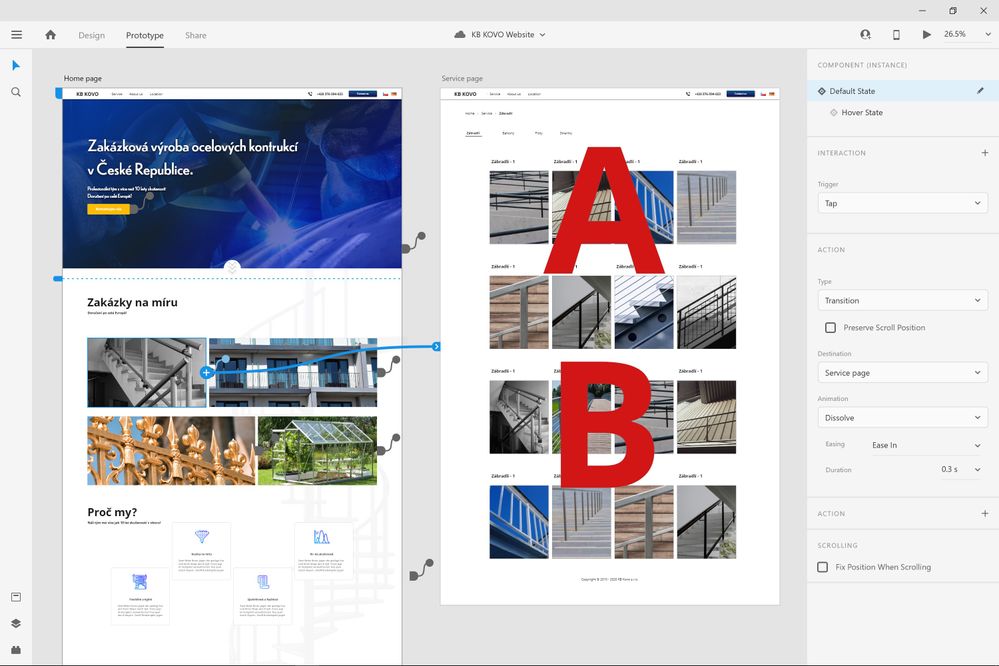
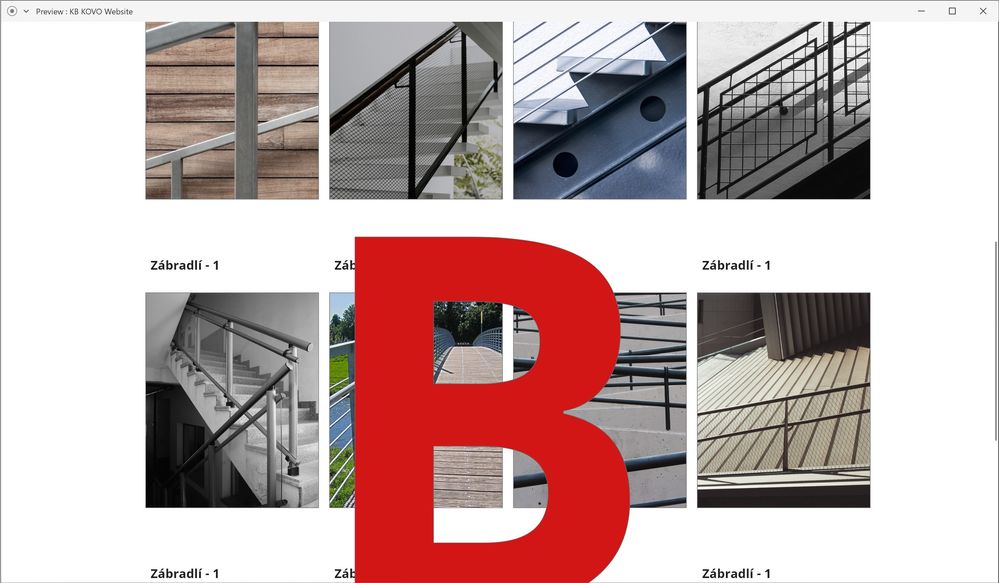
Hi I might have the same problem, without the Preserve Scroll Position choosen, it gose to the middle,
do you suggest that I set something wrong? Thank you.
In preview mode, if I click, the screen should bring me to the top of the artboard that shows "A":
But insted it bring me to somewhere arround the middle of the page:

Copy link to clipboard
Copied
Just keep Action - Type -> Transiton (and not "Animation" or other). Then the linked page will start at the Top!
Cheers

Copy link to clipboard
Copied
Idk how that answer got marked as 'Correct' but surely there has to be an explanation. I'm having this same issue on the latest version as of today (7/12/2019)

Copy link to clipboard
Copied
Hi Eric,
We're sorry to hear that you're having trouble using prototype links. The answer is marked correct by our users who find Dan Rodney answer as correct or helpful for them. We'd like to know a few more details like: -
- Could you please share the screenshot or gif file of your workflow, so that we can understand about the problem?
- Please share the OS and XD version of your machine.
Thanks,
Harshika


Get ready! An upgraded Adobe Community experience is coming in January.
Learn more
 AdChoices