
Participant
December 17, 2019
Answered

[Design]-Component states doesn't get copied from one file into another in Adobe XD on macOS.

  • December 17, 2019
  • 15 replies
  • 4262 views

I have a master design system file with a ton of components.

Most components have several states.

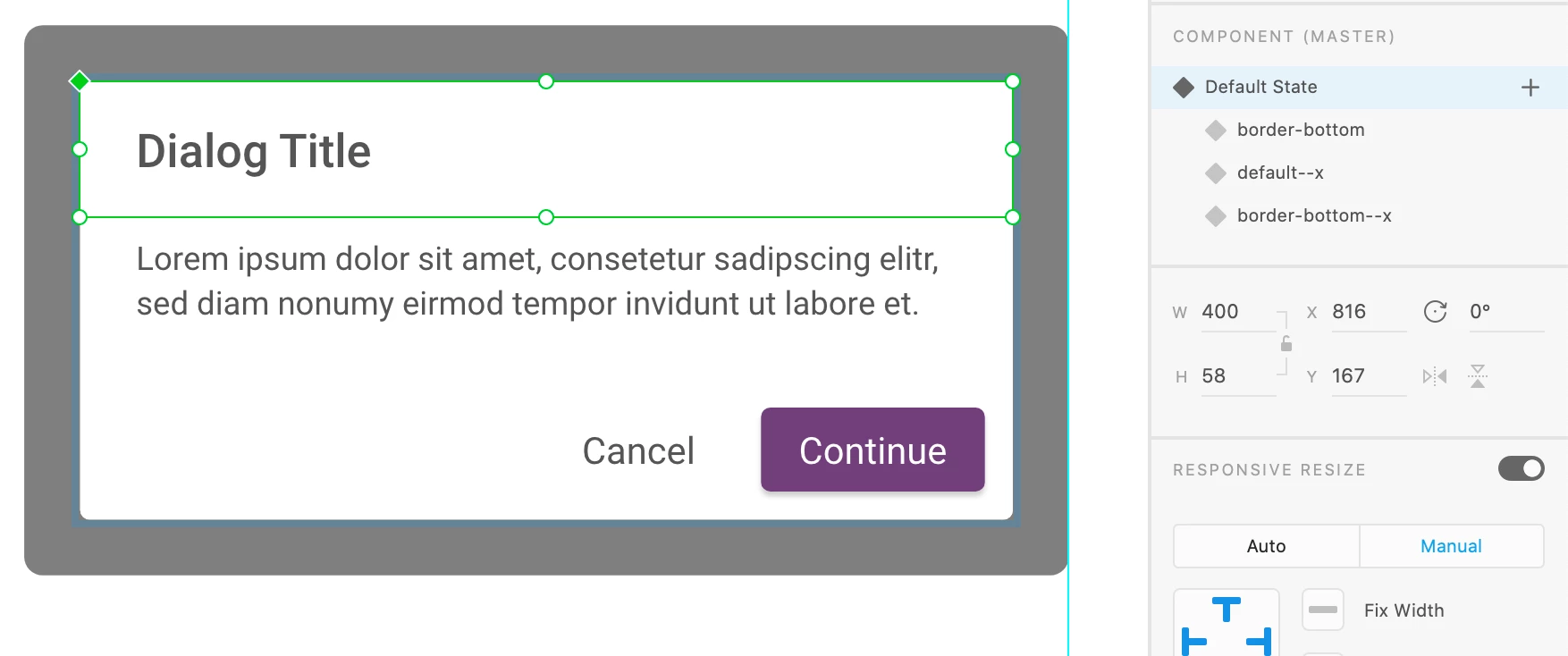
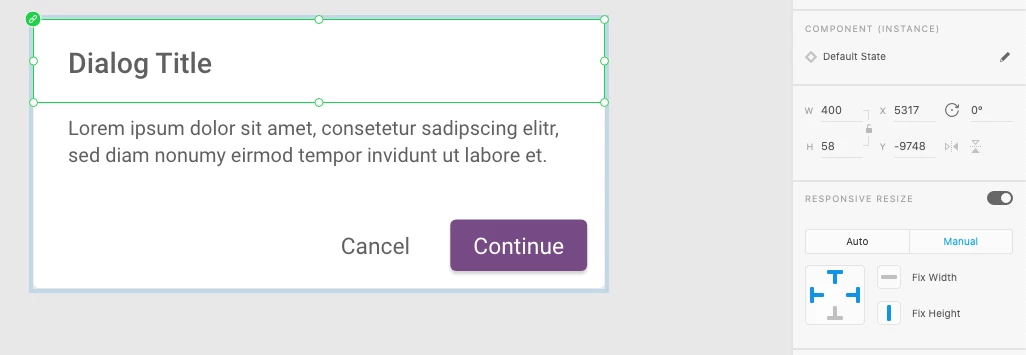
When I copy a component from the master design system file to a new file, in the new file only the "default" state is available. 


This problem occurs with some components, but not all.


Running XD 25.1.12.7 on macOS 10.15.2


Here is the component in the master file
And here is the component in the new file (only default state available)
 

<The Title was renamed by moderator>

This topic has been closed for replies.
Correct answer fnonaka

[EDITED] it worked when I did this: I saved the XD file into my local machine. Then, copied the component to a new XD file. I was copying the component with a file that was not saved in my machine... it was the history file from the Adobe cloud. And don't forget to create a local component, because when I copied, it linked the component to the other file.

[EDIT]: it's not copying the component states, if the XD file is not saved in a local machine. If it's, it copies... but anyway, the issue continues if we don't save the XD file, like a history file when we're just previewing it.

15 replies

tonygray_
Participating Frequently
September 3, 2020

This is still happening in version 32.1.22.3 on mac. It works if I create a new document and paste there but that is not a solution. I cannot move everything over to a new doc, I would lose too much. This is a serious bug!

Harshika Verma
Community Manager
Community Manager
September 7, 2020

Hi there,


I am sorry to hear you are still experiencing the issue with copying components states in XD. We have the current version of XD 32.2. Could you please update and let us know if that helps?


I will try my best to escalate the issue.


Thanks,

Harshika

martin.kiss
Participant
September 1, 2020

Since recently we noticed our components lose their states if we compy them from our master file to a mock-up. It does not happen to all components, just certain ones. I think it mostly happens, if the component is also used as a base for a more complex component.

For example, we do have a box as a component with different states and use it in combination with text in an other component to make the common forumlar checkbox.


As you can see in the video, we have the checkbox with states in the master file, but after compying it to another file, it looses its states. 


Please fix this isse!
Thank you

Harshika Verma
Community Manager
Community Manager
September 1, 2020

Hi there,


Sorry to hear you are having trouble copying the component with states in an XD file. I found similar post describing the same issue: https://community.adobe.com/t5/adobe-xd/design-component-states-doesn-t-get-copied-from-one-file-into-another-in-adobe-xd-on-macos/td-p/10806559?page=1#M33223


Please check the post and try the suggestion in the correct answer to the post.


Let us know if that helps.


Thanks,

Harshika

martin.kiss
Participant
September 2, 2020

Hi Harshika,


thank you for your quick response. I checked the solution but it did not work for me. Some components still lose their state. The only way to re-gain it, is to make a quick change in the parent component, this way the child component in the other file gains its states back (as if it remembers).


However, for our colleagues who are not as skilled in XD as our team and who just want to use the mock ups, it is quite annoying.

Participating Frequently
May 4, 2020

Hi Harshika, I have exactly the same problem when copying/pasting components with state from one file to another: When I copy a component from the master design system file to a new file, in the new file only the "default" state is available. 

I think this is a bug since it happens quite often. Do you have a solution for this? You can see how it happens here: https://www.loom.com/share/552f686bf04a43b08294c833767cb924

Inspiring
July 13, 2020

I discovered it today... and I lost the project. Had to rollback to an older version and created a new link. This is really bad! Did you have to rollback to a previous version of the file? It's not practical: you have to copy and paste all the project... WTF! And now, with this issue with component states being not copied, it's useless... I'm so angry and frustrated with XD! I don't know why I don't migrate to Figma or ask to my company buy a Mac to use Sketch! lol

Harshika Verma
Community Manager
Community Manager
December 17, 2019

Hi there,


We are sorry to hear you are having trouble copying components with component states into another document. I am unable to reproduce the behavior at my end on mac. Would you mind creating a new component with component states in a new document & paste into a another document?


Let us know if that helps.


Thanks,

Harshika

Participant
April 8, 2020

Hi - in our UX team of three, we are having exactly the same problem. We are a small team but our work spans multiple applications across the healthcare organisation in which we work. To streamline our workload, we have created master files containing buttons, icons etc all with multiple states – we have spent days optimising these master files – however (and the results always vary), sometimes the components copy across containing all the states, and sometimes they just bring across the default state. Sometimes it's the same components that have worked previously that don't copy and then sometimes they copy across properly again. This sounds ridiculous I know, but if we quit Xd and attempt again the next day, often the components copy correctly (but that's not a realistic solution). Our only guess was that maybe we are 'super-users' in that our master files are densely populated with components and the each component may have 5 or more states, therefore adding a huge memory load to the app. This is a big concern for us. As a team we are stretched very thin and really need this feature to function properly.

Harshika Verma
Community Manager
Community Manager
April 8, 2020

Hi Nick, 


We understand it could be very frustrating for you. It shouldn't supposed to happen like that. Would you mind telling us the number of components you have in this file? What is the size of the file? Are you using the current version of XD (28.4)?


We will try our best to help.


Thanks,

Harshika