loucass31997555
Participant
March 21, 2019
Answered

Issue Opening Adobe XD (Your developer license has expired. To continue to use this app, please renew your license.)

  • March 21, 2019
  • 25 replies
  • 39394 views

Hi can anyone help with this > I got this error today after opening XD once I tried to open it again and receive a license expired Popup saying  ("Your developer license has expired. To continue to use this app, please renew your license.") Please note my creative cloud license is up to date and there doesn't seem to be any issues with my account. thanks

This topic has been closed for replies.
Correct answer Preran

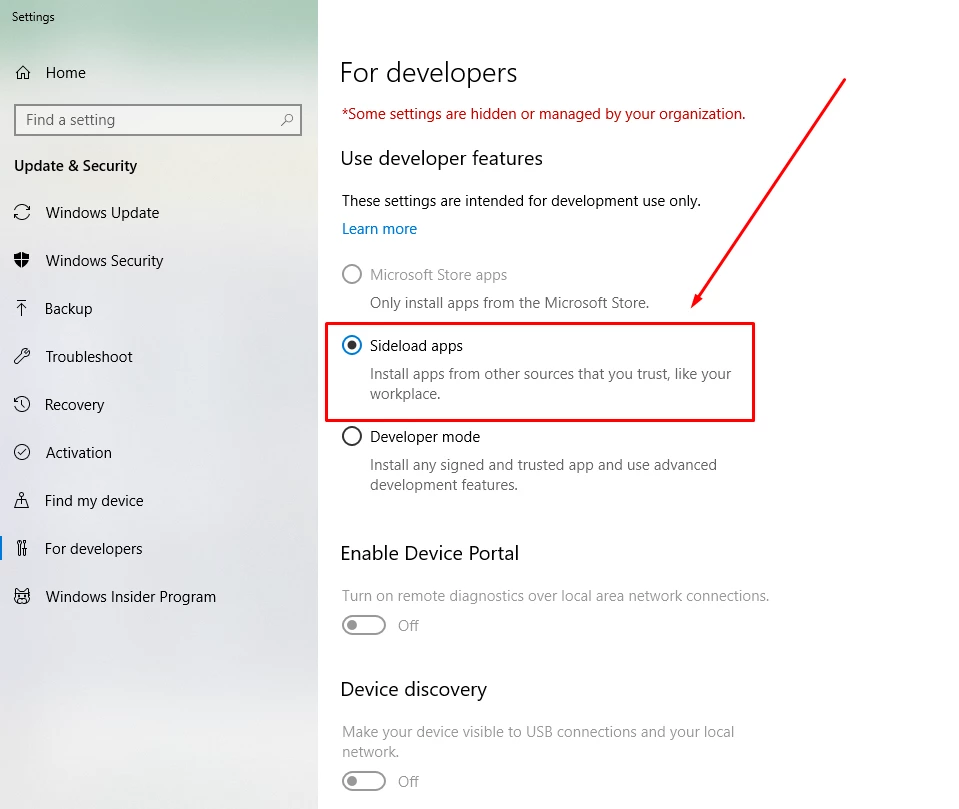
Can you try enabling side loading of application as described in the screenshot below? Let us know of it helped.

25 replies

Participant
July 7, 2021

while opening XD I'm getting the message "Your developer license has expired, To continue please renew your license", and not able to open in Offline mode also why??, without a license, we can open and edit xd files right??


Rishabh_Tiwari
Community Manager
Community Manager
July 7, 2021

Hi harish,


Sorry to hear about the trouble. Please try the suggestions shared here https://community.adobe.com/t5/adobe-xd/issue-opening-adobe-xd-your-developer-license-has-expired-to-continue-to-use-this-app-please-renew/td-p/10409593 and let us know if this helps or if you need any further assistance.


Regards

Rishabh

Participant
February 13, 2021

Thanks man, it works fine.

marist21444812
Participating Frequently
January 7, 2021

I worked for me

Tobias Swe
Participant
October 2, 2020

It solved my problem. My O.S is in Swedish so it took a while before I found the setting.

 
In Swedish the error is:

Din utvecklarlicens har gått ut. Förnya din licens om du vill fortsätta använda den här appen.

Search for Utvecklarinställningar in Windows.
And change to Separat inläsning av appar

charlie macke
Participant
October 2, 2020

Thank you so much! No idea why this happened but glad this solved it. Thank you!

Participant
October 1, 2020

Thank you so much for saving the day

Participant
September 30, 2020

Happened to me too, the accepted answer fixed the issue.

Participant
September 27, 2020

Enabling the sideload apps fixed the issue. Thanks so much! 

Participant
August 10, 2020

This was helpful. Thank you.

Inspiring
July 23, 2020

This worked; but why did this change happen?