


hsukaanqi
Participating Frequently
March 25, 2020
Answered

Variable Font Issue in XD Windows

  • March 25, 2020
  • 14 replies
  • 24895 views

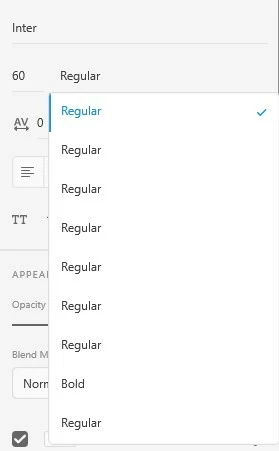
Whenever I use a Variable Font, eg. Inter, in XD in Windows 10 the corresponding weights doesn't show up instead it shows up a list with Regular weight repeated. I haven't face this problem in Mac OS. Please help.
 

Correct answer S23859558538x

Hi All,


I would like to inform you all that these variable fonts are not supported yet. Though it's on the team roadmap and yes the best answer would be to install separate font weights separately for now.


We will let you know if we have more updates on this in the future.


Thanks,

Harshika


Does Adobe XD support variable fonts yet?

14 replies

Known Participant
August 31, 2021

Same problem here. One year later, and still no fix.

New Participant
August 12, 2021

Hello,


To be noted, Figma already show variable weights for example for Inter font, installed on windows 10 locally.


It's a "software issue" not a "logic issue".


Adobe, please fix.

New Participant
August 5, 2021

Just try to find another source of download!

Look in Google open fonts for Designed by field and find designer who developed this font.

Then searh designer name. Best source of course is from original designer website!

New Participant
March 1, 2021

I have created a document using the Google font Public Sans but the weights of the fonts are not displaying correctly all seem to appear BOLD

Rishabh_Tiwari
Community Manager
Community Manager
March 2, 2021

Hi Carol,


Sorry to hear about the trouble. Could you please try the suggestion shared here: https://community.adobe.com/t5/adobe-xd/text-variable-font-issue-in-xd-windows/m-p/11001813#M25845


Let us know if this helps or if you need any further assistance.


Regards

Rishabh

HARSHIKA_VERMA
Community Manager
Community Manager
March 3, 2021

Hi All,


I would like to inform you all that these variable fonts are not supported yet. Though it's on the team roadmap and yes the best answer would be to install separate font weights separately for now.


We will let you know if we have more updates on this in the future.


Thanks,

Harshika


Cristiano__Menger
New Participant
February 17, 2021

Hello,
I am having a conflict problem with the "Roboto" font. I can't uninstall it from windows (Windows is not letting me delete)  and consequently it is causing problems in my adobe fonts. Does anyone know the solution? Thanks

HARSHIKA_VERMA
Community Manager
Community Manager
February 23, 2021

Hi Cristiano,


We are sorry for the delay in response. Actually, this is more of a windows bug instead of XD. I would suggest try installing separate font weights separately and see if that helps. We also had a similar discussion happening here: https://community.adobe.com/t5/adobe-xd/text-variable-font-issue-in-xd-windows/td-p/11001813 Please join the discussion for more updates.


Hope it helps.


Thanks,

Harshika

New Participant
February 17, 2021

Issue with multiple font weight in Windows 

Inspiring
February 21, 2021

Many fonts (google fonts) are broken now on XD. Can't use font weights show only regular. Other adobe programs Ps Ai Id work fine with them. XD latest version (37.0.32.10) Windows 10 64. This is very big BUG makes XD unusable!

Ares Hovhannesyan
Community Expert
Community Expert
February 21, 2021

Can you share fontfamily information to test.

New Participant
February 15, 2021

The same issue I have faced, but I have installed the font separately but again issued faced.

Please give me the solution asap.

Participating Frequently
March 3, 2021

Hi!


Can you review the date, time and size of this files?

I'm pretty sure that its 3 values are the same, and actually, are the same file.

This it's what happened to me:

It's a Google Font problem (and Adobe XD issue)


New Participant
February 10, 2021

Don't get me wrong, I love XD. But why the hell you don't fix that typo problem after that many many updates?

Support, please, please don't ask me about the font i want to use, my settings e.g. ... I'm sure you do a lot of testing before you release a new version of XD - so it seems obvious you know about that problem, right? Why isn't it possible in 2021 to show all options of a font how they should be shown? (see screenshot)

Adobe wants to stay the first adress for all kinds of designers -  typo is one of the most important parts of that! Please fix that!


{Reamed By MOD}

Rishabh_Tiwari
Community Manager
Community Manager
February 15, 2021

Hi there,


We're so sorry to hear about the trouble. We can surely escalate this further and share feedback with the team however we'll definitely need a few more details for investigating:


  1. The exact version of XD.
  2. The name of the font.
  3. Are you using any font manager?
  4. Have you tried installing the font-weights separately?
  5. Are you able to use the other font-weights in any other applications?


We're here to help, just need more information.


Regards

Rishabh

Crea-team MT
Participating Frequently
December 1, 2020

And again. One year later and this issue is still there.... Great job at wasting my time with your buggy software Adobe. 

stylish_Coconut98A6
New Participant
August 21, 2020

I'm having the same issue for a font called Antartica.  Works in Illustrator but not in XD


https://beta.newglyph.com/#font-antarctica