

What are Design Systems? How are they different from Style Guides and Pattern Libraries?
I could begin with the many definitions and comparisons out there, or I could just focus your attention to the graphic below from Jan Toman @HonzaTmn. While this graphic may not apply in its totality to every use case, Jan says that the representation helped visualize how he would present the idea to his team.
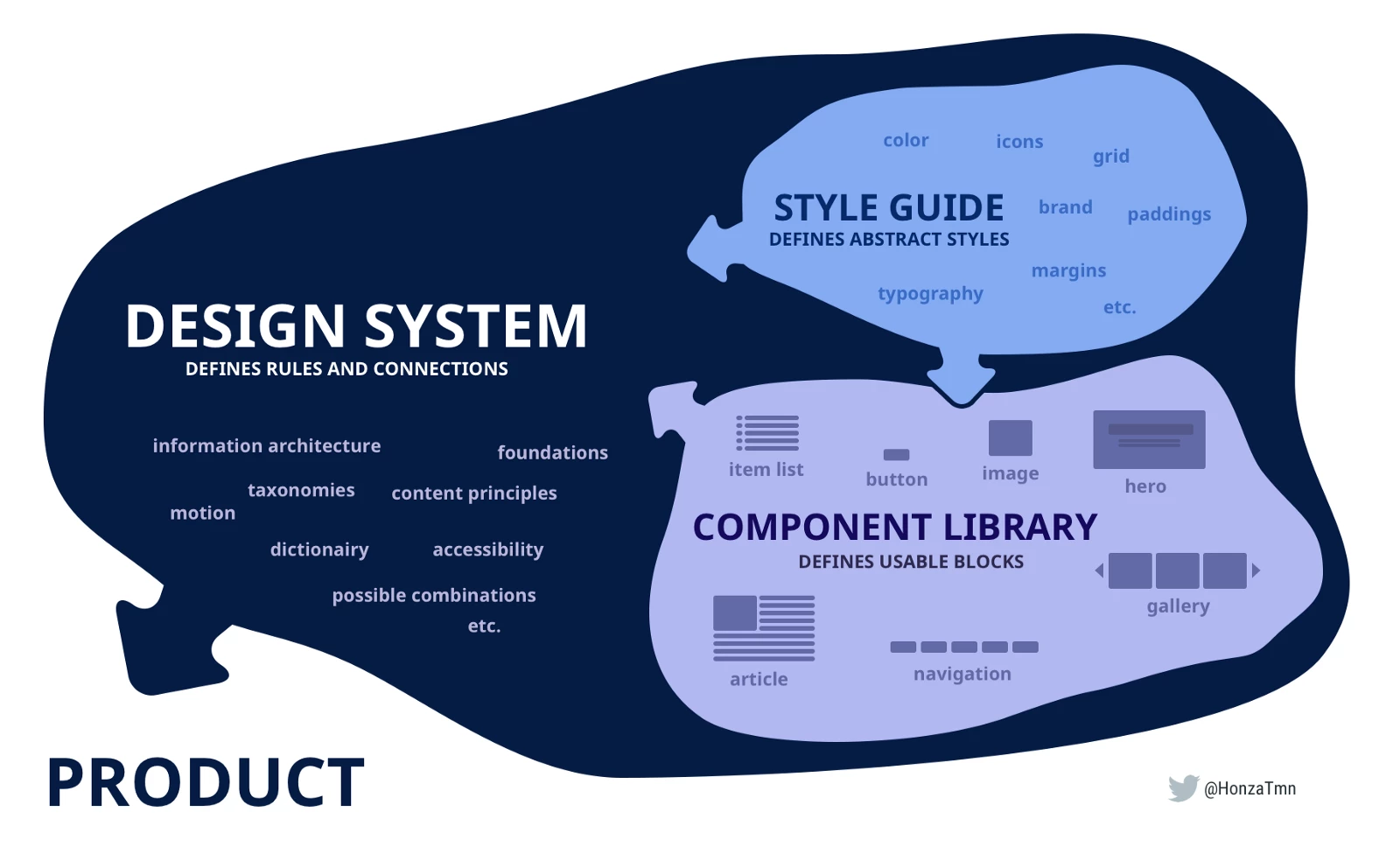
Note: This article is my understanding of the differences based on my reading. I would love to hear from you about your observations on the differences between these three. Do they differ from mine? Is there anything else that you feel should have been included? I look forward to hearing from you.
A Design System provides the framework, guidelines, and assets required to ensure consistency and predictability in terms of voice, tone, look, and feel for all properties owned by a company.
For example, irrespective of whether you are a designer working on company’s website or the one designing a brochure, the design system is your go-to.
The contents of a design system will vary based on the nature of its audience. For example, if you are a company that is only into design, your design dystem will, most likely, not have a requirement for code snippets.
That does not, however, mean that when there is a requirement to standardize code, your design system will not support it. A design system is a living breathing entity that is responsive to changes when required.
Examples of Design Systems:
- Material Design by Google
- Shopify Design System
- IBM’s Design System
Smaller companies sometimes may dispense with an exhaustive design system and choose to create just the style guide and pattern libraries.
The Style Guide, as the name implies, helps achieve consistency in style by providing guidelines around color, typography, spacing, and so on. When in doubt, designers refer to the style guide for information on such as the fonts they are allowed to use and the colors that have been chosen to represent the brand.
Examples of Style Guides:
Pattern Libraries or Component Libraries contain reusable assets that that can be used across projects. These assets follow the rules outlined in the Style Guide. Designers can quickly copy components such as buttons, images, and clipart from the library saving several hours of work in creating these or getting them reviewed. Because these assets are linked to a master, any changes made to the master are reflected across all its instances.
Examples of component libraries:
Important References:
- Differences between Design System, Style Guide, and Pattern Library by Adi Shanbhag
- Pattern library, Style guides, Design Systems. Do you need one? by UX bootcamp
 AdChoices