


- Home
- Animate
- Discussions
- Re: Audio does not play after paused?
- Re: Audio does not play after paused?

Copy link to clipboard
Copied
okay, so basically the audio is in a separate layer than the animation and working just fine, but when i pause the audio and play it again, the audio is silent. i put it on loop and everytime the audio starts over it works again. this is very annoying because i need to know the exact location of where the singing of the song begins. is there anyway to fix this? id appreciate any help given, thank you!


 1 Correct answer

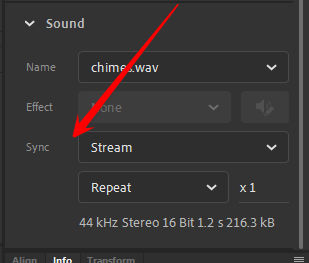
Select the sound in the timeline, then in Properties set the Sync to be Stream instead of Event.

 18
Replies
18
18
Replies
18

Copy link to clipboard
Copied
If you are creating an animation to go to video you should use an ActionScript 3.0 FLA, not an HTML5 Canvas FLA. With an AS3 FLA you can set the sound's sync to Stream instead of Event, and then you can start the sound playing from any point.
If you're making an animation that has to play back in HTML5, still use an AS3 FLA with Stream sync, at least until you have finished animating in time with the sound. After that you can convert the animation to HTML5 Canvas, and hopefully the animation will keep up with the sound.
Can you say more about what you're doing, before I tell you about other things that can go wrong (and how to fix them)?
Copy link to clipboard
Copied
well, jeez. didnt fully understand the first part, aha, but i created a new file as a actionscript file and there is the same problem.
here is a screen shot if that helps ^^

Copy link to clipboard
Copied
Select the sound in the timeline, then in Properties set the Sync to be Stream instead of Event.
Copy link to clipboard
Copied
thank you both! it worked ^^

Copy link to clipboard
Copied
i love u

Copy link to clipboard
Copied
I know I'm late to the thread, but I'm having the same problem. However, I don't see a Sync option anywhere in Properties. Is there something I'm missing?

Copy link to clipboard
Copied
but when I go to properties it doesn;t show me steam neither even. btw im working on adobe animate 2019


Copy link to clipboard
Copied
When you click on a keyframe or a frame in a layer, you will get the properties window with different sections like, Sound, Label, color effects etc. Under Sound, you can see the word Sync with dropdown option to select between stream and event.
Copy link to clipboard
Copied
Thank you for your answer but still when I press right-click on a frame or keyframe in the layer that has audio, it does show options like insert keyframe, actions, etc. But I don't see a properties option, neither stream nor event
Copy link to clipboard
Copied
Sorry now I get it thank you for the response now i see the option


Copy link to clipboard
Copied
stream and event are the two main sync properties
Copy link to clipboard
Copied
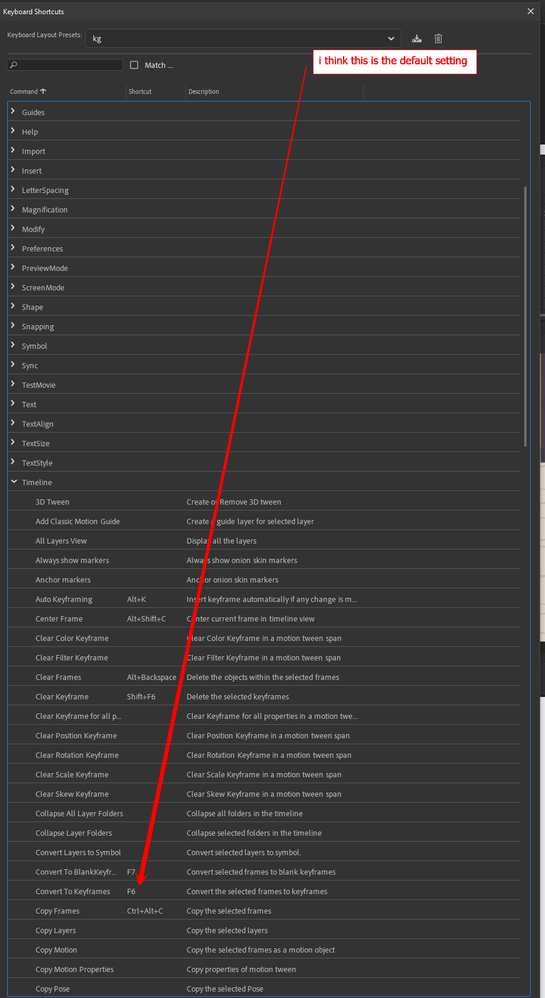
i have one more question. sometimes when i press f6 it takes me back to the first frame and it is very fustrating, how do i solve it
Copy link to clipboard
Copied
you can customize most animate shortcuts (including f6) by clicking edit>keyboard shortcuts.

f6 is a timeline shortcut, so expand timeline and remove f6 or change what it does (by re-assigning it) by clicking it and choosing an option

Copy link to clipboard
Copied
thank you soo much!!!!!!!!!!!😘😘😘😘😘😘😘😘😘😘😘😘😘

Copy link to clipboard
Copied
Thank you Colin Holgate!
I was concerned that the unofficial version might have this feature, but it seems like Adobe has made it more secure since they introduced the subscription model for Animate. Thanks a lot for the advice!
Copy link to clipboard
Copied
all versions, as far as i recall, have allowed selection of sound sync.

Copy link to clipboard
Copied
You click on the orange bit (audio) and on the right side in PROPERTIES, it should say SYNC somewhere. Press the thing that should probably say EVENT and then change it to STREAM.

Copy link to clipboard
Copied
Definitely helped! Thank you very much!


Find more inspiration, events, and resources on the new Adobe Community
Explore Now
 AdChoices