


back button problem-pleas help

Copy link to clipboard
Copied
hi, i created memory game with code i find in youtube-it works great.
the first scene is menu with 3 buttons (game levels- easy/medume/hard)- each button take you to another scene with the game- works great.
when i in scene 2, for example, and i press "back to the menu" it take me back to the menu scene but with the problem : (i add images with the fllow)
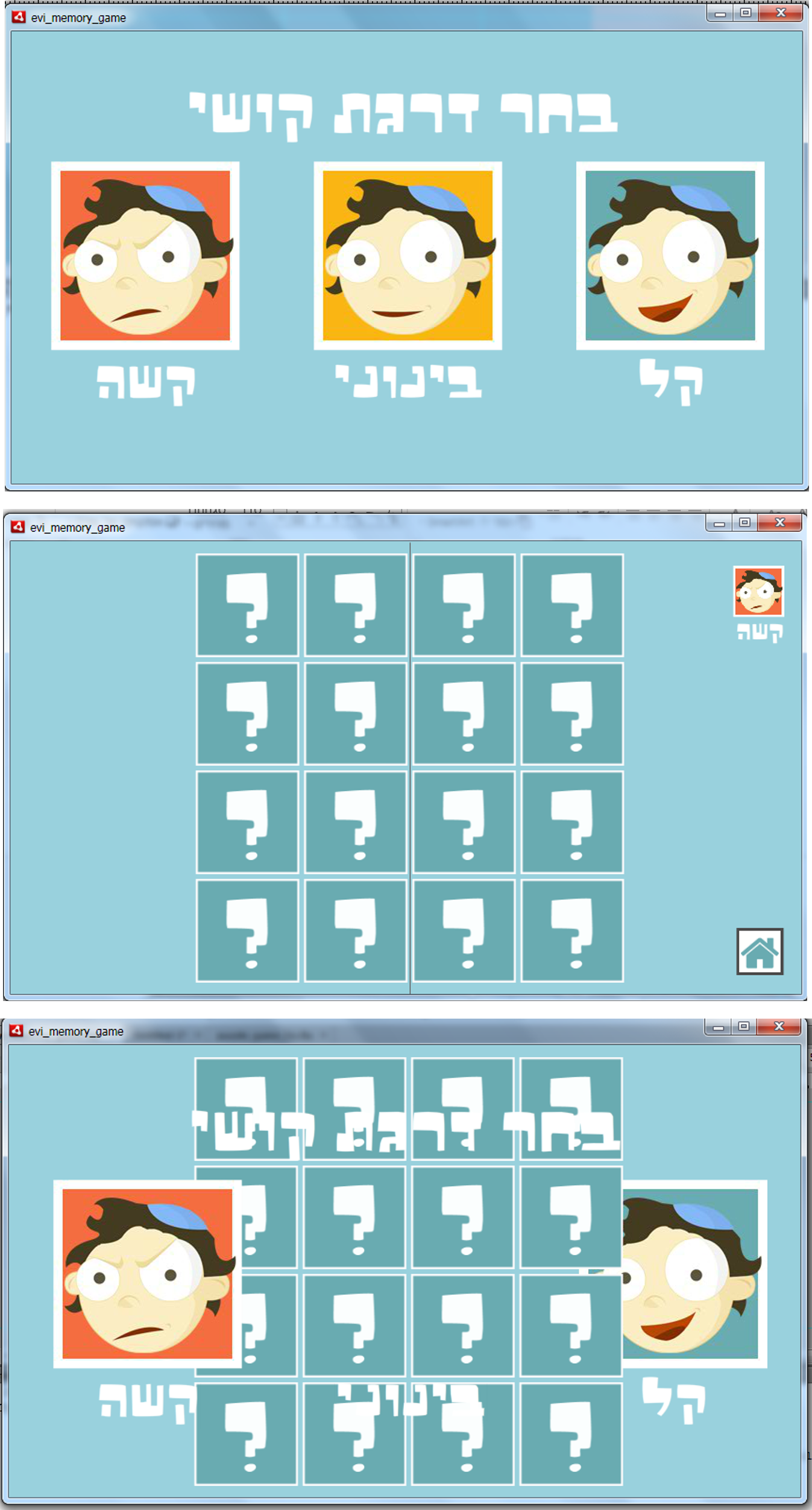
here is the code- what do ineed to to to fix the proble?
// I MADE MOVIE CLIP WITHOUT INSTANCE NAME WITH INSIDE DIFFRENT 9 IMAGES FRAME
// IN MOVIE CLIP PROPETIES I CHECKED TWO BOXES AND SET CLASS " colors "
// BELOW LINES TOLD THE CLASS NAME "var tile:colors = new colors(); "
import flash.display.Sprite;
import flash.events.MouseEvent;
import flash.events.TimerEvent;
import flash.utils.Timer;
var first_tile:colors;
var second_tile:colors;
var pause_timer:Timer;
var colordeck:Array = new Array(1,1,2,2,3,3,4,4,5,5,6,6,7,7,8,8);
for (x=1; x<=4; x++){
for (y=1; y<=4; y++){
var random_card = Math.floor(Math.random()*colordeck.length);
var tile:colors = new colors();
tile.col = colordeck[random_card];
colordeck.splice(random_card,1);
tile.gotoAndStop(9);
tile.x = (x-1)*115;
tile.y = (y-1)*115;
tile.addEventListener(MouseEvent.CLICK,tile_clicked);
addChild(tile)}}
function tile_clicked(event:MouseEvent) {
var clicked:colors = (event.currentTarget as colors);
if (first_tile == null) {
first_tile = clicked;
first_tile.gotoAndStop(clicked.col);
}
else if (second_tile == null && first_tile != clicked) {
second_tile = clicked;
second_tile.gotoAndStop(clicked.col);
if (first_tile.col == second_tile.col) {
pause_timer = new Timer(1000,1);
pause_timer.addEventListener(TimerEvent.TIMER_COMPLETE,remove_tiles);
pause_timer.start();
}
else {
pause_timer = new Timer(1000,1);
pause_timer.addEventListener(TimerEvent.TIMER_COMPLETE,reset_tiles);
pause_timer.start()}}}
function reset_tiles(event:TimerEvent) {
first_tile.gotoAndStop(9);
second_tile.gotoAndStop(9);
first_tile = null;
second_tile = null;
pause_timer.removeEventListener(TimerEvent.TIMER_COMPLETE,reset_tiles);
}
function remove_tiles(event:TimerEvent) {
removeChild(first_tile);
removeChild(second_tile);
first_tile = null;
second_tile = null;
pause_timer.removeEventListener(TimerEvent.TIMER_COMPLETE,remove_tiles);
}


 4
Replies
4
4
Replies
4


Copy link to clipboard
Copied
remove the tiles when you return to the game level scene.
Copy link to clipboard
Copied
do i need to write the code in the action of the back button?
Copy link to clipboard
Copied
my friend i still didn't succed to solve to problem.
can you write me the code that i need to add?
Copy link to clipboard
Copied
push the tiles created in your double for-loop into an array.
when returning back, loop through your array and remove those tiles.


Get ready! An upgraded Adobe Community experience is coming in January.
Learn more
 AdChoices