- Home
- Animate
- Discussions
- Re: Cannot remove Ease from Classic Tween
- Re: Cannot remove Ease from Classic Tween
Cannot remove Ease from Classic Tween

Copy link to clipboard
Copied
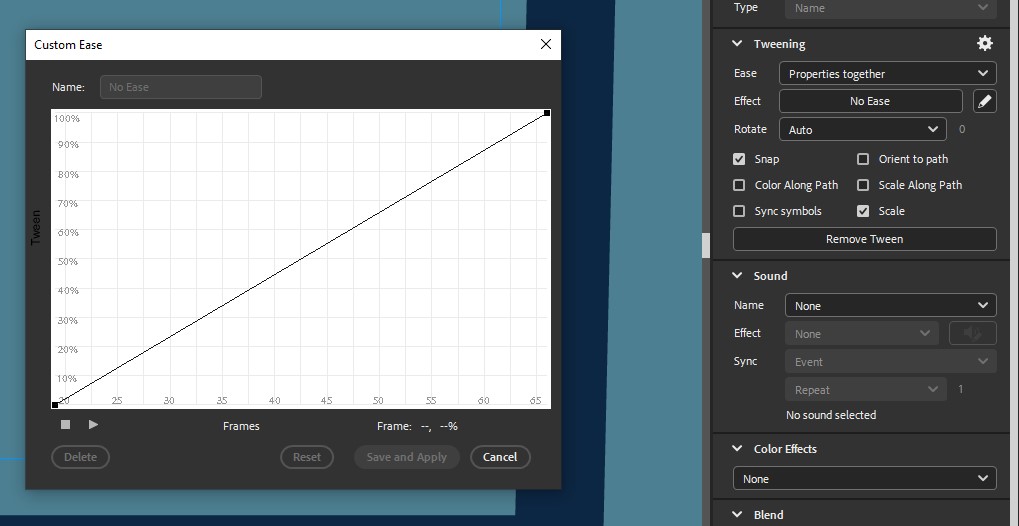
Despite manually trying to remove an ease from a Classic Tween and having the Ease Effect have "No Ease" selected, the tween still has an ease on it. I tried making a custom ease in attempt to make no ease there, to no avail.
Attached is what I see on my end. Both this starting keyframe and its ending keyframe have the "No Ease" selected.


 10
Replies
10
10
Replies
10


Copy link to clipboard
Copied
This is clearly a no-ease graph.
What do you expect to see?
Member of the Flanimate Power Tools team - extensions for character animation
Copy link to clipboard
Copied
I expect to see no easing in my tween. There is still easing when I play my animation.


Copy link to clipboard
Copied
remive the tween. add the tween with no ease.
Copy link to clipboard
Copied
If you mean:
- Select "Remove Classic Tween" in my keyframes,
- Right click the keyframe again and "Add Classic Tween"
- Then choose "No Ease" on the Effect on the Tweening side panel,
I've already done this.
Copy link to clipboard
Copied
create anew layer.
remove the tween
copy the initial keyframe and past in new layer
same for final keyframe
create tween in new layer
delete old layer, or at least, the tween span
Copy link to clipboard
Copied
I've now tried this, and also made the Effect on No Ease after this, and the results are still the same.
The tween is very slow for 80% of my tweened frames before suddenly picking up speed at the end.
Copy link to clipboard
Copied
strio your fla to just the tween showing the problem and upload your fla to a file server and post a link here.
Copy link to clipboard
Copied
Opening a new scene and pasting the tweened frames into it makes it function normally, without an ease like I want. (It still doesn't work in its original scene.)
I have no idea why this is the case. But I have since changed my idea for the animation that no longer needs my original tween that I had a problem with, so I think I can move on from this problem. Must just be some strange mysterious glitch.
Thanks so much for trying to help, regardless.
Copy link to clipboard
Copied
you're welcome

Copy link to clipboard
Copied
It seems like a tricky issue. Have you tried deleting and recreating the Classic Tween entirely? Sometimes starting fresh can resolve stubborn easing problems in Adobe Animate.


Get ready! An upgraded Adobe Community experience is coming in January.
Learn more
 AdChoices