


- Home
- Animate
- Discussions
- Re: canvas html5 - change color of instance in sep...
- Re: canvas html5 - change color of instance in sep...

Copy link to clipboard
Copied
If I change the color of an instance on the main timeline it works perfect in html5.
If I change the color of an instance on the timeline of a movieclip, which is not on the main timeline - then it does not work anymore.
does anybody know why? and what I can do, that it works again?
thanks for a hinch


 1 Correct answer


i've had the previous versions and never encountered that, and i've not seen anyone else report that issue. my guess is a clean install of that same version would have fixed the problem, too.
but there's not need to test that. all's well that ends well.

 33
Replies
33
33
Replies
33

Copy link to clipboard
Copied
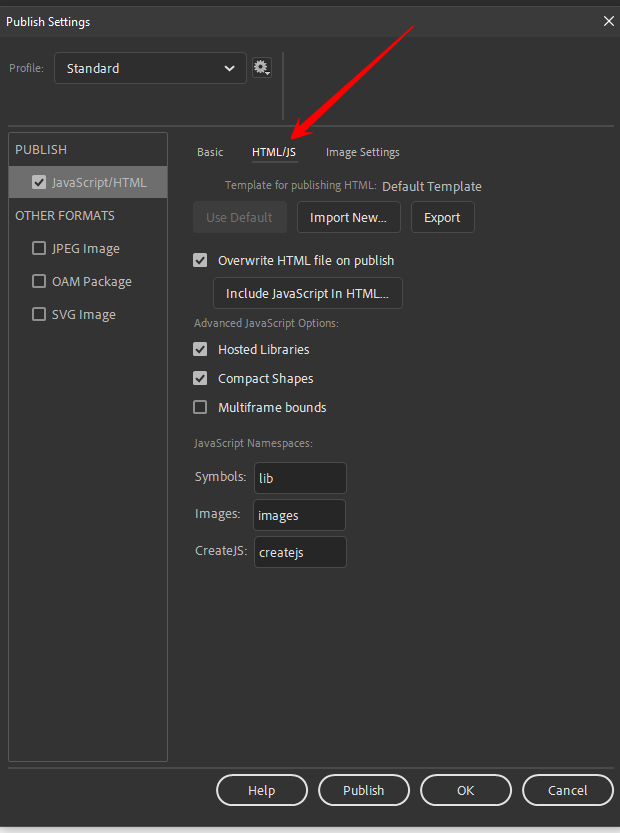
click the html/js tab and embed a screenshot of those settings.
Copy link to clipboard
Copied
ups - sorry - i posted twice the same pix - here is the screenshot of the html/js tab

Copy link to clipboard
Copied
that looks good.
assign, at least, one custom keyboard shortcut (if you have none now)
reset your animate preferences, https://helpx.adobe.com/animate/using/set-preferences.html
confirm you were successful by trying to use that custom shortcut (that should fail).
if it fails, retest your fla
Copy link to clipboard
Copied
i have no idea how to assign a custom keyboard shorcut...
i started animate, as mentioned on the side of your link, by holding down cmd+option+shift - i was asked, if i want to delete all my preferences - i clickt yes - then opend the file agian and published as usual - same problem as before. still wrong js
no effect at all...
Copy link to clipboard
Copied
edit > keyboard shortcuts
Copy link to clipboard
Copied
i found it in the meantime. and i reseted the preferences once again - does't help...
Copy link to clipboard
Copied
were you successful resetting your preferences, proven by seeing a custom shortcut get reset?
Copy link to clipboard
Copied
yes i was successful. thanks for that.
in the meantime i could try the script on another computer. and it worked perfect. like on yours. then we compared everything we found - and the difference was, that my version animate cc 2021 was not with the latest update. after the update of animate cc 2021 - it works! i wonder, why adobe did not inform, that there is an update and that the older version of animate cc 2021 had quite a heavy big bug.
im very sorry to have kept you busi with my problem. but i learnd quite a few things. thank you so much for your kindness and help!
during all the tries and errors i thought, maybe the reason it did not work right is, that it was not on the main timeline. so i made a version on the main timeline. when i publish it, it counts perfect for the first run. if i click again it starts at frame 1. with the second click it jumps to frame 3, then to frame 5, then to frame 2, again to frame 5 and after a few clicks more it even jumps backward. strange things still happen also with the super-newest version...
Copy link to clipboard
Copied
i've had the previous versions and never encountered that, and i've not seen anyone else report that issue. my guess is a clean install of that same version would have fixed the problem, too.
but there's not need to test that. all's well that ends well.

-
- 1
- 2

Get ready! An upgraded Adobe Community experience is coming in January.
Learn more
 AdChoices