


- Home
- Animate
- Discussions
- Re: Changing color of a Movieclip with Javascript?
- Re: Changing color of a Movieclip with Javascript?

Copy link to clipboard
Copied
Hi,
I want to change the color of a Movieclip with a Mouse click. I have two areas. When I click on on one Area, the second should change in this color, wich I wrote in the Code.
But I don't know how to write this code in Javascript (please no answers in HTML)...
I should be able to write the color in hexadecimal.
Please can someone help me.. It's very important.
Thank you


 1 Correct answer


in your click listener (if you bind(this)), you can use (if you want blue):
this.your_movieclip.shape.graphics._fill.style = "#0000FF";

 21
Replies
21
21
Replies
21

Copy link to clipboard
Copied
in your click listener (if you bind(this)), you can use (if you want blue):
this.your_movieclip.shape.graphics._fill.style = "#0000FF";
Copy link to clipboard
Copied
The code does not work 
I have this code:
this.Marine_2.addEventListener("click", fl_MouseClickHandler_8.bind(this));
function fl_MouseClickHandler_8()
{
this.flaeche2.shape.graphics._fill.style = "#0000FF";
}
Is this wrong? what do I have to do?
Copy link to clipboard
Copied
one (or both) of your objects are not defined. use the console to see where you made the error.
Copy link to clipboard
Copied
How do I define a object? Is "flaeche2" my object? Its a movieclip on the stage.
"Uncaught TypeError: Cannot read property 'shape' of undefined"
This happens, when I click on "Marine_2"
Whats does that mean?
Copy link to clipboard
Copied
on your stage, click what you think is Marine_2 and check the properties panel. that object should have an instance name of Marine_2 in the top-most field. likewise for flaeche2. (and case-counts!)
Copy link to clipboard
Copied
Thank you 🙂 it works. But now I have a new error.. "Uncaught TypeError: Cannot set property 'style' of null" What is that?
Copy link to clipboard
Copied
open you console to see what line of code is triggering that error.
if you don't know what the console is, what browser are you using to test?
Copy link to clipboard
Copied
this.bise1.shape.graphics._fill.style = "#0000FF";
makes the error... and i don't know why...
And I test it with chrome
Copy link to clipboard
Copied
on your stage, click what you think is bise1 and check the properties panel. that object should have an instance name of bise1 in the top-most field.
(p.s when using the adobe forums, please mark helpful/correct responses, if there are any.)
Copy link to clipboard
Copied
It has this name... thats why I am so confused...
Copy link to clipboard
Copied
remove the bise1 movieclip from all keyframes that contain it.
create a new layer and add a keyframe where you first want bise1 to appear. assign its instance name.
add other keyframe where needed and add you code where needed.
retest.
Copy link to clipboard
Copied
I don't know, what you mean It says every time the same... "Uncaught TypeError: Cannot set property 'style' of null"
Copy link to clipboard
Copied
what don't you understand about message 11?

Copy link to clipboard
Copied
Hi, Kglad...
Its me again. I've tried the code. I have two movieclips name btnSet and theStar. When btnSet clicked, theStar suppose to be change color (as I wish). But really nothing happen with theStar (not even change the color).
This is the code :
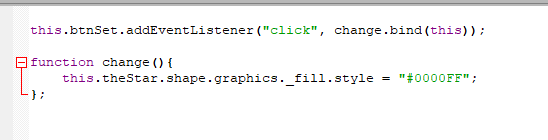
And this is error message when button btnSet is clicked :
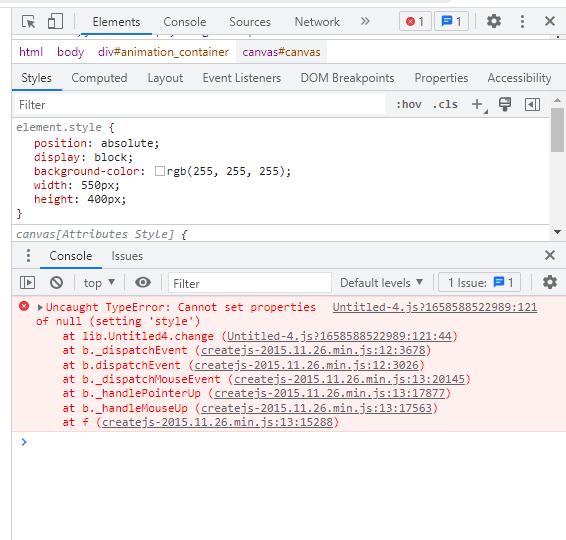
What I'm missing ?
Copy link to clipboard
Copied
create a new fla
create and add a btnSet movieclip to frame 0
create and add a (eg, red) theStar movieclip to frame 0.
double check their instance names (in the properties panel)
copy and past the code you showed
test > click btnSet
did you see the red theStar turn blue?
Copy link to clipboard
Copied
Copy link to clipboard
Copied
Your fla is working perfect anyway. But everytime I created new fla, that code didn't work. Until I found this thread : https://community.adobe.com/t5/animate-discussions/change-color-tint-fill-of-a-symbol-in-an-animate-...
So, I replace the code to :
this.redStar.shape_1.graphics._fill.style = "#0000FF";
And it works!
By the way I use Animate 2019. Is that code only work in latest version of Animate?
still confused....
Copy link to clipboard
Copied
are you using an old animate version?
Copy link to clipboard
Copied
I use Adobe Animate CC 2019.
Copy link to clipboard
Copied
that's the problem. cc 2019 does some illogical stuff.

Copy link to clipboard
Copied
This is great stuff.


Get ready! An upgraded Adobe Community experience is coming in January.
Learn more
 AdChoices